# Home Network
# Networks & Switching
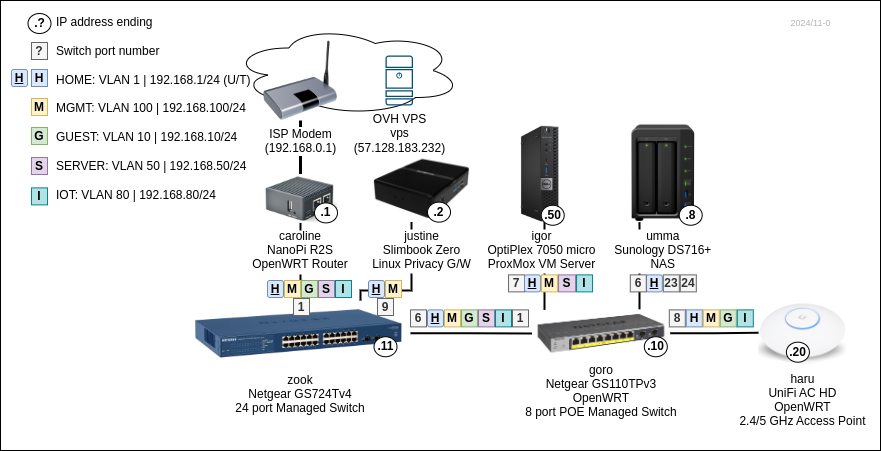
Editable diagram
| **Name**
| **Tag**
| **Network**
| **Description** | **Gateways**
|
| HOME | 1
| 192.168.1.0/24 | Internal home network
| caroline: 192.168.1.1
justine: 192.168.1.2 (DHCP default)
|
| GUEST | 10
| 192.168.10.0/24 | Isolated network
| caroline: 192.168.10.1 (DHCP default)
|
| SERVER | 50
| 192.168.50.0/24 | Internet exposed servers
| caroline: 192.168.50.1 (DHCP default)
|
| IOT
| 80
| 192.168.80.0/24 | IoT devices
| carolone: 192.168.100.1 (DHCP default)
|
| MGMT | 100
| 192.168.100.0/24 | Management network
| carolone: 192.168.100.1
justine: 192.168.100.2 (DHCP default)
|
### Connectivity
Caroline does VLAN routing.
| **Name**
| **Internet access G/W** | **DNS** | **WiFi SSID** | **Access to** |
| HOME | Justine (VPN), Caroline
| Justine (PiHole), Caroline
| Haru, Haru Legacy (2.4GHz)
| SERVER, IOT
|
| GUEST | Caroline | Caroline | Toudi, Toudi Legacy (2.4GHz)
|
|
| SERVER | Caroline | Caroline | |
|
| IOT
| Caroline | Caroline | IoT (2.4GHz)
| |
| MGMT | Justine (VPN), Caroline | Justine (PiHole), Caroline | Haru MGMT (2.4GHz)
| SERVER |
## Subnets
| **Base range**
| **Subnet 1 / Usage**
| **Subnet 2 / Usage** | **IPv6 ULA `fd42:dead:beef/48`** |
| `10.0.0.0/8` | *reserved for work VPNs*
|
|
|
| `172.16.0.0/12` (to 172.31.)
|
|
|
|
|
| `172.17.1.1/24. ` | Justine VPN: `vpn`
| `fd42:dead:beef:1701/64` |
|
| `172.17.2.1/24` | Justine VPN: `outpust` | `fd42:dead:beef:1721/64` |
|
| `172.17.100.1/24` | VPS VPN: `vps`
| `fd42:dead:beef:1700/64` |
|
| `172.18.0.0/16` | Justine Docker
| `fd42:dead:beef:1800/64` |
|
| `172.19.0.0/16` | Igor Kubenretes
| `fd42:dead:beef:1900/64` |
|
| `172.20.0.0/24` | Igor Sandbox VMs
| `fd42:dead:beef:2000/64` |
| `192.168.0.0/16` |
|
| `fd42:dead:beef:68/56` |
|
| `192.168.1.0/24` | HOME VLAN
| `fd42:dead:beef:6801/64` |
|
| `192.168.10.0/24` | GUEST VLAN
| `fd42:dead:beef:6810/64` |
|
| `192.168.50.0/24` | SERVER VLAN
| `fd42:dead:beef:6850/64` |
|
| `192.168.80.0/24` | IOT VLAN
| `fd42:dead:beef:6880/64` |
|
| `192.168.100.0/24` | MGMT VLAN
| `fd42:dead:beef:6800/64` |
## Adding networks
### Caroline
- *Network* -> *Interfaces* -> *Devices*
- Add `VLAN (802.1q)` on `eth1` for new VLAN tag
- *Network* -> *Interfaces*
- Add interface for the new device
- Configure DHPC server on the new interface with options for default G/W and DNS server
- `3,192.168.80.1`
- `6,192.168.80.1`
- *Network* -> *Firewall* -> *Zones*
- Add zone for the new interface
- *Network* -> *Firewall* -> *Traffic rules*
- Add rule for DHCP (`UDP 67`)
- Add rule for DNS (`UDP+TCP 53`)
- Add rule for ICMP
- *Network* -> *DHCP and DNS* -> *Devices & Ports*
- Add new interface to DHCP server *Listen interfaces*
## Switch configuration
**OpenWRT edit VLAN tag assignment** Network -> Interfaces -> Devices -> `switch` (Bridge device) -> Configure... -> Bridge VLAN filtering
## IPv6
### ULA
- [Unique local address](https://en.wikipedia.org/wiki/Unique_local_address)
- Use for private or local addressing.
- Prefix `fc00::/7`
- Prefix `fd00::/8` format:
- Global ID: `fdxx:xxxx:xxxx::/48` - `x`-es should be chosen random
- Subnets (64k): `fdxx:xxxx:xxxx:ssss::/64`
- Expanded: `fdxx:xxxx:xxxx:ssss:0000:0000:0000:0000/128`
- Prefix `fc00::/8` is not defined.
For WireGuard the Global ID can be generated with `base64 -d | hexdump` from server's public key.
Random ID can be made with `cat /dev/random | head -c5 | ruby -e 'puts STDIN.read.unpack("H*")'`.
Encode v4 in v6 example: `fd00:192:168::1/64`.
ULA: `fd42:dead:beef/48`
### IPv4 in IPv6
Example: `::ffff:192.0.2.1` -> hex encoded `::ffff:c000:201`
# Gateways & Routing
## ISP
Virgin Media Fiber:
- 1Gbit/s down
- 100Mbit/s up
- XGS-PON (10-Gigabit-capable passive optical network; 10 Gbit/s shared symmetric capacity)
- MTU: 1468 `1460` for IPv4 (IPv4 in IPv6),
- no IPv4 on router - IPv6 DS-Lite (IPv4 tunneled in IPv6 to DS-Lite carrier-grade NAT),
- no router bridge mode.
### ISP gateway MTU
From VPS:
```
ping -s 1472 8.8.8.8
PING 8.8.8.8 (8.8.8.8) 1472(1500) bytes of data.
1480 bytes from 8.8.8.8: icmp_seq=1 ttl=110 time=1.34 ms
```
From router itself max ping size `1440` (IP packet size: `1468`). For IPv6 it is `1500` (`1452 + 40 + 8`).
From network (via Caroline/no VPN):
```
ping -s 1440 57.128.183.232
PING 57.128.183.232 (57.128.183.232) 1440(1468) bytes of data.
1448 bytes from 57.128.183.232: icmp_seq=1 ttl=48 time=25.1 ms
```
Router configuration:
- `Gateway MTU size 2000 (1280-1500)` ???
- When set to `1500` MTU drops to `1460` and I cannot go back! They took 8 byte WTF is this?!?!?!
- Looks like I was getting extra 8 bytes (`1508`) with `2000` setting.
IPv6 header occupies 40 bytes so IPv4 in IPv6 gets `1500 - 40 = 1460` MTU.
## Two gateways
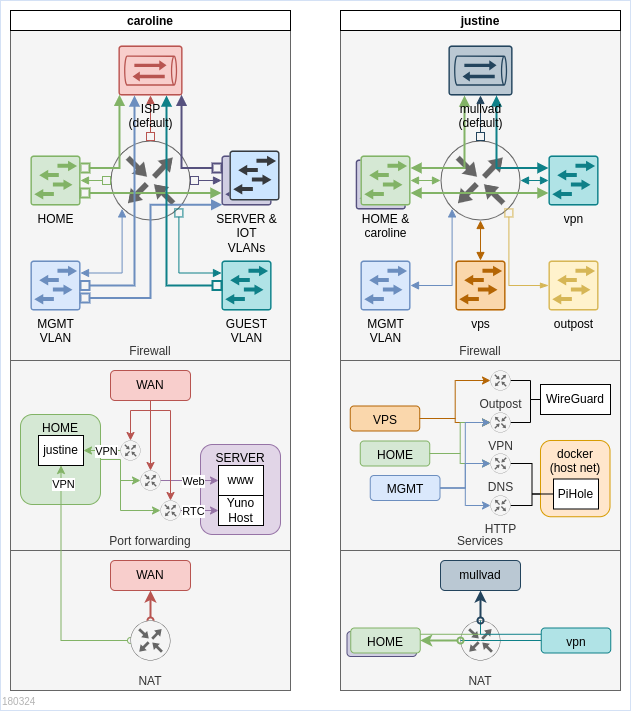
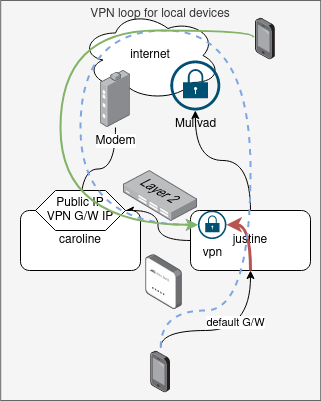
There are two gateways on the network:
1. **caroline** - exposed to the internet, provides access to internet and forwards connections to servers in SERVER VLAN
2. [justine](https://wiki.hexadust.net/books/home-network/page/justine "Justine") - VPN G/W that connects to Mullvad and terminates incoming WireGuard VPN connections
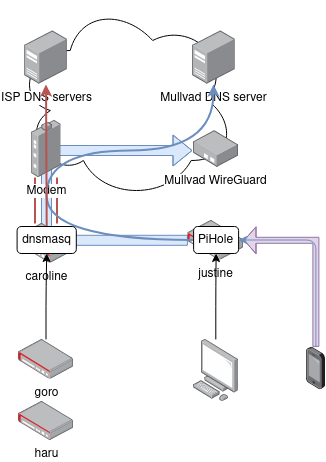
Clients use **caroline** as G/W for direct internet access and **justine** as G/W for Mullvad protected internet access. Additionally **caroline** runs DNS server that uses the ISP DNS server, while **justine** will use PiHole and Mullvad's DNS server.
## Routing with two gateways
Things get very complicated with two gateways setup. Clients need to be able to direct traffic to correct gateway in response to connections coming from one or the other gateway.
Gateway forwarded connections:
1. **caroline** forwards from the internet to access internal network to:
1. public SERVER network services from outside: blog, younohost etc.
2. **justine** WireGuard VPN
2. **justine** forwards from internet VPN connected devices to:
1. HOME network
2. to **caroline** for SERVER network
This creates the challenge where devices can be configured with any G/W and need to be able to forward the traffic to the other G/W in some cases:
1. local IP & bridge - VPN clients could be bridged directly and assigned bridged network IP
2. NAT - packets coming into the network are MASQUERADE'd to G/W IP address (how it is done currently)
3. static route - push static routes to all clients so response to packets coming from G/W terminated IPs (e.g. VPN) are forwarded back to correct G/W
4. ICMP redirect - both G/W could be configured to inform clients on the correct G/W to use for packets destination
Problems:
- NAT will obscures the source IP address making troubleshooting, monitoring and accounting more difficult.
- Static routes or redirects will work if G/W can be deduced from destination IP address.
- ICMP redirects many not work reliably, will probably drop first packet?
- Pushing routes to clients requires client support, NAT makes things transparent to clients.
## Inbound connectivity
Since ISP does not provide direct IPv4 (DS-Lite - only IPv6 inbound connection forwarding is supported) in I use a VPS service and WireGuard VPN to establish inbound channels.
Vps server uses firewall rules to SNAT/DNAT incoming connections over incoming `vps` WireGuard tunnels to:
- Justine: for inbound VPN connections for roaming,
- Server-gw: for inbound HTTP connections for this wiki and other services.
### MTU
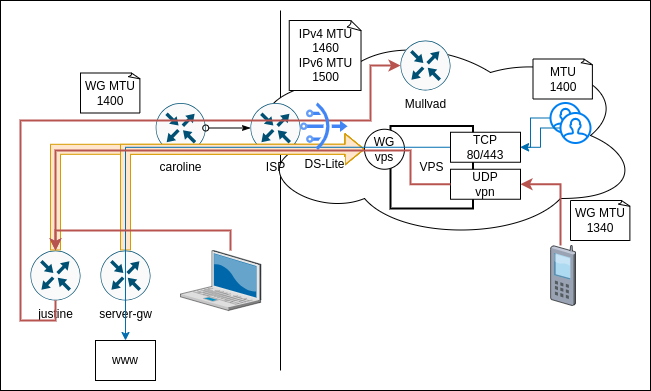
Given this layered approach calculating correct MTU for WireGuard endpoints becomes tricky. Default WireGuard MTU of `1420` assumes IPv6 (as worst case) connection to WireGuard server over full `1500` MTU link.
Protocol overhead:
- IPv4 - 20 bytes
- IPv6 - 40 bytes
- UDP + WireGuard - 40 bytes
| **Link type** | **Link MTU** | **IPv4 max payload** | **IPv6 max payload** | **WireGuard MTU (IPv4)** |
| Ethernet/Wi-Fi (LAN connectivity) | `1500` | `1480` | `1460` | `1440` |
| ISP link (DS-Lite) | `1500` | `1440` (IPv4 in IPv6) | `1460` | `1400` |
| vps VPN (WG IPv4) over ISP link | `1400` | `1380` | `1360` | `1340` |
#### WireGuard MTU settings
| **Source** | **Destination** | **Bottleneck Link** | **WireGuard MTU** |
| Justine | Mullvad (IPv4) | ISP DS-Lite | `1400` |
| Justing & Server-gw | Vps (IPv4) | ISP DS-Lite | `1400` |
| In-LAN (Laptop) | Mullvad via Justine (IPv4) | ISP DS-Lite | `1400` |
| Roaming (Phone, Laptop) | Mullvad via Justine via Vps (IPv4) | Vps VPN over ISP DS-Lite | `1340` |
## Server VLAN
Uses dedicated VM `server-gw` that uses WireGuard VPN to connect to Vps server. It acts as default G/W for all SERVER VLAN hosts and routes traffic out via Vps over the VPN connection. This way all servers have Vps public IP as their outgoing IP.
Incoming traffic is forwarded by Vps over same VPN connection to `server-gw` and from there to `www` for HTTP(S) termination and also to `younohost` service for Jitsi meet streams.
## Sanbox VM network
Igor runs dedicated network (vnet) with `sanbox-gw` instance acting as default G/W for VMs connected to it. It runs Mullvad VPN and this way provides private connectivity out to the internet. There is no port forwarding into the network. The network is isolated from all other networks.
# Devices & VMs
## Devices
| **Name**
| **IP**
| **Location**
| **Role**
| **OS** | **Model**
|
| caroline
| HOME: 192.168.1.1 (S)
GUEST: 192.168.10.1 (S)
SERVER: 192.168.50.1 (S)
MGMT: 192.168.100.1 (S)
| TV shelf over Umma
| - Router
- DNS
- DHCP
| OpenWRT | FriendlyARM NanoPI R2S
|
| [justine](https://wiki.hexadust.net/books/home-network/page/justine "Justine")
| HOME: 192.168.1.2 (S)
MGMT: 192.168.100.2 (S)
| TV shelf in the back
| - VPN router
- WireGuard
- DNS (PiHole)
| Void Linux | Slimbook Zero; i3-8145U; 4GB
|
| sandbox-gw
| HOME: 192.168.1.5 (S)
SERVER: 192.168.50.175 (DHCP)
sandbox: 172.20.0.1 (S)
| Network cabinet
| - Router and VPN G/W for VM in sandbox network
| Void Linux | Igor VM
|
| goro
| MGMT: 192.168.100.10 (S)
| Network cabinet | - VLAN switch
| OpenWRT
| Netgear GS110TPv3
|
| zook
| MGMT: 192.168.100.11 (S)
| Behind TV
| - VLAN switch
| Netgear
| Netgear (24 port)
|
| haru
| MGMT: 192.168.100.20 (S)
| Hotpress room
| - Wi-Fi access point
| OpenWRT
| UniFi AC HD |
| hifumi
| HOME: 192.168.1.202 (DHCP/?)
| Office desk
| - Print server (CUPS)
| Void Linux
| FriendlyARM NanoPI R2S
|
| igor
| HOME: 192.168.0.50 (S)
SERVER: 192.168.100.50 (S)
| Network cabinet
| - VM server
- www VM
- YunoHost VM
| Proxmox/Ubuntu
| Dell
OptiPlex 7050 micro
i7-6700T
|
| umma
| HOME: 192.168.1.8 (S)
| NAS
| - NFS, SMB
- HTTP
- iSCSI
| DiskStation Manager
| Sunology
DS716+
|
| ann
| HOME: 192.168.1.174 (DHCP/S)
| TV shelf top
| - Multimedia (Kodi)
- Game (Batocera)
- VNC (Void Linux)
| Depending on USB key used
| Dell
|
| nami
| HOME: 192.168.1.216 (S)
| TV
|
| Android TV
| Philips
|
| zummi | HOME: 192.168.1.175 (S) | TV |
| Firefox OS
| Panasonic
|
### VMs
| **Name**
| **IP**
| **Host**
| **Role**
| **OS** |
| www | SERVER: 192.168.50.159 (DHCP/S)
| igor | - Web server / proxy (Caddi)
| Void Linux
|
| yunohost
| SERVER: 192.168.50.137 (DHCP/S)
| igor
| - YunoHost apps
| Ubuntu
|
| zabbix
| HOME: 192.168.0.40 (S)
SERVER: 192.168.50.40 (S)
MGMT: 192.168.100.40 (S)
| igor
| - Monitoring
| AlmaLinux
|
## VPS
| **Name**
| **IP**
| **Location**
| **Role**
| **OS** | **Type**
|
| vps
| IPv4: `57.128.183.232`
IPv6: `fe80::f816:3eff:fe78:d4a7/64`
| London `os-uk2` | - Terminate HTTP and VPN-in to lab networks
| AlmaLinux 9
| `vps2020-starter-1-2-20` (1 vcore, 2 GiB RAM, 20 GB HDD) |
# Hardware Specs
# Ann
## BIOS
[](https://wiki.hexadust.net/uploads/images/gallery/2023-08/vp1PLmW31wkmYQI6-ann-3.jpg)
[](https://wiki.hexadust.net/uploads/images/gallery/2023-08/5Brr9nWBalURv2Di-ann-2.jpg)
[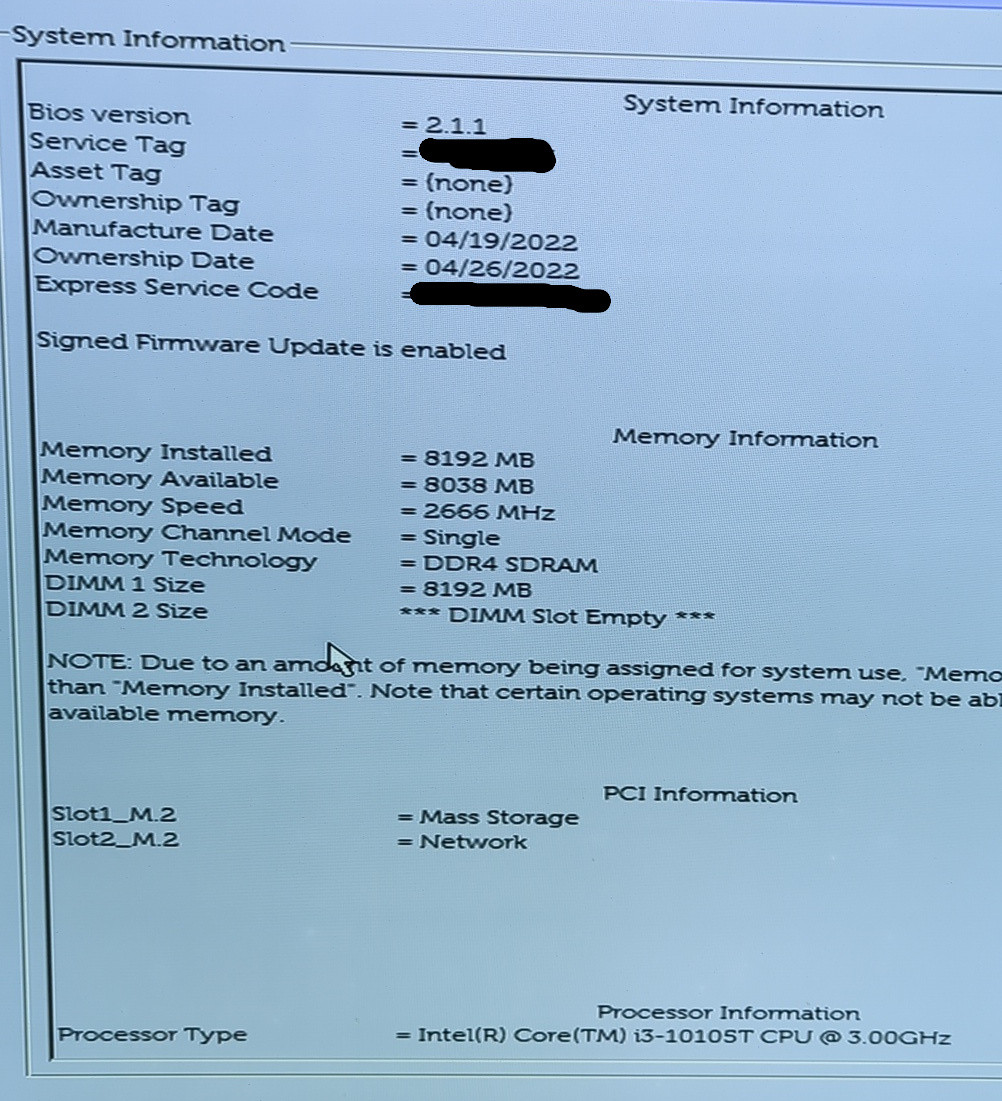](https://wiki.hexadust.net/uploads/images/gallery/2023-08/ZN2WjXeOITXtNYIe-ann-1.jpg)
## Hardware
### RAM
- 1x 8GB 1Rx16 PC4-3200AA SOSIMM SK hynix
- DDR4-3200 (1600MHz) PC4-25600
- SODIMM DDR4 Synchronous 3200 MHz (0.3 ns)
- HMAA1GS6CJR6N-XN
[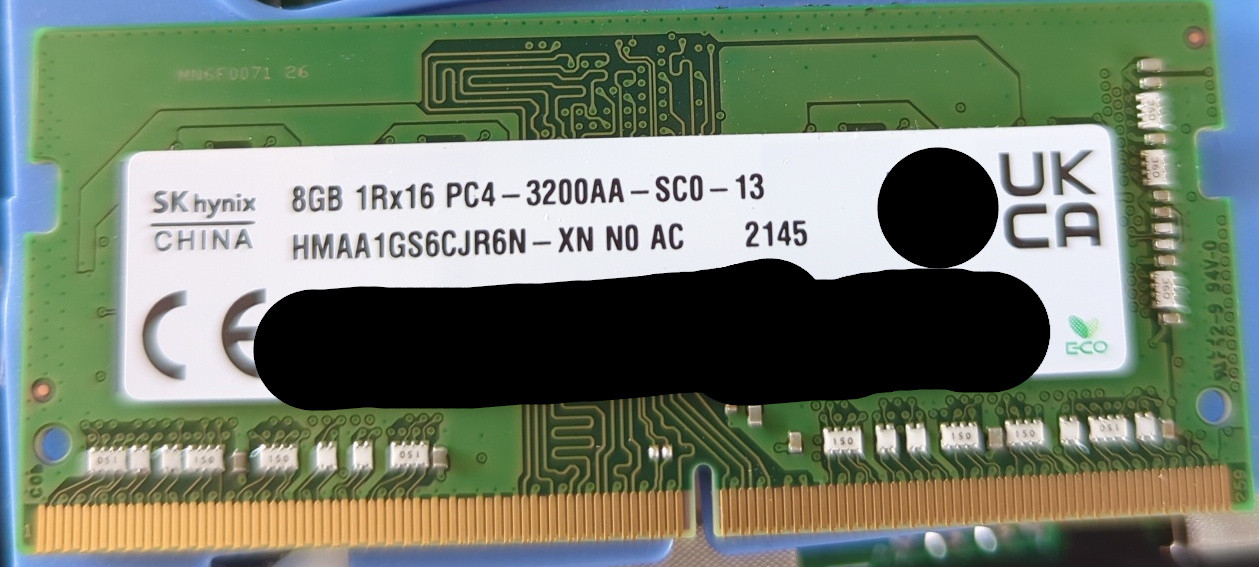](https://wiki.hexadust.net/uploads/images/gallery/2023-08/gvySSHmrZprvGtNj-ann-6.jpg)
### SSD
[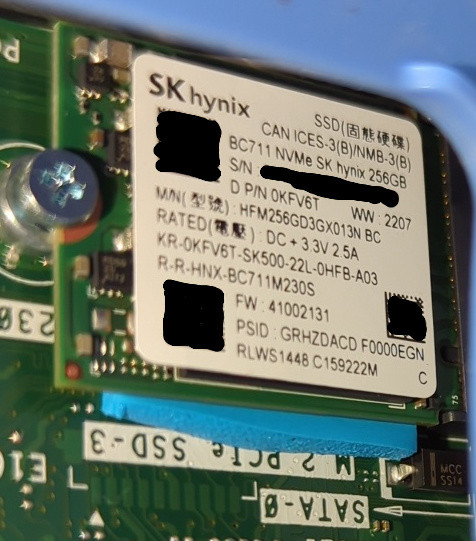](https://wiki.hexadust.net/uploads/images/gallery/2023-08/n1ZxaiBK5oY6gNco-ann-4.jpg)
### WiFi/BT
[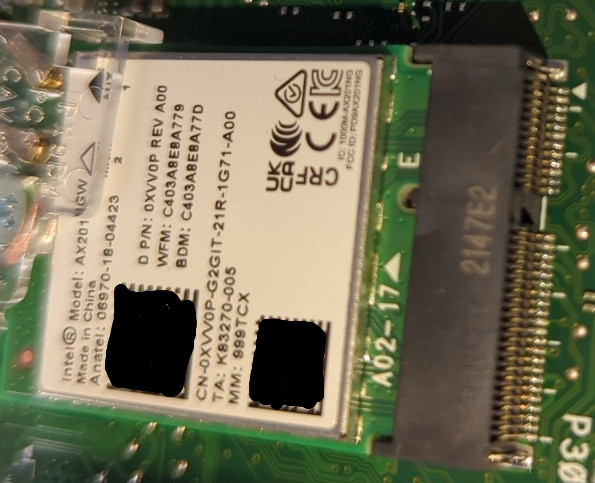](https://wiki.hexadust.net/uploads/images/gallery/2023-08/A9cAj2T7Xh9nlcmb-ann-5.jpg)
### OS reported
```
product: OptiPlex 3090 (0B8A)
vendor: Dell Inc.
serial: XXXX
width: 64 bits
capabilities: smbios-3.2.0 dmi-3.2.0 smp vsyscall32
configuration: boot=normal chassis=desktop family=OptiPlex sku=0B8A uuid=XXX
*-core
description: Motherboard
product: 02459H
vendor: Dell Inc.
physical id: 0
version: A00
serial: XXXX
*-firmware
description: BIOS
vendor: Dell Inc.
physical id: 0
version: 2.1.1
date: 12/13/2021
size: 64KiB
capacity: 32MiB
capabilities: pci pnp upgrade shadowing cdboot bootselect edd int13floppy1200 int13floppy720 int13floppy2880 int5printscreen int9keyboard int14serial int17printer acpi usb biosbootspecification netboot uefi
*-memory
description: System Memory
physical id: 9
slot: System board or motherboard
size: 8GiB
*-bank:0
description: SODIMM DDR4 Synchronous 3200 MHz (0.3 ns)
product: HMAA1GS6CJR6N-XN
vendor: Hynix Semiconductor (Hyundai Electronics)
physical id: 0
serial: XXXX
slot: DIMM1
size: 8GiB
width: 64 bits
clock: 3200MHz (0.3ns)
*-bank:1
description: [empty]
physical id: 1
slot: DIMM2
*-pci
description: Host bridge
product: 10th Gen Core Processor Host Bridge/DRAM Registers
vendor: Intel Corporation
physical id: 100
bus info: pci@0000:00:00.0
version: 03
width: 32 bits
clock: 33MHz
configuration: driver=skl_uncore
resources: irq:0
*-display
description: VGA compatible controller
product: CometLake-S GT2 [UHD Graphics 630]
vendor: Intel Corporation
physical id: 2
bus info: pci@0000:00:02.0
version: 03
width: 64 bits
clock: 33MHz
capabilities: pciexpress msi pm vga_controller bus_master cap_list rom
configuration: driver=i915 latency=0
resources: irq:135 memory:d0000000-d0ffffff memory:c0000000-cfffffff ioport:4000(size=64) memory:c0000-dffff
*-generic:0 UNCLAIMED
description: System peripheral
product: Xeon E3-1200 v5/v6 / E3-1500 v5 / 6th/7th/8th Gen Core Processor Gaussian Mixture Model
vendor: Intel Corporation
physical id: 8
bus info: pci@0000:00:08.0
version: 00
width: 64 bits
clock: 33MHz
capabilities: msi pm cap_list
configuration: latency=0
resources: memory:d1323000-d1323fff
*-network
description: Wireless interface
product: Comet Lake PCH CNVi WiFi
vendor: Intel Corporation
physical id: 14.3
bus info: pci@0000:00:14.3
logical name: wlan0
version: 00
serial: c4:03:a8:e8:a7:79
width: 64 bits
clock: 33MHz
capabilities: pm msi pciexpress msix bus_master cap_list ethernet physical wireless
configuration: broadcast=yes driver=iwlwifi driverversion=6.3.13_1 firmware=74.a5e9588b.0 QuZ-a0-hr-b0-74.u latency=0 link=no multicast=yes wireless=IEEE 802.11
resources: irq:19 memory:d1314000-d1317fff
*-pci:0
description: PCI bridge
product: Comet Lake PCI Express Root Port #17
vendor: Intel Corporation
physical id: 1b
bus info: pci@0000:00:1b.0
version: f0
width: 32 bits
clock: 33MHz
capabilities: pci pciexpress msi pm normal_decode bus_master cap_list
configuration: driver=pcieport
resources: irq:122 memory:d1200000-d12fffff
*-nvme
description: NVMe device
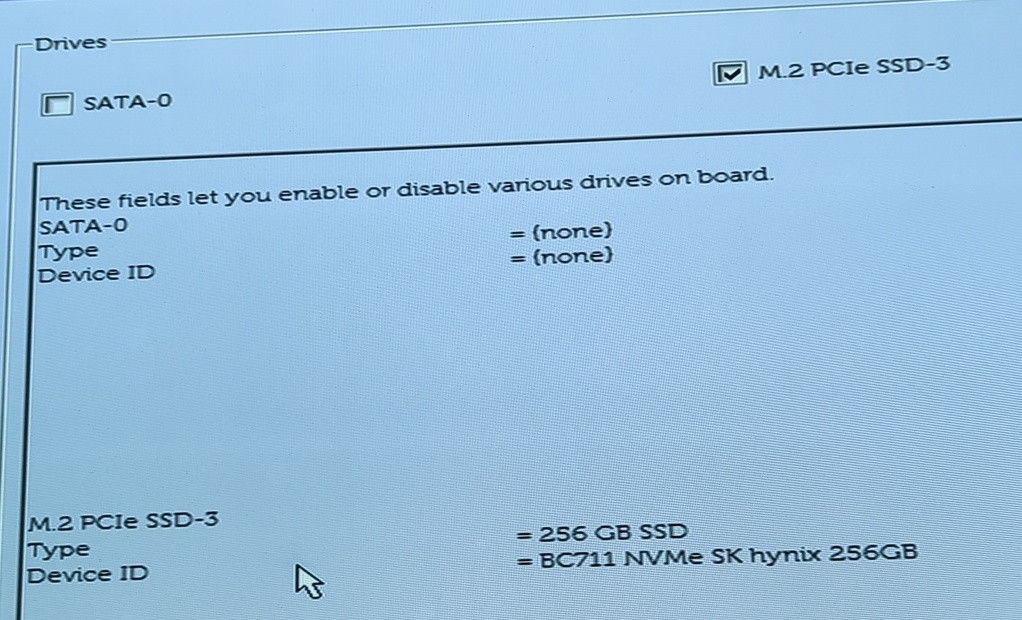
product: BC711 NVMe SK hynix 256GB
vendor: SK hynix
physical id: 0
bus info: pci@0000:01:00.0
logical name: /dev/nvme0
version: 41002131
serial: XXXX
width: 64 bits
clock: 33MHz
capabilities: nvme pm msi msix pciexpress nvm_express bus_master cap_list
configuration: driver=nvme latency=0 nqn=nqn.2022-02.com.skhynix:nvme:nvm-subsystem-sn-XXXX state=live
resources: irq:16 memory:d1200000-d1203fff memory:d1205000-d1205fff memory:d1204000-d1204fff
*-namespace:0
description: NVMe disk
physical id: 0
logical name: hwmon0
*-namespace:1
description: NVMe disk
physical id: 2
logical name: /dev/ng0n1
*-namespace:2
description: NVMe disk
physical id: 1
bus info: nvme@0:1
logical name: /dev/nvme0n1
size: 238GiB (256GB)
capabilities: gpt-1.00 partitioned partitioned:gpt
configuration: guid=XXX logicalsectorsize=512 sectorsize=512 wwid=XXX
*-volume
description: EFI partition
physical id: 1
bus info: nvme@0:1,1
logical name: /dev/nvme0n1p1
logical name: /mnt/nvme
serial: XXXX
capacity: 238GiB
configuration: mount.fstype=btrfs mount.options=rw,relatime,ssd,discard=async,space_cache=v2,subvolid=5,subvol=/ state=mounted
*-pci:1
description: PCI bridge
product: Intel Corporation
vendor: Intel Corporation
physical id: 1c
bus info: pci@0000:00:1c.0
version: f0
width: 32 bits
clock: 33MHz
capabilities: pci pciexpress msi pm normal_decode bus_master cap_list
configuration: driver=pcieport
resources: irq:123 ioport:3000(size=4096) memory:d1100000-d11fffff
*-network
description: Ethernet interface
product: RTL8111/8168/8411 PCI Express Gigabit Ethernet Controller
vendor: Realtek Semiconductor Co., Ltd.
physical id: 0
bus info: pci@0000:02:00.0
logical name: eth0
version: 1b
serial: XXXX
size: 1Gbit/s
capacity: 1Gbit/s
width: 64 bits
clock: 33MHz
capabilities: pm msi pciexpress msix vpd bus_master cap_list ethernet physical tp mii 10bt 10bt-fd 100bt 100bt-fd 1000bt-fd autonegotiation
configuration: autonegotiation=on broadcast=yes driver=r8169 driverversion=6.3.13_1 duplex=full firmware=rtl8168h-2_0.0.2 02/26/15 ip=192.168.0.176 latency=0 link=yes multicast=yes port=twisted pair speed=1Gbit/s
resources: irq:16 ioport:3000(size=256) memory:d1104000-d1104fff memory:d1100000-d1103fff
```
```
Architecture: x86_64
CPU op-mode(s): 32-bit, 64-bit
Address sizes: 39 bits physical, 48 bits virtual
Byte Order: Little Endian
CPU(s): 8
On-line CPU(s) list: 0-7
Vendor ID: GenuineIntel
BIOS Vendor ID: Intel(R) Corporation
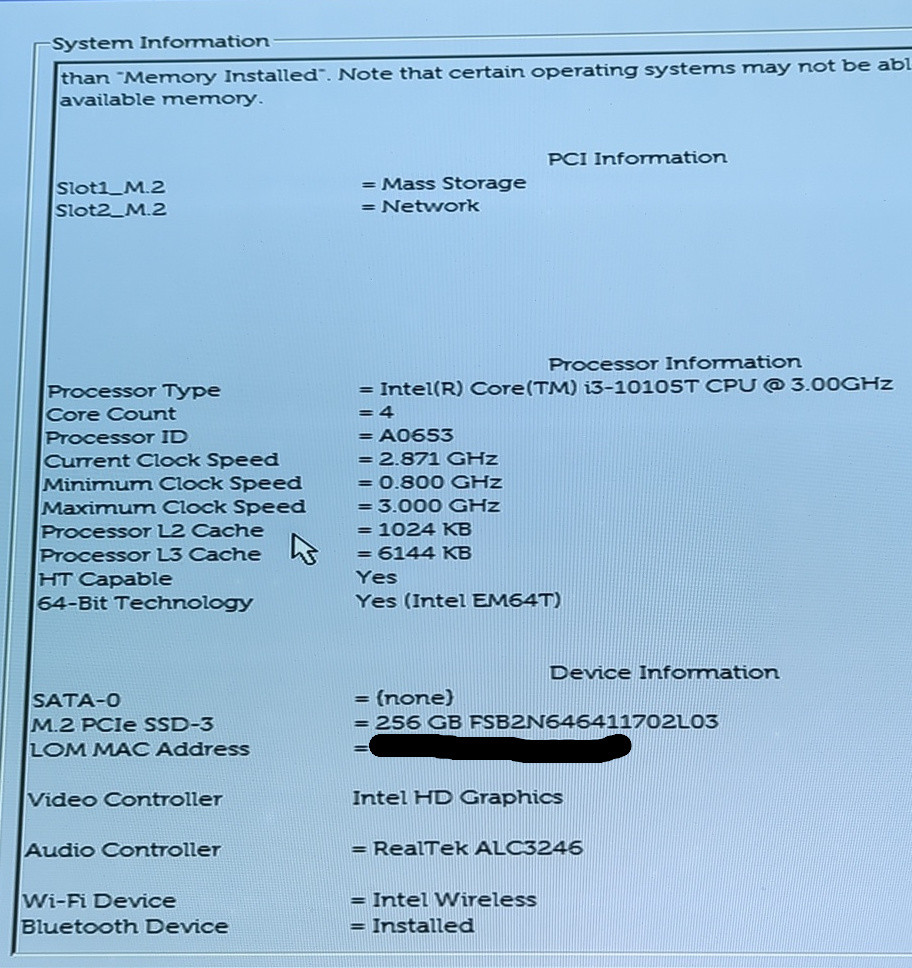
Model name: Intel(R) Core(TM) i3-10105T CPU @ 3.00GHz
BIOS Model name: Intel(R) Core(TM) i3-10105T CPU @ 3.00GHz CPU @ 2.8GHz
BIOS CPU family: 206
CPU family: 6
Model: 165
Thread(s) per core: 2
Core(s) per socket: 4
Socket(s): 1
Stepping: 3
CPU(s) scaling MHz: 91%
CPU max MHz: 3900.0000
CPU min MHz: 800.0000
BogoMIPS: 6000.00
Flags: fpu vme de pse tsc msr pae mce cx8 apic sep mtrr pge mca cmov pat pse36 clflush dts acpi mmx fxsr sse sse2 ss ht tm pbe syscall nx pdpe1gb rdtscp lm constant_tsc art arch_perfmon pebs bts
rep_good nopl xtopology nonstop_tsc cpuid aperfmperf pni pclmulqdq dtes64 monitor ds_cpl vmx est tm2 ssse3 sdbg fma cx16 xtpr pdcm pcid sse4_1 sse4_2 x2apic movbe popcnt tsc_deadline_tim
er aes xsave avx f16c rdrand lahf_lm abm 3dnowprefetch cpuid_fault epb invpcid_single ssbd ibrs ibpb stibp ibrs_enhanced tpr_shadow vnmi flexpriority ept vpid ept_ad fsgsbase tsc_adjust b
mi1 avx2 smep bmi2 erms invpcid mpx rdseed adx smap clflushopt intel_pt xsaveopt xsavec xgetbv1 xsaves dtherm ida arat pln pts hwp hwp_notify hwp_act_window hwp_epp md_clear flush_l1d arc
h_capabilities
Virtualization features:
Virtualization: VT-x
Caches (sum of all):
L1d: 128 KiB (4 instances)
L1i: 128 KiB (4 instances)
L2: 1 MiB (4 instances)
L3: 6 MiB (1 instance)
NUMA:
NUMA node(s): 1
NUMA node0 CPU(s): 0-7
Vulnerabilities:
Itlb multihit: KVM: Mitigation: VMX disabled
L1tf: Not affected
Mds: Not affected
Meltdown: Not affected
Mmio stale data: Vulnerable: Clear CPU buffers attempted, no microcode; SMT vulnerable
Retbleed: Mitigation; Enhanced IBRS
Spec store bypass: Mitigation; Speculative Store Bypass disabled via prctl
Spectre v1: Mitigation; usercopy/swapgs barriers and __user pointer sanitization
Spectre v2: Mitigation; Enhanced / Automatic IBRS, IBPB conditional, RSB filling, PBRSB-eIBRS SW sequence
Srbds: Vulnerable: No microcode
Tsx async abort: Not affected
```
# Igor
## Resources
- Manual: [optiplex-7050-desktop-micro-owners-manual-en-us.pdf](https://wiki.hexadust.net/attachments/80)
## Hardware
- Model: Dell OptiPlex 7050 micro
- CPU: Intel Core i7-6700T (QC/8MB/8T/2.8GHz/35W)
- RAM: 16GB
- Disk: 2 TB SSD
### CPU
- Installed: Intel Core i7-6700T (QC/8MB/8T/2.8GHz/35W)
- Available:
- Intel Core i3-6100 (DC/3MB/4T/3.7GHz/65W)
- Intel Core i3-6100T (DC/3MB/4T/3.2GHz/35W)
- Intel Core i5-6400T (QC/ 6MB/4T/2.2GHz/35W)
- Intel Core i5-6500 (QC/6MB/4T/3.2GHz/65W)
- Intel Core i5-6500T (QC/6MB/4T/2.5GHz/35W)
- Intel Core i5-6600 (QC/6MB/4T/3.3GHz/65W)
- Intel Core i5-6600T (QC/6MB/4T/2.7GHz/35W)
- Intel Core i7-6700 (QC/8MB/8T/3.4GHz/65W)
- Intel Core i7-6700T (QC/8MB/8T/2.8GHz/35W)
- Intel Core i3-7100 (DC/3MB/4T/3.9GHz/65W)
- Intel Core i3-7100T (DC/3MB/4T/3.5GHz/35W)
- Intel Core i3-7300T (DC/4MB/4T/3.5GHz/35W)
- Intel Core i5-7400T (QC/ 6MB/4T/2.4GHz/35W)
- Intel Core i5-7500 (QC/6MB/4T/3.4GHz/65W)
- Intel Core i5-7500T (QC/6MB/4T/2.7GHz/35W)
- Intel Core i5-7600 (QC/6MB/4T/3.5GHz/65W)
- Intel Core i5-7600T (QC/6MB/4T/2.8GHz/35W)
- Intel Core i7-7700 (QC/8MB/8T/3.6GHz/65W)
- Intel Core i7-7700T (QC/8MB/8T/2.9GHz/35W) - 12% faster than installed
### RAM
- Installed: 16GB - 2x 8GB
- Max: 32GB
- Type: SODIMM DDR4 2400 MT/s (running 2133 MT/s)
```
root@igor2:~# dmidecode --type memory
# dmidecode 3.4
Getting SMBIOS data from sysfs.
SMBIOS 3.0.0 present.
Handle 0x0009, DMI type 16, 23 bytes
Physical Memory Array
Location: System Board Or Motherboard
Use: System Memory
Error Correction Type: None
Maximum Capacity: 32 GB
Error Information Handle: Not Provided
Number Of Devices: 2
Handle 0x000A, DMI type 17, 40 bytes
Memory Device
Array Handle: 0x0009
Error Information Handle: Not Provided
Total Width: 64 bits
Data Width: 64 bits
Size: 8 GB
Form Factor: SODIMM
Set: None
Locator: DIMM1
Bank Locator: Not Specified
Type: DDR4
Type Detail: Synchronous Unbuffered (Unregistered)
Speed: 2400 MT/s
Manufacturer: 802C0000802C
Serial Number: xxxx
Asset Tag: xxxxx
Part Number: 8ATF1G64HZ-2G3B1
Rank: 1
Configured Memory Speed: 2133 MT/s
Minimum Voltage: Unknown
Maximum Voltage: Unknown
Configured Voltage: 1.2 V
Handle 0x000B, DMI type 17, 40 bytes
Memory Device
Array Handle: 0x0009
Error Information Handle: Not Provided
Total Width: 64 bits
Data Width: 64 bits
Size: 8 GB
Form Factor: SODIMM
Set: None
Locator: DIMM2
Bank Locator: Not Specified
Type: DDR4
Type Detail: Synchronous Unbuffered (Unregistered)
Speed: 2400 MT/s
Manufacturer: 802C0000802C
Serial Number: xxxxx
Asset Tag: xxxx
Part Number: 8ATF1G64HZ-2G3B1
Rank: 1
Configured Memory Speed: 2133 MT/s
Minimum Voltage: Unknown
Maximum Voltage: Unknown
Configured Voltage: 1.2 V
```
# Phoenix (Magi)
- PowerEdge SC1430
- Intel Xeon E5335 @ 2.00 GHz - dual 4 core
- PC2-5300F-555-11-H0 DDR2 FB-DIMM @ 667 MHz - 8 GB RAM (2x4); 2x slots free (bad RAM)
- Looks like DDR2 max RAM is 4x4GB (16)
- https://www.dell.com/support/product-details/en-uk/product/poweredge-1430sc/drivers
# Device Setup
# Justine
## Interfaces
### enp1s0
- HOME VLAN; untagged
```
ip link set enp1s0 up
ip addr replace 192.168.1.2/24 dev enp1s0
ip route add default via 192.168.1.1 dev enp1s0
```
### mgmt@enp1s0
- MGMT VLAN; tagged VLAN 100
```
ip link add link enp1s0 name mgmt type vlan id 100
ip link set mgmt up
ip addr replace 192.168.100.2/24 dev mgmt
```
### docker0
- 172.18.0.1/16
Set up automatically by docker.
Docker namespaces use virtual interface that gets bridged with docker0.
## Routing
### Forwarding
Enabled but packets dropped by default on firewall.
```
sysctl net.ipv4.ip_forward=1
iptables -P FORWARD DROP
```
#### Mullvad
Mullvad VPN outgoing traffic is MASQUERADEed for it to get Mullvad assigned internal IP.
```
# Mullvad gateway
iptables -t nat -A POSTROUTING -s 192.168.1.0/24 -o mullvad -j MASQUERADE
iptables -t nat -A POSTROUTING -s 172.17.1.0/24 -o mullvad -j MASQUERADE
```
When Mullvad VPN is up/down additional firewall rules are added:
```
PostUp = iptables -A FORWARD -o mullvad -i enp1s0 -j ACCEPT && iptables -A FORWARD -i mullvad -o enp1s0 -j ACCEPT
PreDown = iptables -D FORWARD -o mullvad -i enp1s0 -j ACCEPT && iptables -D FORWARD -i mullvad -o enp1s0 -j ACCEPT
```
This will allow forwarding between mullvad (VPN) and enp1s0 (HOME) networks.
#### Vpn
When this WireGuard endpoint is enabled additional rules are added:
```
PostUp = iptables -A FORWARD -o vpn -i enp1s0 -j ACCEPT && iptables -A FORWARD -i vpn -o enp1s0 -j ACCEPT && iptables -A FORWARD -o vpn -i mullvad -j ACCEPT && iptables -A FORWARD -i vpn -o mullvad -j ACCEPT
PreDown = iptables -D FORWARD -o vpn -i enp1s0 -j ACCEPT && iptables -D FORWARD -i vpn -o enp1s0 -j ACCEPT && iptables -D FORWARD -o vpn -i mullvad -j ACCEPT && iptables -D FORWARD -i vpn -o mullvad -j ACCEPT
```
This will allow:
1. vpn users to access local network (HOME),
2. vpn users to access the internet via mullvad VPN interface.
#### Docker
Allow traffic from Docker (IPHole) to be originating from justine IP if routed through default HOME VLAN gateway (caroline) - this is when VPN is turned off to keep DNS working.
```
# VPN gateway (used if mullvad is stopped)
iptables -t nat -A POSTROUTING -s 172.17.1.1/24 -o enp1s0 -j MASQUERADE
```
PIHole uses Mullvad's hosted DNS server at: 193.138.218.74. It is accessible over VPN and also without it.
Any DNS port 53 packet going over Mullvad VPN will be SNAT'ed to Mullvads DNS server transparently to prevent DNS leaks. This means that running DNS resolved (unbind) makes no sense since all DNS requests will end up on Mullvad's server anyway.
### Local networks
Allow access to other local networks via caroline:
```
ip route add 192.168.1.0/16 dev enp1s0 via 192.168.1.1
```
## VPN
### Outpost
- caroline UDP port: `34564`
- justine UDP port: `51822`
Used for devices to connect in to Justine (no forwarding is set up currently).
### vpn
- caroline UDP port: `34563`
- justine UDP port: `51821`
For all devices to VPN-in to the G/W from internal networks and also from the internet.
#### VPN access from outside the network
DEPRECATED: This is no longer the case as I don't have ability to forward IPv4 ports into the network or set ISP router in bridge mode.
TODO: Document how VPN connection is established from Justine to Vps and there incoming VPN connections are forwarded back to Justine. Justine to not route this connection to Vps via mullvad...
```
iptables -t nat -A POSTROUTING -s 172.17.1.0/24 -o enp1s0 -j MASQUERADE
```
Traffic from VPN (`172.17.1.0/24`) needs to be MASQUERADE'ed when going out to internal network because there are devices configured with **caroline** as default G/W. Also **justine**, when not connected to Mullvad will use **caroline** as default G/W.
This means that all traffic from external devices will looks like coming from **caroline**.
#### VPN access from withing the network
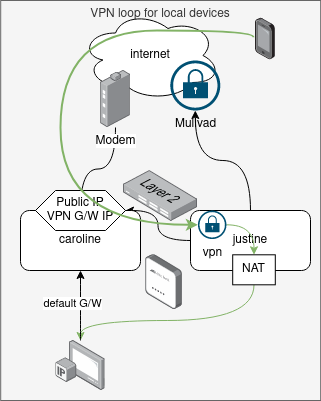
Devices like laptop or phone will be on always-on home VPN. This means that they will be connecting to VPN via public IP to reach justine.
This entry will capture attempt from devices that route via justine (default G/W `192.168.1.2`) to justine to prevent traffic going out to Mullvad and comming back to caroline and down to justine.
```
iptables -t nat -A PREROUTING -s 192.168.1.0/16 -d 57.128.183.232 -p udp --dport 34563 -j DNAT --to-destination 192.168.1.2:51821
```
The /16 prefix is used so this rule captures all internal subnets.
Public IP in the rule will need to be updated if it ever changes! This IP is the IP of VPN endpoint - caroline public DHCP assigned IP/Virgin Media IP.
MYSTERY
- this only gets few packet hit, so bulk traffic is bypassing this rule
- when connected to MGMT with laptop the traffic to HOME network is slow, looks like it is going through the loop
# Hifumi: Printer server
## Hardware - R2S
### Network
- `eth0` - RTL8211E
- `eth1` - RTL8153
The RTL8153 device needs MAC assignment as it will use random value by default:
/etc/udev/rules.d/10-network-mac-addr.rules
```udev
SUBSYSTEM=="net", ACTION=="add", KERNEL=="eth1", PROGRAM="/sbin/ip link set %k address 8a:f4:c8:41:48:35"
```
/etc/runit/core-services/03-\_led.sh
```
echo "1" > /sys/class/leds/nanopi-r2s:red:sys/brightness
```
/etc/rc.local
```
modprobe ledtrig-netdev
echo "netdev" > /sys/class/leds/nanopi-r2s:green:lan/trigger
echo "eth0" > /sys/class/leds/nanopi-r2s:green:lan/device_name
echo "1" > /sys/class/leds/nanopi-r2s:green:lan/link
echo "1" > /sys/class/leds/nanopi-r2s:green:lan/tx
echo "0" > /sys/class/leds/nanopi-r2s:green:lan/rx
echo "netdev" > /sys/class/leds/nanopi-r2s:green:wan/trigger
echo "eth1" > /sys/class/leds/nanopi-r2s:green:wan/device_name
echo "1" > /sys/class/leds/nanopi-r2s:green:wan/link
echo "1" > /sys/class/leds/nanopi-r2s:green:wan/tx
echo "0" > /sys/class/leds/nanopi-r2s:green:wan/rx
echo "mmc0" > /sys/class/leds/nanopi-r2s:red:sys/trigger
```
Needed to set MTU to 1400 to fix authentication issues with MS server
In `/etc/rc.local`:
```
# curl -v https://13.107.246.52 --insecure
ip link set eth0 mtu 1400
```
# Igor
## Network
After reboot need to add default route manually for Igor to find access to internet.
```
ip route add default via 192.168.100.1
```
## Backups
### Local
They run to `/var/lib/vz/dump` which is the root volume that has 94GB in total so only keep 2 backups max.
### Umma over SMB
Backups go to SMB mount at `/mnt/pve/umma` on Igor that mounts `Igor` share from Umma.
#### Failing backups
Looks like compression is not on the fly but it first dumps data uncompressed and then runs compression which fails on SMB mount... [https://community.nethserver.org/t/proxmox-help-needed-proxmox-backup-ends-with-broken-pipe/18537/2](https://community.nethserver.org/t/proxmox-help-needed-proxmox-backup-ends-with-broken-pipe/18537/2)
Can set where the "temp" file is created so it goes to local drive first:
/etc/vzdump.conf
```
tmpdir: /var/lib/vz/dump/temp
```
Make sure you can access ProxMox via SSH. If you make a mistake PVE services may fail to start and there won't be UI available.
```diff
--- /usr/share/perl5/PVE/Storage/CIFSPlugin.pm.orig 2024-02-26 17:50:07.546260476 +0000
+++ /usr/share/perl5/PVE/Storage/CIFSPlugin.pm 2024-02-26 18:06:23.136144956 +0000
@@ -254,6 +254,7 @@
}
}
+=begin
sub check_connection {
my ($class, $storeid, $scfg) = @_;
@@ -287,6 +288,7 @@
return 1;
}
+=cut
# FIXME remove on the next APIAGE reset.
# Deprecated, use get_volume_attribute instead.
```
# Igor: Zabbix
## Templates
- Synology DiskStation SNMPv3 (modified): [Synology DiskStation SNMPv3.yaml](https://wiki.hexadust.net/attachments/26)
- Switch Interfaces SNMPv2: [Switch Interfaces SNMPv2.yaml](https://wiki.hexadust.net/attachments/25)
# Ann: Kodi
## SSL certificate for web UI
1. Put certificate in `/storage/.kodi/userdata/server.pem` (*pem*) and key in `/storage/.kodi/userdata/server.key` (unencrypted; *pem*)
2. Go to **Settings** / **Services** / **Control** and turn on **Enable SSL**.
# OVH VPS
Since I no longer have public IPv4 assigned to my modem/router and no way to enable modem/bridge mode I use VPS to terminate incoming traffic for HTTP and VPN-in.
- Type: VPS `vps2020-starter-1-2-20` (1 vcore, 2 GiB RAM, 20 GB HDD)
- Location: London `os-uk2`
- OS: AlmaLinux 9
- IPv4: `57.128.183.232`
- IPv6: `fe80::f816:3eff:fe78:d4a7/64`
Justine (`172.17.100.3`) and Server-gw (`172.17.100.2`) establish VPN connection to it on port `51322` using `172.17.100.1/24` VPS.
```
[Interface]
PrivateKey =
MTU = 1380
ListenPort = 51322
Address = 172.17.100.1/24
[Peer]
PublicKey = PTu13g5XRIVt+i1DL3g5QujHwL6TJaHkC9z8Kw7pwQE=
AllowedIPs = 172.17.100.2/32
PersistentKeepalive = 300
[Peer]
PublicKey = EnRj9UgoE1qyQ9qK9OU3jZ39tpAo24FTZMdT6nQN0wY=
AllowedIPs = 172.17.100.3/32
PersistentKeepalive = 300
```
IP tables configuration is used to forward packets to Justine and Server-gw:
```bash
iptables -P INPUT DROP
iptables -A INPUT ! -i vps -d 172.17.100.0/24 -j DROP
iptables -A INPUT -p icmp -j ACCEPT
iptables -A INPUT -m state --state RELATED,ESTABLISHED -j ACCEPT
iptables -A INPUT -m tcp -p tcp --dport 22 -m recent --rcheck --seconds 30 --name SSH -j ACCEPT
iptables -A INPUT -m tcp -p tcp --dport -m recent --set --name SSH -j DROP
iptables -A INPUT -p udp -m udp --dport 51322 -j ACCEPT
sysctl net.ipv4.ip_forward=1
iptables -P FORWARD DROP
iptables -A FORWARD -o vps -i eth0 -j ACCEPT
iptables -A FORWARD -i vps -o eth0 -j ACCEPT
iptables -t nat -A POSTROUTING -o eth0 -j MASQUERADE
iptables -t nat -A POSTROUTING -o vps -d 172.17.100.3 -j MASQUERADE
iptables -t nat -A PREROUTING -i eth0 -p tcp --dport 80 -j DNAT --to-destination 172.17.100.2:80
iptables -t nat -A PREROUTING -i eth0 -p tcp --dport 443 -j DNAT --to-destination 172.17.100.2:443
iptables -t nat -A PREROUTING -i eth0 -p tcp --dport 4443 -j DNAT --to-destination 172.17.100.2:4443
iptables -t nat -A PREROUTING -i eth0 -p udp --dport 10000 -j DNAT --to-destination 172.17.100.2:10000
iptables -t nat -A PREROUTING -i eth0 -p tcp --dport 25565 -j DNAT --to-destination 172.17.100.2:25565
iptables -t nat -A PREROUTING -i eth0 -p udp --dport 34563 -j DNAT --to-destination 172.17.100.3:51821
iptables -t nat -A PREROUTING -i eth0 -p udp --dport 34564 -j DNAT --to-destination 172.17.100.3:51822
```
Vps acts as VPN router for all traffic for Server-gw and by extension for all SERVER VLAN hosts. This way enter and exit IP for servers is the public IP of Vps. Servers can also see original client IP as it is not NATed on the way in.
For VPN-in Vps will NAT connections to Justine since Justine uses Mullvad or ISP IP as default G/W.
## Blocking forwarded traffic
```bash
ipset create forward-drop hash:net
iptables -I FORWARD 1 -m set --match-set forward-drop src -j DROP
```
List IP and add IP to block list:
```bash
ipset list
ipset add forward-drop 66.249.0.0/16
```
# DNS
## DNS provider settings
| **Host**
| **Provider**
| **Method**
| **IP**
|
| caroline
| ISP provided
| dnsmasq
| 127.0.0.1
|
| justine
| Mullvad
| resolv.conf | 193.138.218.74 |
| haru
| caroline / ISP
| resolv.conf | 192.168.100.1 |
| goro | caroline / ISP
| resolv.conf | 192.168.100.1 |
| HOME DHCP devices
| justine / PiHole / Mullvad
| DHCP
| 192.168.1.2
|
| VPNed DHCP devices
| justine/ PiHole / Mullvad
| DHCP
| 172.17.1.1 |
# Troubleshooting
## Known problems
### Default G/W for Igor
Igor can't find it's local network:
```
hxd@morgana ~/net> ssh -J igor.lan 192.168.50.159
channel 0: open failed: connect failed: open failed
stdio forwarding failed
kex_exchange_identification: Connection closed by remote host
Connection closed by UNKNOWN port 65535
```
Use web UI to access console and exec as root:
```
ip route add default via 192.168.100.1
```
## Troubleshooting
### Default G/W for Igor
Igor can't find it's local network:
```
hxd@morgana ~/net> ssh -J igor.lan 192.168.50.159
channel 0: open failed: connect failed: open failed
stdio forwarding failed
kex_exchange_identification: Connection closed by remote host
Connection closed by UNKNOWN port 65535
```
Use web UI to access console and exec as root:
```
ip route add default via 192.168.100.1
```
### TCP dump
Installing on OpenWRT:
```bash
opkg update
opkg install tcpdump
```
#### DHCP
```
tcpdump -vvv -i any udp port 67 and port 68
```
## Network Issues
### Wi-Fi slow
Slow access to HOME from laptop on MGMT wi-fi.
#### UPDATE: 2023-10-28
Looks like laptop gets very low Rx rate (throughput from haru to Morgana) of ~17Mbit or even 6Mbit:
```
iperf3 -c 192.168.100.20 -p 2345 -R -t 9999
Connecting to host 192.168.100.20, port 2345
Reverse mode, remote host 192.168.100.20 is sending
[ 5] local 192.168.100.161 port 42966 connected to 192.168.100.20 port 2345
[ ID] Interval Transfer Bitrate
[ 5] 0.00-1.00 sec 1.75 MBytes 14.7 Mbits/sec
[ 5] 1.00-2.00 sec 1.64 MBytes 13.8 Mbits/sec
[ 5] 2.00-3.00 sec 1.64 MBytes 13.8 Mbits/sec
[ 5] 3.00-4.00 sec 1.55 MBytes 13.0 Mbits/sec
[ 5] 4.00-5.00 sec 1.62 MBytes 13.6 Mbits/sec
[ 5] 5.00-6.00 sec 1.63 MBytes 13.6 Mbits/sec
^C[ 5] 6.00-6.14 sec 252 KBytes 14.4 Mbits/sec
- - - - - - - - - - - - - - - - - - - - - - - - -
[ ID] Interval Transfer Bitrate
[ 5] 0.00-6.14 sec 0.00 Bytes 0.00 bits/sec sender
[ 5] 0.00-6.14 sec 10.1 MBytes 13.8 Mbits/sec receiver
```
At the same time I get like 60Mbit sending data out:
```
iperf3 -c 192.168.100.20 -p 2345 -t 9999
Connecting to host 192.168.100.20, port 2345
[ 5] local 192.168.100.161 port 45200 connected to 192.168.100.20 port 2345
[ ID] Interval Transfer Bitrate Retr Cwnd
[ 5] 0.00-1.00 sec 10.1 MBytes 85.0 Mbits/sec 0 469 KBytes
[ 5] 1.00-2.00 sec 6.71 MBytes 56.3 Mbits/sec 0 469 KBytes
[ 5] 2.00-3.00 sec 7.08 MBytes 59.4 Mbits/sec 0 502 KBytes
[ 5] 3.00-4.00 sec 6.40 MBytes 53.7 Mbits/sec 0 529 KBytes
[ 5] 4.00-5.00 sec 7.77 MBytes 65.2 Mbits/sec 0 529 KBytes
[ 5] 5.00-6.00 sec 7.77 MBytes 65.2 Mbits/sec 0 529 KBytes
[ 5] 6.00-7.00 sec 7.01 MBytes 58.8 Mbits/sec 0 587 KBytes
[ 5] 7.00-8.00 sec 8.47 MBytes 71.0 Mbits/sec 0 621 KBytes
^C[ 5] 8.00-8.40 sec 2.41 MBytes 50.4 Mbits/sec 0 621 KBytes
- - - - - - - - - - - - - - - - - - - - - - - - -
[ ID] Interval Transfer Bitrate Retr
[ 5] 0.00-8.40 sec 63.8 MBytes 63.7 Mbits/sec 0 sender
[ 5] 0.00-8.40 sec 0.00 Bytes 0.00 bits/sec receiver
```
Haru reports low MCS values of 10 or lower.
| **Server**
| **SSID**
| **Channel** | **Client**
| **Location**
| **Client -> Server Mbit**
| **Server <- Client Mbit**
|
|
| Justine | Haru Legacy
| 6
| L (android)
| living room | 25
| 25
|
|
| Justine | Haru Legacy | 6
| futaba
| living room | 21
| 9
|
|
| Justine | Haru Legacy | 6
| futaba
| kitchen
| 25
| 10
|
|
| Justine | Haru Legacy | 6
| futaba
| by Haru
| 26
| 11
|
|
| Justine | Haru Legacy | 11
| futaba | living room | 26
| 11
|
|
| Justine | Haru MGMT | 11
| morgana | living room | 53
| 23
|
|
| Justine | Haru Legacy | 6
| morgana
| living room | 50
| 11
|
|
| Justine | Haru
| ?
| morgana | living room | 89
| 72 |
|
| Justine | Haru (IE)
| 52 | morgana | living room | 95
| 95
|
|
| Justine | Haru MGMT (IE)
| 11 | morgana | living room | 92
| 92
|
|
| Justine | Haru MGMT (IE)
| 11 | morgana | kitchen | 95
| 94
|
|
| Justine
| Haru (IE/1G)
| 11
| morgana | kitchen | 53
| 321
| \*1
|
| Justine
| Haru MTMT (IE/1G)
| 52
| morgana
| kitchen
| 44
| 92
| \*1
|
\*1 - both washing and drying going on
Config changes:
- Set max power to 30dBm
- channel switched to 5 (was 6): 15-25 on morgana and 13 on futaba
- channel 11: 10 to 25 on moragna, 16 on futaba
- Setting region to IE(!):
- 95/95 morgana -> justine over Haru channel 52
- BINGO!: 92/92 on MGMT channel 11
- This get me to 100Mbit; but I get much higher rates reported for wifi like 866/780 Mbit on Haru
- eth0 on Speed: 100Mb/s!
- Looks like faulty cable but I also rebooted Haru so could be that as well, although on secondary port I was getting 1Gbit with laptop before restart.
- goro reports only lan8 (haru) at 100Mbit/s but others at 1Gbit
```
Mon Oct 30 19:30:27 2023 kern.info kernel: [8584550.111467] RTL8380 Link change: status: 1, ports 8000
Mon Oct 30 19:30:28 2023 kern.info kernel: [8584550.992936] rtl83xx-switch switch@1b000000 lan8: Link is Up - 100Mbps/Full - flow control rx/tx
Mon Oct 30 19:30:28 2023 kern.info kernel: [8584551.003123] switch: port 8(lan8) entered blocking state
Mon Oct 30 19:30:28 2023 kern.info kernel: [8584551.009306] switch: port 8(lan8) entered forwarding state
Mon Oct 30 19:30:28 2023 daemon.notice netifd: Network device 'lan8' link is up
```
- I have replaced the cable and now have 1Gbps
```
Mon Oct 30 20:32:29 2023 kern.info kernel: [8588272.090512] rtl83xx-switch switch@1b000000 lan8: Link is Up - 1Gbps/Full - flow control rx/tx
```
#### UPDATE: 2023-11-05
There was a packet drop between Haru and Goro. I have replaced the cable that goes from Goro to power supply (for Haru).
After replacing the cable link dropped to 100Mbps, reconnecting it got me 1Gbit.
I have also switched channels for 5GHz radio to use:
- channel: 104 (5520MHz)
- width: 160MHz
Now everything is very fast. In kitchen I got 356/407 Mbps using Haru!
#### UPDATE: 2023-11-11
After power issue the network went up in bad state.
I was getting 300Mbit one way and only 46Mbit and high packet loss the other way.
I decided to route another cable to Haru.
Looks like Primary interface is the only one that can take power so I left it connected to the power supply but disconnected it from the swich.
New, longer cable now connects switch to Haru Secondary port which is part of a bridge setup with Primary port so no configuration changes was needed.
Now I am getting up from Morgana in kitchen 657Mbit and down 334Mbit from Justine.
### DHCP no responses, no IP assigned
Looks like Graphene OS uses random MAC for every connection attempt to Haru:
```
13:34:45.185659 IP 0.0.0.0.68 > 255.255.255.255.67: BOOTP/DHCP, Request from b2:7f:5d:03:bf:61, length 288
13:34:46.144502 IP 0.0.0.0.68 > 255.255.255.255.67: BOOTP/DHCP, Request from b2:7f:5d:03:bf:61, length 288
13:34:48.135488 IP 0.0.0.0.68 > 255.255.255.255.67: BOOTP/DHCP, Request from b2:7f:5d:03:bf:61, length 288
13:34:52.237864 IP 0.0.0.0.68 > 255.255.255.255.67: BOOTP/DHCP, Request from b2:7f:5d:03:bf:61, length 288
13:35:00.303513 IP 0.0.0.0.68 > 255.255.255.255.67: BOOTP/DHCP, Request from b2:7f:5d:03:bf:61, length 288
13:35:10.015298 IP 0.0.0.0.68 > 255.255.255.255.67: BOOTP/DHCP, Request from 8a:ba:ab:74:33:23, length 288
13:35:11.105965 IP 0.0.0.0.68 > 255.255.255.255.67: BOOTP/DHCP, Request from 8a:ba:ab:74:33:23, length 288
13:35:13.292155 IP 0.0.0.0.68 > 255.255.255.255.67: BOOTP/DHCP, Request from 8a:ba:ab:74:33:23, length 288
13:35:17.375826 IP 0.0.0.0.68 > 255.255.255.255.67: BOOTP/DHCP, Request from 8a:ba:ab:74:33:23, length 288
13:35:24.972812 IP 0.0.0.0.68 > 255.255.255.255.67: BOOTP/DHCP, Request from 8a:ba:ab:74:33:23, length 288
13:43:05.585122 IP 0.0.0.0.68 > 255.255.255.255.67: BOOTP/DHCP, Request from 5a:88:7a:60:55:fd, length 288
13:43:06.607297 IP 0.0.0.0.68 > 255.255.255.255.67: BOOTP/DHCP, Request from 5a:88:7a:60:55:fd, length 288
13:43:08.473318 IP 0.0.0.0.68 > 255.255.255.255.67: BOOTP/DHCP, Request from 5a:88:7a:60:55:fd, length 288
13:43:12.547523 IP 0.0.0.0.68 > 255.255.255.255.67: BOOTP/DHCP, Request from 5a:88:7a:60:55:fd, length 288
13:43:21.310413 IP 0.0.0.0.68 > 255.255.255.255.67: BOOTP/DHCP, Request from 5a:88:7a:60:55:fd, length 288
13:43:27.942393 IP 0.0.0.0.68 > 255.255.255.255.67: BOOTP/DHCP, Request from ca:9a:d3:13:a3:1c, length 288
13:43:28.860544 IP 0.0.0.0.68 > 255.255.255.255.67: BOOTP/DHCP, Request from ca:9a:d3:13:a3:1c, length 288
13:43:30.774370 IP 0.0.0.0.68 > 255.255.255.255.67: BOOTP/DHCP, Request from ca:9a:d3:13:a3:1c, length 288
13:43:34.697002 IP 0.0.0.0.68 > 255.255.255.255.67: BOOTP/DHCP, Request from ca:9a:d3:13:a3:1c, length 288
13:43:43.292732 IP 0.0.0.0.68 > 255.255.255.255.67: BOOTP/DHCP, Request from ca:9a:d3:13:a3:1c, length 288
```
This may lead to depletion of IP addresses (pool has up to 150 to allocate).
To clean up the pool SSH to Caroline:
```bash
service dnsmasq stop
mv /tmp/dhcp.leases /tmp/dhcp.leases.bac
service dnsmasq start
```
To mitigate the issue I have reduced leas time from 30 days to 24 hours.
### VPN clients coming from outside are NAT'ed
They will looks like **justine**, not their actual VPN IP, since devices can use **caroline** as their default G/W.
### No access to SERVER VLAN from HOME with justine G/W
### VPN clients can access justine MGMT interface IP
```
11:06:10.811023 vpn In IP 172.17.1.10 > 192.168.100.2: ICMP echo request, id 44951, seq 814, length 64
11:06:10.811041 vpn Out IP 192.168.100.2 > 172.17.1.10: ICMP echo reply, id 44951, seq 814, length 64
```
I have set up more strict forwarding rules:
```
Chain FORWARD (policy DROP 52 packets, 4368 bytes)
num pkts bytes target prot opt in out source destination
9 35 5441 ACCEPT all -- enp1s0 vpn 192.168.0.0/24 0.0.0.0/0
10 32 5244 ACCEPT all -- vpn enp1s0 0.0.0.0/0 192.168.0.0/24
```
but this does not help.
This is because it is not going through FORWARD but through INPUT:
```
iptables -A INPUT -i vpn -d 192.168.100.0/24 -j LOG
```
```
[604557.640819] IN=vpn OUT= MAC= SRC=172.17.1.10 DST=192.168.100.2 LEN=84 TOS=0x00 PREC=0x00 TTL=64 ID=56812 DF PROTO=ICMP TYPE=8 CODE=0 ID=44951 SEQ=1064
```
Adding the above rule will block it. But is this normal that any IP assigned to any interface can be used when routing to a G/W?
FIXED: I have added the following rule:
```
iptables -A INPUT ! -i mgmt -d 192.168.100.0/24 -j DROP
```
FOLLOWUP: Is this the same for other devices? Try static route to them and access MGMT IP.
```
ip route add 192.168.100.50 via 192.168.0.50 dev wlan0
```
And it will ping on 192.168.100.50. So services bound only to 192.168.100.50 will be exposed to HOME VLAN devices.
CONCLUSION: Binding to selected IP address does not protect service from being accessed from another network interface without extra firewall rule to prevent this!
What makes localhost (`lo`) interface special - services bound to it are not accessible from other interfaces? It has `local` routing tables set up by default.
#### Same problem for caroline
Same with **caroline:**
```
ip route add 192.168.100.1 via 192.168.0.1 dev wlan0
```
I can now access [https://192.168.100.1/cgi-bin/luci/](https://192.168.100.1/cgi-bin/luci/) while on HOME VLAN, probably will work form SERVER and any other as well!
FIXED: DROP all INPUT on all interfaces apart from MGMT. Added ACCEPT rules for LAN, GUEST and SERVER VLANs for DHCP (UDP 67), DNS (TCP/UDP: 53) and ICMP.
I could not use the negative interface setup as in case of justine. Probably should use default INPUT DROP on justine as well and only allow mgmt interface traffic as well.
#### Would this be same for goro and haru?
They don't have IP on HOME network but they have interface. Injecting packet for MGMT IP to their HOME interface may be (using MAC/ARP) possible but they would not respond since they have no routing to HOME network?
### Access to web services from internal network
Need to manually add static route for devices using default DHCP G/W (justine) when going to local server services like video.hexadust.net.
```
ip route add 46.7.126.16 dev eth0 via 192.168.0.1
ping video.hexadust.net
```
#### Things to try:
1. Try to push static routes from DHCP - this did not work for some reason
2. Set up static route on justine
3. Set up SNAT on justnie
4. Use bridge layer DNAT: [https://ebtables.netfilter.org/br\_fw\_ia/br\_fw\_ia.html](https://ebtables.netfilter.org/br_fw_ia/br_fw_ia.html)
5. Set up split DNS
1. `video.hexadust.net 192.168.50.159`
2. This would require justine to forward to SERVER VLAN since ann uses 0.2 as default G/W
6. Set up separate DNS for internal access
## No more IPs on DHCP
Looks like Horizon box eats up leases: [https://www.boards.ie/discussion/2057720465/my-new-virgin-media-stb-issued-two-lan-i-ps](https://www.boards.ie/discussion/2057720465/my-new-virgin-media-stb-issued-two-lan-i-ps)
I have removed leases from /var/lib/dhcp.lease file on caroline.
### Justine access is laggy; DNS is slow
Happens after OpenWRT updates.
Try disconnecting and connecting network cables for Haru and uplink on goro.
**UPDATE: 2023-11-05:** I have replaced both cables that connect Haru and Goro. The link tends to drop to 100Mbit if Goro end is disconnected, reconnecting fixes it.
## Igor does not set it's default route after boot
While it is configured in web UI it is not taking effect on boot and results in it unable to find local network. VMs stuff will work OK though.
## TODO
### YunoHost access to internet via default IP instead of VPN
Not good for IRC etc.
1. Clone the VM and put copy in HOME VLAN, remove public web stuff from it, remove web clients from SERVER VLAN one.
2. Better yet. Create DMZ VLAN that has only access to Caroline and will run `www` server. Use SERVER VLAN to only have access to Justine, so out traffic goes out of the VPN, add interface to YunoHost that is in DMZ VLAN so that it can get requests from www server, but have it default G/W to use Justine over DMZ?
3. Create SANDBOX VLAN that only has access to justine as G/W.
4. Create VM that connects to Justinve via WireGuard and pit it in HOME network and in virtual network that it will be G/W for, put other VMs in that sandbox virtual network.
5. Create VM that uses SERVER VLAN to make connection to Mullvad (dedicated key) and act as a G/W for sandbox virtual network for other VMs.
## 24/09: WWW access very slow
Downloading file from www server (Caddy) is slow.
Phone over 5G with VPN (to justine): ~1-2 MB/s
Phone over Haru with VPN: ~2-3 MB/s
From laptop (VPN + Mullvad): ~3 MB/s \[NOTE: Even using local SERVER IP it goes over Mullvad IP!\]
```
> curl --insecure -o /dev/null --connect-to 192.168.50.159:443 https://jpastuszek.net/links/data --http1.1
% Total % Received % Xferd Average Speed Time Time Time Current
Dload Upload Total Spent Left Speed
1 412M 1 5216k 0 0 50859 0 2:21:39 0:01:45 2:19:54 63055
```
From laptop but using port 8080 (darkhttpd) and no TLS: ~38 MB/s \[NOTE: NAT'ed by 192.168.0.2 justine\]
```
> curl --insecure -o /dev/null http://192.168.50.159:8080/links/data
% Total % Received % Xferd Average Speed Time Time Time Current
Dload Upload Total Spent Left Speed
100 412M 100 412M 0 0 37.9M 0 0:00:10 0:00:10 --:--:-- 38.0M
```
From SDF: ~1 MB/s
```
$ curl -o /dev/null https://jpastuszek.net/links/data --http1.1
% Total % Received % Xferd Average Speed Time Time Time Current
Dload Upload Total Spent Left Speed
5 412M 5 22.8M 0 0 884k 0 0:07:57 0:00:26 0:07:31 957k^C
$ curl -o /dev/null https://jpastuszek.net/links/data
% Total % Received % Xferd Average Speed Time Time Time Current
Dload Upload Total Spent Left Speed
2 412M 2 11.9M 0 0 796k 0 0:08:49 0:00:15 0:08:34 1007k
```
From Igor VM in the same VLAN (SERVER): ~85 MB/s
```
hxd@void ~> curl --insecure -o /dev/null --connect-to 192.168.50.159:443 https://jpastuszek.net/links/data --http1.1
% Total % Received % Xferd Average Speed Time Time Time Current
Dload Upload Total Spent Left Speed
100 412M 100 412M 0 0 84.8M 0 0:00:04 0:00:04 --:--:-- 87.0M
hxd@void ~> curl --insecure -o /dev/null --connect-to 192.168.50.159:443 https://jpastuszek.net/links/data
% Total % Received % Xferd Average Speed Time Time Time Current
Dload Upload Total Spent Left Speed
100 412M 100 412M 0 0 83.7M 0 0:00:04 0:00:04 --:--:-- 85.6M
```
Same but to dakrhttpd (no TLS): ~700 MB/s:
```
> curl --insecure -o /dev/null http://192.168.50.159:8080/links/data
% Total % Received % Xferd Average Speed Time Time Time Current
Dload Upload Total Spent Left Speed
100 412M 100 412M 0 0 691M 0 --:--:-- --:--:-- --:--:-- 691M
```
iperf3 between laptop and www: 300 Mbit/s, 37 MB/s \[NOTE: it is NAT'ed by 192.168.0.2 justine\]
```
hxd@morgana /tmp [1]> iperf3 -c 192.168.50.159 -t 9999 -R
Connecting to host 192.168.50.159, port 5201
Reverse mode, remote host 192.168.50.159 is sending
[ 5] local 172.17.1.10 port 42964 connected to 192.168.50.159 port 5201
[ ID] Interval Transfer Bitrate
[ 5] 0.00-1.00 sec 34.2 MBytes 287 Mbits/sec
[ 5] 1.00-2.00 sec 33.1 MBytes 278 Mbits/sec
[ 5] 2.00-3.00 sec 35.1 MBytes 295 Mbits/sec
[ 5] 3.00-4.00 sec 35.0 MBytes 294 Mbits/sec
^C[ 5] 4.00-4.17 sec 5.75 MBytes 289 Mbits/sec
- - - - - - - - - - - - - - - - - - - - - - - - -
[ ID] Interval Transfer Bitrate
[ 5] 0.00-4.17 sec 0.00 Bytes 0.00 bits/sec sender
[ 5] 0.00-4.17 sec 143 MBytes 288 Mbits/sec receiver
iperf3: interrupt - the client has terminated
hxd@morgana /tmp [1]> iperf3 -c 192.168.50.159 -t 9999
Connecting to host 192.168.50.159, port 5201
[ 5] local 172.17.1.10 port 34608 connected to 192.168.50.159 port 5201
[ ID] Interval Transfer Bitrate Retr Cwnd
[ 5] 0.00-1.00 sec 48.1 MBytes 403 Mbits/sec 35 508 KBytes
[ 5] 1.00-2.00 sec 51.8 MBytes 434 Mbits/sec 0 577 KBytes
[ 5] 2.00-3.00 sec 55.4 MBytes 465 Mbits/sec 0 643 KBytes
^C[ 5] 3.00-3.69 sec 38.0 MBytes 462 Mbits/sec 0 684 KBytes
- - - - - - - - - - - - - - - - - - - - - - - - -
[ ID] Interval Transfer Bitrate Retr
[ 5] 0.00-3.69 sec 193 MBytes 439 Mbits/sec 35 sender
[ 5] 0.00-3.69 sec 0.00 Bytes 0.00 bits/sec receiver
iperf3: interrupt - the client has terminated
```
```
root@www ~# iperf3 -s
-----------------------------------------------------------
Server listening on 5201 (test #1)
-----------------------------------------------------------
^[[1;5CAccepted connection from 192.168.0.2, port 42948
[ 5] local 192.168.50.159 port 5201 connected to 192.168.0.2 port 42964
[ ID] Interval Transfer Bitrate Retr Cwnd
[ 5] 0.00-1.00 sec 36.2 MBytes 304 Mbits/sec 99 514 KBytes
[ 5] 1.00-2.00 sec 33.4 MBytes 280 Mbits/sec 64 419 KBytes
[ 5] 2.00-3.00 sec 34.5 MBytes 289 Mbits/sec 0 477 KBytes
[ 5] 3.00-4.00 sec 35.0 MBytes 294 Mbits/sec 0 528 KBytes
[ 5] 3.00-4.00 sec 35.0 MBytes 294 Mbits/sec 0 528 KBytes
- - - - - - - - - - - - - - - - - - - - - - - - -
[ ID] Interval Transfer Bitrate Retr
[ 5] 0.00-4.00 sec 145 MBytes 304 Mbits/sec 163 sender
iperf3: the client has terminated
-----------------------------------------------------------
Server listening on 5201 (test #2)
-----------------------------------------------------------
Accepted connection from 192.168.0.2, port 34604
[ 5] local 192.168.50.159 port 5201 connected to 192.168.0.2 port 34608
[ ID] Interval Transfer Bitrate
[ 5] 0.00-1.00 sec 44.8 MBytes 375 Mbits/sec
[ 5] 1.00-2.00 sec 52.2 MBytes 438 Mbits/sec
[ 5] 2.00-3.00 sec 54.5 MBytes 457 Mbits/sec
[ 5] 2.00-3.00 sec 54.5 MBytes 457 Mbits/sec
- - - - - - - - - - - - - - - - - - - - - - - - -
[ ID] Interval Transfer Bitrate
[ 5] 0.00-3.00 sec 191 MBytes 533 Mbits/sec receiver
iperf3: the client has terminated
-----------------------------------------------------------
Server listening on 5201 (test #3)
-----------------------------------------------------------
```
Some requests from Morgana to WWW are very slow, like 45KB/s while most are fast 3MB/s:
```
146.70.189.27:36190 192.168.50.159:443 ESTABLISHED 0s 82 KB/s
hxd@morgana /tmp> time curl -o /dev/null https://wiki.hexadust.net/attachments/15
% Total % Received % Xferd Average Speed Time Time Time Current
Dload Upload Total Spent Left Speed
100 3460k 100 3460k 0 0 53464 0 0:01:06 0:01:06 --:--:-- 78502
________________________________________________________
Executed in 66.28 secs fish external
usr time 100.61 millis 56.00 micros 100.55 millis
sys time 60.88 millis 705.00 micros 60.17 millis
hxd@morgana /tmp> time curl -o /dev/null https://wiki.hexadust.net/attachments/15
% Total % Received % Xferd Average Speed Time Time Time Current
Dload Upload Total Spent Left Speed
100 3460k 100 3460k 0 0 2588k 0 0:00:01 0:00:01 --:--:-- 2590k
________________________________________________________
Executed in 1.35 secs fish external
usr time 52.86 millis 0.00 micros 52.86 millis
sys time 29.61 millis 748.00 micros 28.86 millis
hxd@morgana /tmp> time curl -o /dev/null https://wiki.hexadust.net/attachments/15
% Total % Received % Xferd Average Speed Time Time Time Current
Dload Upload Total Spent Left Speed
75 3460k 75 2598k 0 0 55139 0 0:01:04 0:00:48 0:00:16 28232^C
________________________________________________________
Executed in 48.58 secs fish external
usr time 71.12 millis 567.00 micros 70.56 millis
sys time 54.87 millis 196.00 micros 54.67 millis
```
Requests to kernel.org are fine.
Requests from sanbox-gw are also slow - they go via Mullvad that is deployed on sandbox-gw (not via justine):
```
146.70.189.27:35562 192.168.50.159:443 ESTABLISHED 0s 48 KB/s
> time curl -o /dev/null https://wiki.hexadust.net/attachments/15
% Total % Received % Xferd Average Speed Time Time Time Current
Dload Upload Total Spent Left Speed
73 3460k 73 2544k 0 0 59686 0 0:00:59 0:00:43 0:00:16 62609^C
________________________________________________________
Executed in 44.33 secs fish external
usr time 67.40 millis 676.00 micros 66.72 millis
sys time 37.12 millis 0.00 micros 37.12 millis
```
Using local route to go directly to caroline does fix the issue, so going through the internet is where the slowdown happens.
```bash
ip route add 46.7.126.16 dev wlp52s0 via 192.168.0.1
```
Things to try:
1. Change VPN exit node
2. Try access from non-VPN connection
Fast.com (over VPN) shows 300Mbit down and 1.2 Mbit up - this explains slow download from the server (as it is upload to the internet). Without VPN I get 300Mbit / 48Mbit - so the slow down is due to VPN.
Ping with max MTU:
```
ping -4 -M do -c 20 -s 1392 jpastuszek.net
```
Detailed connection info:
```
ss -ntpi
```
Update 2024-10-11:
- MTU looks good and is 1420 with MSS 1368.
- Ping packet loss is 30-40%
- When connections is slow we get 16% bytes re-transmitted; good connection has 0.2%
- Bad ping packet loss is on both IE endpoints
FIX: Changing VPN server did the trick.
## Slow Jitsi Meet transmission
Sending out 170KB/s and receiving stream of 64KB/s (512kbit/s).
- Ann is set up to statically route to video.hexadust.net (public IP) to caroline (default G/W is justine)
- I have noticed that UDP 10000 traffic goes directly to SERV VLAN (yunohost/192.168.50.137) so it bypasses the static route and ends up going to justine
- Added additional static route to forward directly to caroline and confirmed with tcpdump (ether host) that it works
- This did not improve traffic/quality
- It would have been going to justine and there to caroline I suppose, so only extra hop; it would be NAT'ed on justine though: `iptables -t nat -A POSTROUTING ! -d 192.168.0.0/24 -o enp1s0 -j MASQUERADE`
- How did Chrome know about local SERV IP? WebRTC shares the IP?
For morgana UDP video traffic goes:
1. To VPN connection to Justine
2. On exits on justine and is NAT'ed through HOME VLAN with destination IP of younohost
3. It should go to caroline
4. Caroline routes it over SERV VLAN to younohost
With static route I can bypass VPN tunnel to justine and go directly to caroline to be VLAN routed to younohost
## No 5GHz WiFi
```
phy0-ap0: DFS-RADAR-DETECTED freq=5520
```
I got radar detection triggered and after 30 minutes it tried to turn it back off but was failing; manually restarting the interface fixed the issue:
```
Mon Nov 11 20:31:03 2024 daemon.notice hostapd: phy0-ap0: DFS-NOP-FINISHED freq=5500 ht_enabled=0 chan_offset=0 chan_width=0 cf1=5500 cf2=0
Mon Nov 11 20:31:03 2024 daemon.err hostapd: could not get valid channel
Mon Nov 11 20:31:03 2024 daemon.notice hostapd: phy0-ap0: interface state DFS->DFS
Mon Nov 11 20:31:03 2024 daemon.notice hostapd: phy0-ap0: DFS-NOP-FINISHED freq=5520 ht_enabled=0 chan_offset=0 chan_width=0 cf1=5520 cf2=0
Mon Nov 11 20:31:03 2024 daemon.notice hostapd: phy0-ap0: interface state DFS->DFS
Mon Nov 11 20:31:03 2024 daemon.notice hostapd: phy0-ap0: DFS-CAC-START freq=5520 chan=104 sec_chan=-1, width=0, seg0=114, seg1=0, cac_time=60s
Mon Nov 11 20:31:03 2024 daemon.err hostapd: 20/40 MHz: center segment 0 (=114) and center freq 1 (=5510) not in sync
Mon Nov 11 20:31:03 2024 daemon.err hostapd: Can't set freq params
Mon Nov 11 20:31:03 2024 daemon.err hostapd: DFS start_dfs_cac() failed, -1
Mon Nov 11 20:31:03 2024 daemon.notice hostapd: phy0-ap0: DFS-NOP-FINISHED freq=5540 ht_enabled=0 chan_offset=0 chan_width=0 cf1=5540 cf2=0
Mon Nov 11 20:31:03 2024 daemon.notice hostapd: phy0-ap0: interface state DFS->DFS
Mon Nov 11 20:31:03 2024 daemon.notice hostapd: phy0-ap0: DFS-CAC-START freq=5520 chan=104 sec_chan=-1, width=0, seg0=114, seg1=0, cac_time=60s
Mon Nov 11 20:31:03 2024 daemon.err hostapd: 20/40 MHz: center segment 0 (=114) and center freq 1 (=5510) not in sync
Mon Nov 11 20:31:03 2024 daemon.err hostapd: Can't set freq params
Mon Nov 11 20:31:03 2024 daemon.err hostapd: DFS start_dfs_cac() failed, -1
```
This is a reported issue:
- [https://forum.openwrt.org/t/5ghz-vht160-on-channel-100-breaks-on-radar-dfs-event-and-never-comes-back/165274](https://forum.openwrt.org/t/5ghz-vht160-on-channel-100-breaks-on-radar-dfs-event-and-never-comes-back/165274)
- [https://forum.openwrt.org/t/center-segment-0-106-and-center-freq-1-5510-not-in-sync/164185](https://forum.openwrt.org/t/center-segment-0-106-and-center-freq-1-5510-not-in-sync/164185)
I have changed from channel `104` to `100` which is the start of 160MHz wide channel that I use: [https://en.wikipedia.org/wiki/List\_of\_WLAN\_channels](https://en.wikipedia.org/wiki/List_of_WLAN_channels). Not sure if this will help, the Wikipedia table suggest the center frequency for 160MHz wide channel is 114 but it cannot be selected. Looks like channel list is made for 20MHz wide channels. So selection 100 puts it as the first 20MHz channel for the 160MHz channel. *Channel Analysis* shows that my radio uses channels 100 through to 128 which matches the table on Wikipedia.
## No internet access from Haru
- Can't get DNS resolved
- On Justine can't ping any public IP including Mullvad endpoing
- On Justinve can't resolve anything
- Can resolve and get to LAN services
- Can ping Caroline from LAN and form Justing
- Disabling VPN, setting default route and DNS to Caroline restores access
- Internet access works on Toudi with VPN off and DNS set to Caroline
Mullvad connection is down; change Mullvad endpoint server.
# Monitoring
## iperf3
Server running on:
- justine.lan (192.168.1.2)
- running as a service
- umma.lan (192.168.1.8)
- this is set up as docker container `networkstatic-iperf31`
Clients installed on:
- igor.lan/void VM
- morgana
- futaba
Can be installed on OpenWRT via opkg.
Void Linux service (`void/iperf`):
```bash
#!/usr/bin/fish
mascot-config "iperf3 server" |
mascot-config-xbps-package iperf3 installed |
mascot-config-dir "/etc/sv/iperf" present |
mascot-config-file "/etc/sv/iperf/supervise" symlink "/run/runit/supervise.iperf" |
mascot-config-file "/etc/sv/iperf/run" present --mode "u=rwx,go=rx" read (begin
echo '#!/bin/sh'
echo 'exec chpst -u nobody:nogroup iperf3 -s'
end | psub) |
mascot-config-runit-service \
--require 'Delegated("XBPS package \"iperf3\"")' \
--require 'FileContent(path:"/etc/sv/iperf/run")' \
iperf running
```
## SNMP
| **Host**
| **Version**
| **Username / Community**
| **Protocol**
| **Passwords**
| **Walk example**
|
| umma.lan
| v3
| `snmp`
| SHA/AES
| `Inne/network-snmp-v3` | `snmpwalk -v3 -l authPriv -u snmp -a SHA -x AES -A (pass Inne/network-snmp-v3 | head -n 1) -X (pass Inne/network-snmp-v3 | head -n 1) 192.168.1.8` |
# Getting Hardware
## Linux/OpenWRT router/small devices
Small devices suitable for running Linux or OpenWRT.
- [https://www.friendlyelec.com](https://www.friendlyelec.com) - ARM devices with dual Ethernet ports - FriendlyEelec NanoPC & NanoPi
- they ship for Singapore? so it takes few weeks
- I used R2S and R4S with VoidLinux and OpenWRT
- [https://wiki.radxa.com/Home](https://wiki.radxa.com/Home) - ARM and Atom SBCs
- [https://pine64.com/product/rockpro64-4gb-single-board-computer/](https://pine64.com/product/rockpro64-4gb-single-board-computer/) - ARM SBCs, PinePhone and other stuff
- Some stuff delivered from EU
- [https://www.gl-inet.com/products/](https://www.gl-inet.com/products/)
- OpenWRT preinstalled by default
- EU local delivery
- [https://mikrotik.com/products](https://mikrotik.com/products) - network oriented devices using RouterOS but some can also run OpenWRT
- [https://hackerboards.com/](https://hackerboards.com/) - SBC directory
## Passive cooled PC
NUC or similar, Atom or Celeron based PC that use only passive cooling.
- [Slimbook Zero](https://slimbook.es/en/store/slimbook-zero/one-v2-intel-i5-3-comprar)
- [https://www.apu-board.de/](https://www.apu-board.de/) - PC Engines APU Boards
- [https://shop.nitrokey.com/shop/product/nitropc-1-132](https://shop.nitrokey.com/shop/product/nitropc-1-132)
## Thin clients
Small form factor PCs used in business and POS. Can often by bought used for cheep.
- [https://www.parkytowers.me.uk/thin/hware/hardware.shtml](https://www.parkytowers.me.uk/thin/hware/hardware.shtml) - List of thin client PCs, specs, power usage
Shops and distributors
- [https://www.okdo.com/](https://www.okdo.com/) - UK based?
-