RC2014
Zilog Z80 & RC2014
- Manuals & Books
- Libraries & coding resources
- Z80 in the wild
- RC2014 Pro Kit
- RC2014 USB UART
- Using CP/M
- Software
- Linux tools
- CP/M Software archives
- ZDE16 - programmers editor
- PMext - archives
- MS Basic
- MACRO-80 Assembler
- Z80ASM - Z80 Relocating Macro Assembler
- FORTH-83 version 2.0 for CP/M-80
- ZASMB - A Zilog mnemonic assembler
- CamelForth
- RC2014 Cards
- Mini II Picasso
Manuals & Books
Z80 CPU
Hardware
Software
- Z-80 Assembly Language Programming (and other books form archive.org)
- How to program the Z80
- Z80 CPU Microprocessor Instant Reference Card (alt)
- 8080 Programmers Manual
- 8085Ref
- 8080A MICROPROCESSOR Instruction Set Summary
8080A
----------------------------------------------------------------
| |
| |
| Intel |
| |
| 88888 000 88888 000 A |
| 8 8 0 0 8 8 0 0 A A |
| 8 8 0 0 0 8 8 0 0 0 A A |
| 88888 0 0 0 88888 0 0 0 AAAAAAA |
| 8 8 0 0 0 8 8 0 0 0 A A |
| 8 8 0 0 8 8 0 0 A A |
| 88888 000 88888 000 A A |
| |
| 8080A MICROPROCESSOR Instruction Set Summary |
| |
| |
| |
| |
| |
| _________ _________ |
| _| \__/ |_ |
| <-- A10 |_|1 40|_| A11 --> |
| _| |_ |
| Vss |_|2 39|_| A14 --> |
| _| |_ |
| <--> D4 |_|3 38|_| A13 --> |
| _| |_ |
| <--> D5 |_|4 37|_| A12 --> |
| _| |_ |
| <--> D6 |_|5 36|_| A15 --> |
| _| |_ |
| <--> D7 |_|6 35|_| A9 --> |
| _| |_ |
| <--> D3 |_|7 34|_| A8 --> |
| _| |_ |
| <--> D2 |_|8 33|_| A7 --> |
| _| |_ |
| <--> D1 |_|9 32|_| A6 --> |
| _| |_ |
| <--> D0 |_|10 8080A 31|_| A5 --> |
| _| |_ |
| Vbb |_|11 30|_| A4 --> |
| _| |_ |
| --> RESET |_|12 29|_| A3 --> |
| _| |_ |
| --> HOLD |_|13 28|_| Vdd |
| _| |_ |
| --> INT |_|14 27|_| A2 --> |
| _| |_ |
| --> CLK2 |_|15 26|_| A1 --> |
| _| |_ |
| <-- INTE |_|16 25|_| A0 --> |
| _| |_ |
| <-- DBIN |_|17 24|_| WAIT --> |
| __ _| |_ |
| <-- WR |_|18 23|_| READY <-- |
| _| |_ |
| <-- SYNC |_|19 22|_| CLK1 <-- |
| _| |_ |
| Vcc |_|20 21|_| HLDA --> |
| |______________________| |
| |
| |
| |
| |
| |
| |
|Written by Jonathan Bowen |
| Programming Research Group |
| Oxford University Computing Laboratory |
| 8-11 Keble Road |
| Oxford OX1 3QD |
| England |
| |
| Tel +44-865-273840 |
| |
|Created May 1983 |
|Updated April 1985 |
|Issue 1.1 Copyright (C) J.P.Bowen 1985|
----------------------------------------------------------------
----------------------------------------------------------------
|Mnemonic |Op|SZAPC|~s|Description |Notes |
|---------+--+-----+--+--------------------------+-------------|
|ACI n |CE|*****| 7|Add with Carry Immediate |A=A+n+CY |
|ADC r |8F|*****| 4|Add with Carry |A=A+r+CY(21X)|
|ADC M |8E|*****| 7|Add with Carry to Memory |A=A+[HL]+CY |
|ADD r |87|*****| 4|Add |A=A+r (20X)|
|ADD M |86|*****| 7|Add to Memory |A=A+[HL] |
|ADI n |C6|*****| 7|Add Immediate |A=A+n |
|ANA r |A7|****0| 4|AND Accumulator |A=A&r (24X)|
|ANA M |A6|****0| 7|AND Accumulator and Memory|A=A&[HL] |
|ANI n |E6|**0*0| 7|AND Immediate |A=A&n |
|CALL a |CD|-----|17|Call unconditional |-[SP]=PC,PC=a|
|CC a |DC|-----|11|Call on Carry |If CY=1(17~s)|
|CM a |FC|-----|11|Call on Minus |If S=1 (17~s)|
|CMA |2F|-----| 4|Complement Accumulator |A=~A |
|CMC |3F|----*| 4|Complement Carry |CY=~CY |
|CMP r |BF|*****| 4|Compare |A-r (27X)|
|CMP M |BF|*****| 7|Compare with Memory |A-[HL] |
|CNC a |D4|-----|11|Call on No Carry |If CY=0(17~s)|
|CNZ a |C4|-----|11|Call on No Zero |If Z=0 (17~s)|
|CP a |F4|-----|11|Call on Plus |If S=0 (17~s)|
|CPE a |EC|-----|11|Call on Parity Even |If P=1 (17~s)|
|CPI n |FE|*****| 7|Compare Immediate |A-n |
|CPO a |E4|-----|11|Call on Parity Odd |If P=0 (17~s)|
|CZ a |CC|-----|11|Call on Zero |If Z=1 (17~s)|
|DAA |27|*****| 4|Decimal Adjust Accumulator|A=BCD format |
|DAD B |09|----*|10|Double Add BC to HL |HL=HL+BC |
|DAD D |19|----*|10|Double Add DE to HL |HL=HL+DE |
|DAD H |29|----*|10|Double Add HL to HL |HL=HL+HL |
|DAD SP |39|----*|10|Double Add SP to HL |HL=HL+SP |
|DCR r |3D|****-| 5|Decrement |r=r-1 (0X5)|
|DCR M |35|****-|10|Decrement Memory |[HL]=[HL]-1 |
|DCX B |0B|-----| 5|Decrement BC |BC=BC-1 |
|DCX D |1B|-----| 5|Decrement DE |DE=DE-1 |
|DCX H |2B|-----| 5|Decrement HL |HL=HL-1 |
|DCX SP |3B|-----| 5|Decrement Stack Pointer |SP=SP-1 |
|DI |F3|-----| 4|Disable Interrupts | |
|EI |FB|-----| 4|Enable Interrupts | |
|HLT |76|-----| 7|Halt | |
|IN p |DB|-----|10|Input |A=[p] |
|INR r |3C|****-| 5|Increment |r=r+1 (0X4)|
|INR M |3C|****-|10|Increment Memory |[HL]=[HL]+1 |
|INX B |03|-----| 5|Increment BC |BC=BC+1 |
|INX D |13|-----| 5|Increment DE |DE=DE+1 |
|INX H |23|-----| 5|Increment HL |HL=HL+1 |
|INX SP |33|-----| 5|Increment Stack Pointer |SP=SP+1 |
|JMP a |C3|-----|10|Jump unconditional |PC=a |
|JC a |DA|-----|10|Jump on Carry |If CY=1(10~s)|
|JM a |FA|-----|10|Jump on Minus |If S=1 (10~s)|
|JNC a |D2|-----|10|Jump on No Carry |If CY=0(10~s)|
|JNZ a |C2|-----|10|Jump on No Zero |If Z=0 (10~s)|
|JP a |F2|-----|10|Jump on Plus |If S=0 (10~s)|
|JPE a |EA|-----|10|Jump on Parity Even |If P=1 (10~s)|
|JPO a |E2|-----|10|Jump on Parity Odd |If P=0 (10~s)|
|JZ a |CA|-----|10|Jump on Zero |If Z=1 (10~s)|
|LDA a |3A|-----|13|Load Accumulator direct |A=[a] |
|LDAX B |0A|-----| 7|Load Accumulator indirect |A=[BC] |
|LDAX D |1A|-----| 7|Load Accumulator indirect |A=[DE] |
|LHLD a |2A|-----|16|Load HL Direct |HL=[a] |
|LXI B,nn |01|-----|10|Load Immediate BC |BC=nn |
|LXI D,nn |11|-----|10|Load Immediate DE |DE=nn |
|LXI H,nn |21|-----|10|Load Immediate HL |HL=nn |
|LXI SP,nn|31|-----|10|Load Immediate Stack Ptr |SP=nn |
|MOV r1,r2|7F|-----| 5|Move register to register |r1=r2 (1XX)|
|MOV M,r |77|-----| 7|Move register to Memory |[HL]=r (16X)|
|MOV r,M |7E|-----| 7|Move Memory to register |r=[HL] (1X6)|
|MVI r,n |3E|-----| 7|Move Immediate |r=n (0X6)|
|MVI M,n |36|-----|10|Move Immediate to Memory |[HL]=n |
|NOP |00|-----| 4|No Operation | |
|ORA r |B7|**0*0| 4|Inclusive OR Accumulator |A=Avr (26X)|
|ORA M |B6|**0*0| 7|Inclusive OR Accumulator |A=Av[HL] |
|ORI n |F6|**0*0| 7|Inclusive OR Immediate |A=Avn |
|OUT p |D3|-----|10|Output |[p]=A |
|PCHL |E9|-----| 5|Jump HL indirect |PC=[HL] |
|POP B |C1|-----|10|Pop BC |BC=[SP]+ |
|POP D |D1|-----|10|Pop DE |DE=[SP]+ |
|POP H |E1|-----|10|Pop HL |HL=[SP]+ |
|POP PSW |F1|-----|10|Pop Processor Status Word |{PSW,A}=[SP]+|
----------------------------------------------------------------
----------------------------------------------------------------
|Mnemonic |Op|SZAPC|~s|Description |Notes |
|---------+--+-----+--+--------------------------+-------------|
|PUSH B |C5|-----|11|Push BC |-[SP]=BC |
|PUSH D |D5|-----|11|Push DE |-[SP]=DE |
|PUSH H |E5|-----|11|Push HL |-[SP]=HL |
|PUSH PSW |F5|-----|11|Push Processor Status Word|-[SP]={PSW,A}|
|RAL |17|----*| 4|Rotate Accumulator Left |A={CY,A}<- |
|RAR |1F|----*| 4|Rotate Accumulator Righ |A=->{CY,A} |
|RET |C9|-----|10|Return |PC=[SP]+ |
|RC |D8|-----| 5|Return on Carry |If CY=1(11~s)|
|RM |F8|-----| 5|Return on Minus |If S=1 (11~s)|
|RNC |D0|-----| 5|Return on No Carry |If CY=0(11~s)|
|RNZ |C0|-----| 5|Return on No Zero |If Z=0 (11~s)|
|RP |F0|-----| 5|Return on Plus |If S=0 (11~s)|
|RPE |E8|-----| 5|Return on Parity Even |If P=1 (11~s)|
|RPO |E0|-----| 5|Return on Parity Odd |If P=0 (11~s)|
|RZ |C8|-----| 5|Return on Zero |If Z=1 (11~s)|
|RLC |07|----*| 4|Rotate Left Circular |A=A<- |
|RRC |0F|----*| 4|Rotate Right Circular |A=->A |
|RST z |C7|-----|11|Restart (3X7)|-[SP]=PC,PC=z|
|SBB r |9F|*****| 4|Subtract with Borrow |A=A-r-CY(23X)|
|SBB M |9E|*****| 7|Subtract with Borrow |A=A-[HL]-CY |
|SBI n |DE|*****| 7|Subtract with Borrow Immed|A=A-n-CY |
|SHLD a |22|-----|16|Store HL Direct |[a]=HL |
|SPHL |F9|-----| 5|Move HL to SP |SP=HL |
|STA a |32|-----|13|Store Accumulator |[a]=A |
|STAX B |02|-----| 7|Store Accumulator indirect|[BC]=A |
|STAX D |12|-----| 7|Store Accumulator indirect|[DE]=A |
|STC |37|----1| 4|Set Carry |CY=1 |
|SUB r |97|*****| 4|Subtract |A=A-r (22X)|
|SUB M |96|*****| 7|Subtract Memory |A=A-[HL] |
|SUI n |D6|*****| 7|Subtract Immediate |A=A-n |
|XCHG |EB|-----| 4|Exchange HL with DE |HL<->DE |
|XRA r |AF|**0*0| 4|Exclusive OR Accumulator |A=Axr (25X)|
|XRA M |AE|**0*0| 7|Exclusive OR Accumulator |A=Ax[HL] |
|XRI n |EE|**0*0| 7|Exclusive OR Immediate |A=Axn |
|XTHL |E3|-----|18|Exchange stack Top with HL|[SP]<->HL |
|------------+-----+--+----------------------------------------|
| PSW |-*01 | |Flag unaffected/affected/reset/set |
| S |S | |Sign (Bit 7) |
| Z | Z | |Zero (Bit 6) |
| AC | A | |Auxilary Carry (Bit 4) |
| P | P | |Parity (Bit 2) |
| CY | C| |Carry (Bit 0) |
|---------------------+----------------------------------------|
| a p |Direct addressing |
| M z |Register indirect addressing |
| n nn |Immediate addressing |
| r |Register addressing |
|---------------------+----------------------------------------|
|DB n(,n) |Define Byte(s) |
|DB 'string' |Define Byte ASCII character string |
|DS nn |Define Storage Block |
|DW nn(,nn) |Define Word(s) |
|---------------------+----------------------------------------|
| A B C D E H L |Registers (8-bit) |
| BC DE HL |Register pairs (16-bit) |
| PC |Program Counter register (16-bit) |
| PSW |Processor Status Word (8-bit) |
| SP |Stack Pointer register (16-bit) |
|---------------------+----------------------------------------|
| a |16-bit address quantity (0 to 65535) |
| n |8-bit data quantity (0 to 255) |
| nn |16-bit data quantity (0 to 65535) |
| p |8-bit I/O port number (0 to 255) |
| r |Register (X=B,C,D,E,H,L,M,A) |
| z |Vector (X=0H,8H,10H,18H,20H,28H,30H,38H)|
|---------------------+----------------------------------------|
| + - |Arithmetic addition/subtraction |
| & ~ |Logical AND/NOT |
| v x |Logical inclusive/exclusive OR |
| <- -> |Rotate left/right |
| <-> |Exchange |
| [ ] |Indirect addressing |
| [ ]+ -[ ] |Indirect addr. auto-increment/decrement |
| { } |Combination of operands |
| ( X ) |Octal op code where X is a 3-bit code |
| If ( ~s) |Number of cycles if condition true |
----------------------------------------------------------------
CP/M
Kits
- RC2014: https://rc2014.co.uk/
- Z80-MBC2: https://github.com/SuperFabius/Z80-MBC2
Libraries & coding resources
- https://github.com/Zeda/Z80-Optimized-Routines - Various routines
- https://github.com/Zeda/z80float/tree/master - Floating point implementation
Z80 in the wild
- TI-84 Plus - graphing calculator made by Texas Instruments
- ZX Spectrum
- MSX
- Oberheim OB-8 - subtractive analog synthesizer
RC2014 Pro Kit
- Site: https://rc2014.co.uk/
- Official store (EU): https://z80kits.com/shop/rc2014-pro/
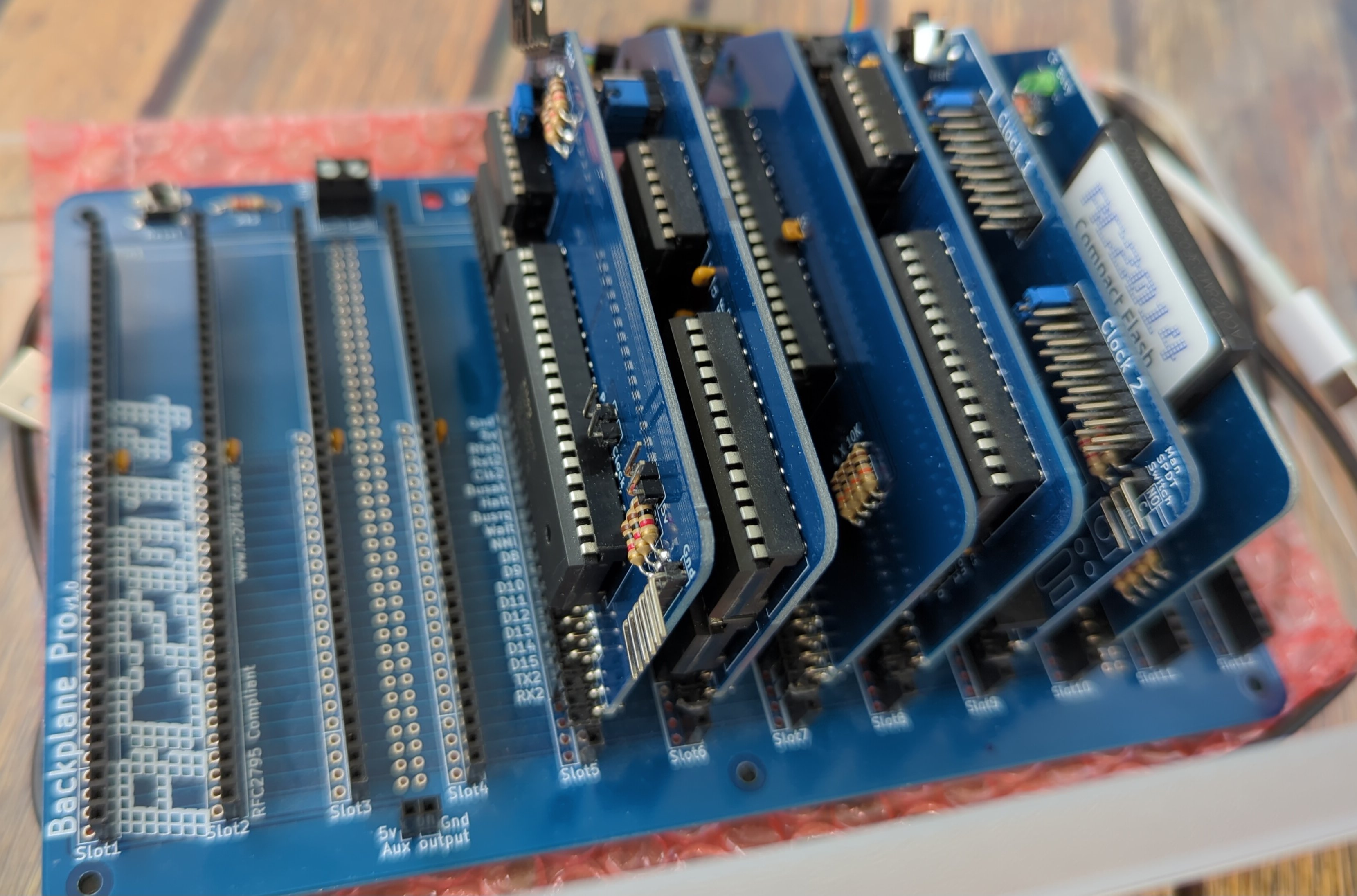
The RC2014 Pro CPM Kit is a modular computer with an 12 slot enhanced backplane. It has a Z80 CPU running at 7.3728MHz, 64k RAM, Microsoft BASIC and SCM on ROM, or CP/M 2.2 on Compact Flash and communicates over serial at 115,200bps via a Zilog SIO/2 UART. The backplane allows expansion modules such as official RC2014 Modules or a selection of 3rd party “Designed for RC2014″ modules. The design is simple, and the standard 0.1” pitch headers encourages building your own add-ons.
Pro Backplane
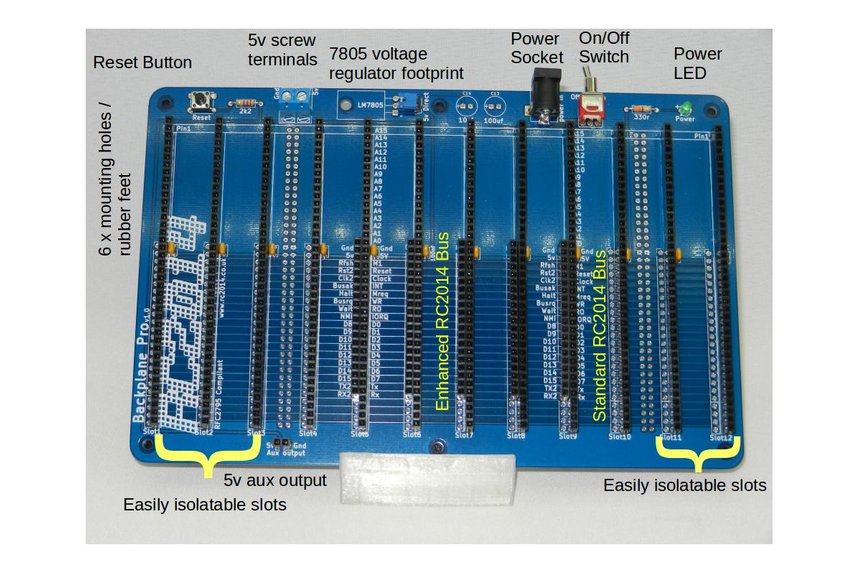
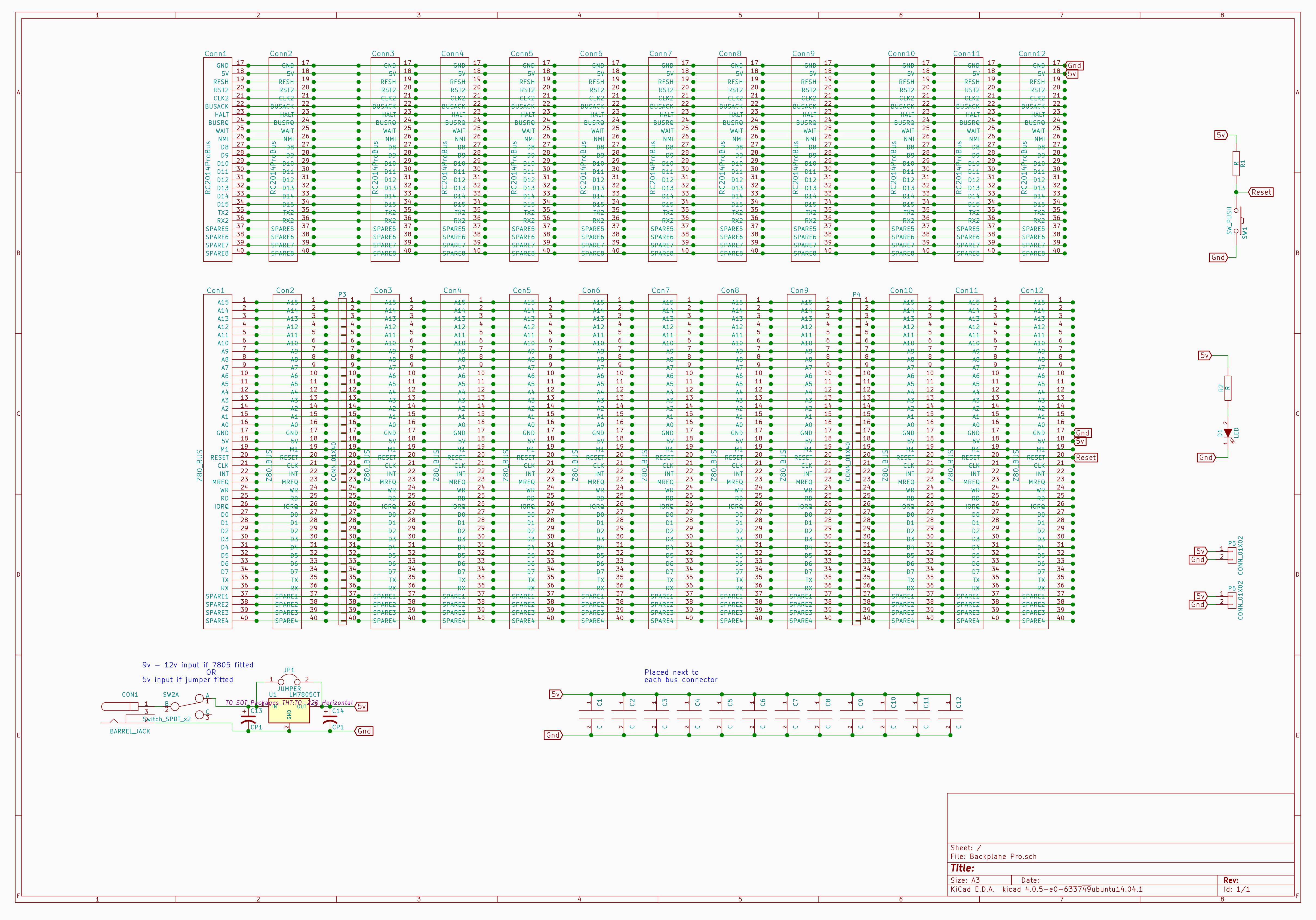
1 RC2014 BACKPRO PCB
1 2.1mm Power Jack
12 40 Way SIL Socket
5 20 Way SIL Socket
12 100nf
1 Tactile Switch
1 2k2 Resistor
1 3mm Green LED
1 330r resistor
1 Jumper
1 USB Barrel Lead
5 40x2 RA Header
1 RA Toggle Switch
1 2 Screw Terminal
6 Rubber Foot
1 2 pin RA Header Dual Clock
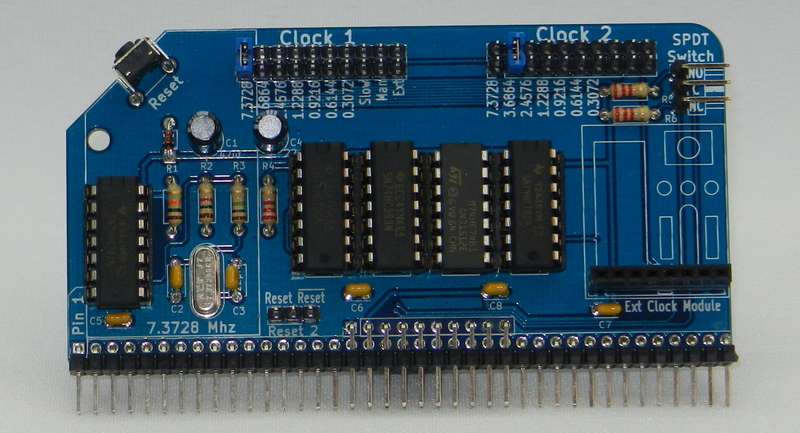
1 RC2014 DUAL CLOCK PCB
1 2x40 pin RA Header
5 14 pin narrow DIL socket
1 74HCT04
1 74HCT00
1 74LS393
1 74HCT74
1 74LS02
1 7.3728 Mhz Xtal
2 22pf ceramic cap
4 100nf
1 1M resitor
1 1k resistor
1 10K resistor
3 2K2 resistor
1 47uf 25v electrolytic
1 22uf 25v electrolytic
1 1N4148
1 RA Tactile Switch
5 10 pin header
1 8 Way SIL Socket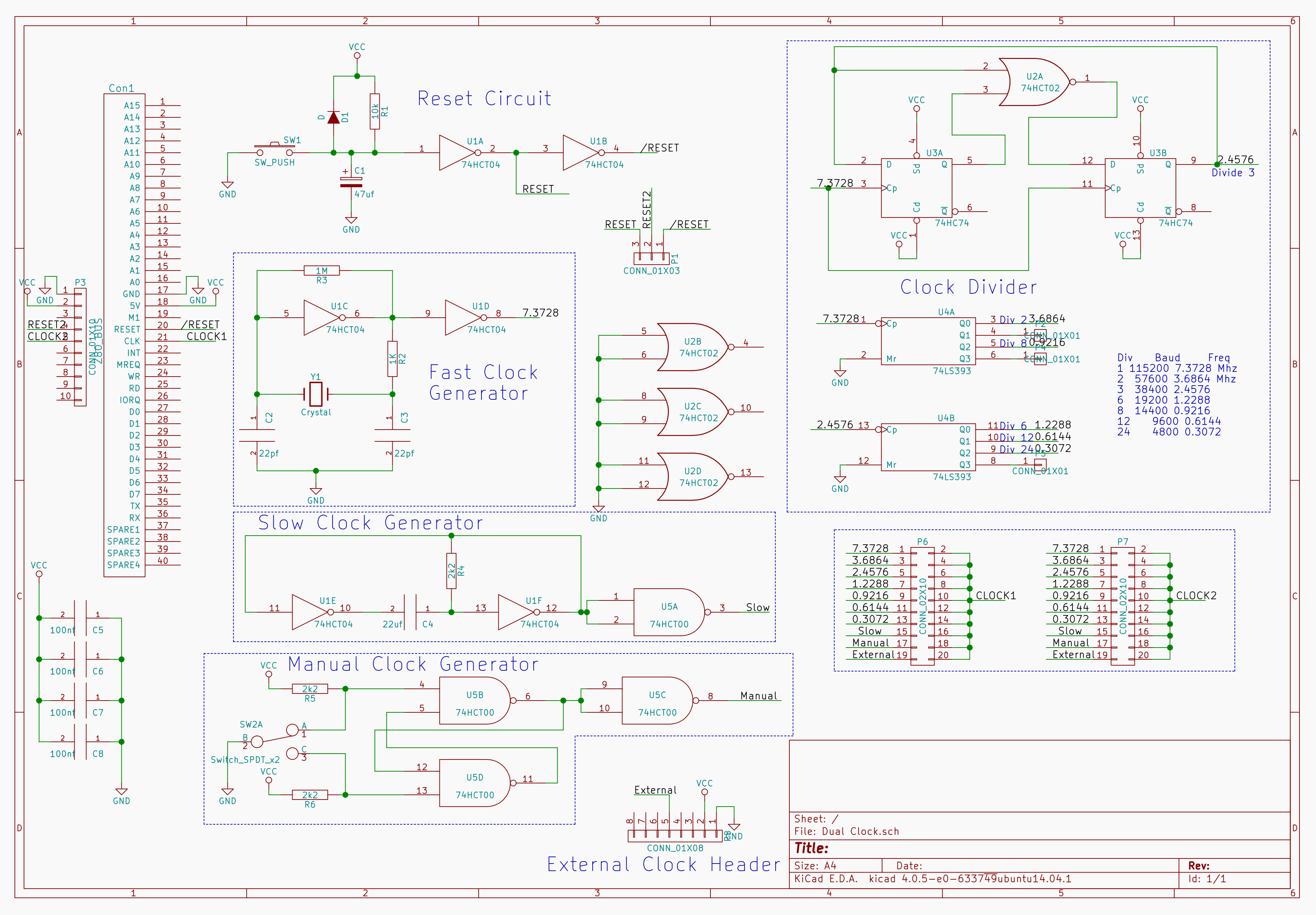
CPU
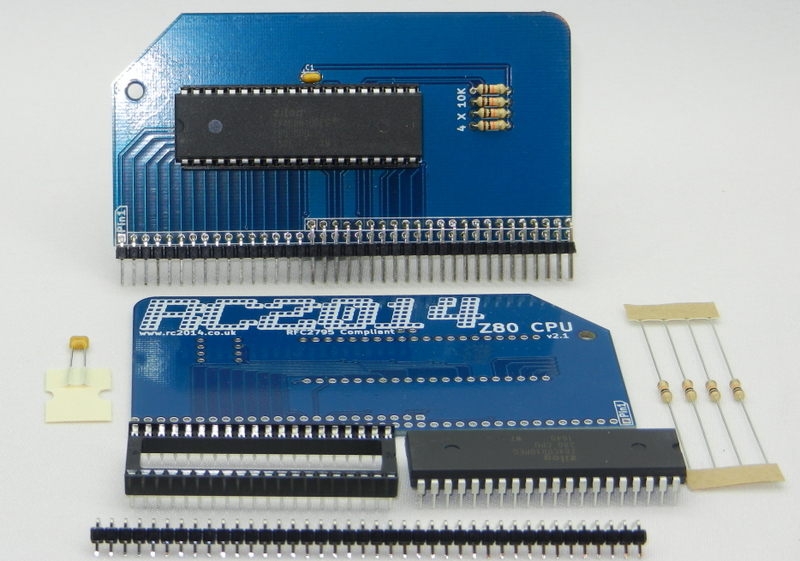
1 Z80 CPU 2.1 PCB
1 2x40 pin DIL socket
1 Zilog Z80 CPU
1 40 pin RA Header
1 100nf
4 10k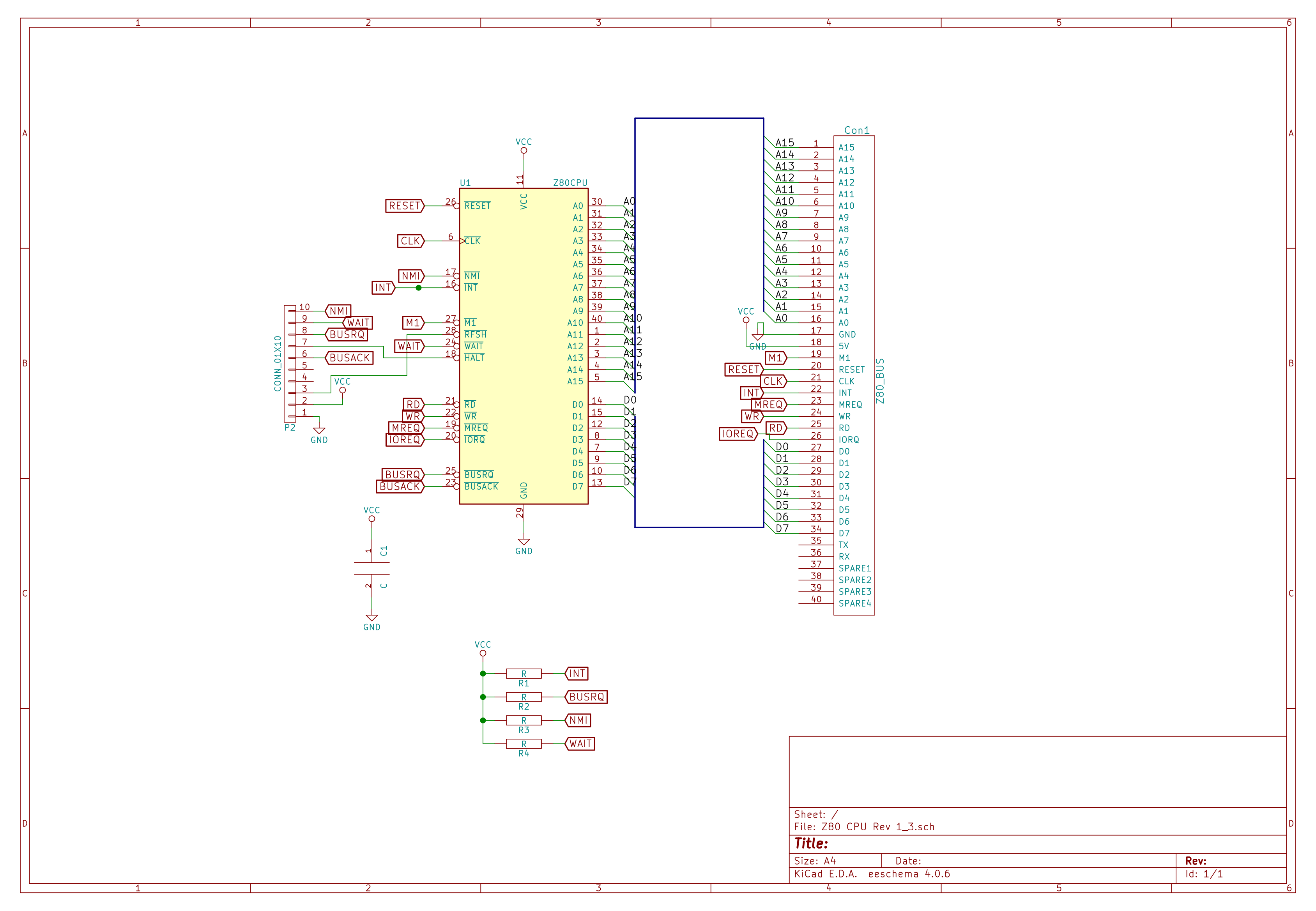
Pageable ROM
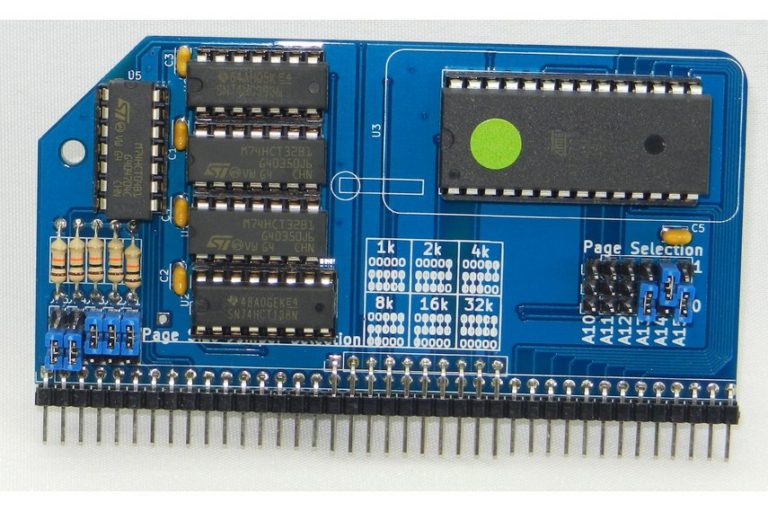
1 RC2014 PAGEROM PCB
1 28 pin wide ZIF socket
1 2x40 pin RA Header
11 3 pin header
1 10 pin header
8 Jumper
1 16 pin narrow DIL socket
4 14 pin narrow DIL socket
5 100nf
1 74LS393
1 74HCT04
2 74LS32
1 74HCT138
5 10K resistor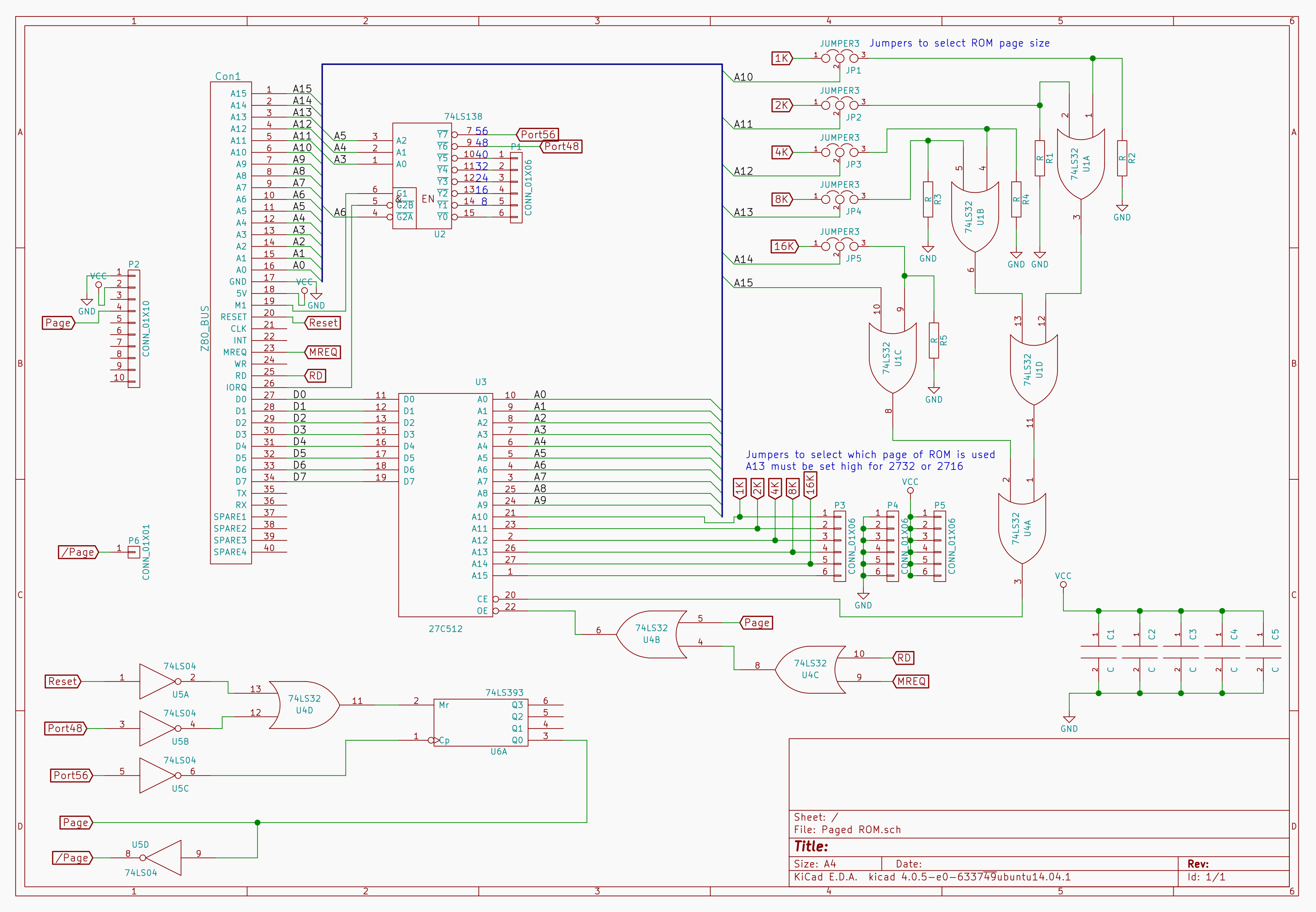
64k RAM
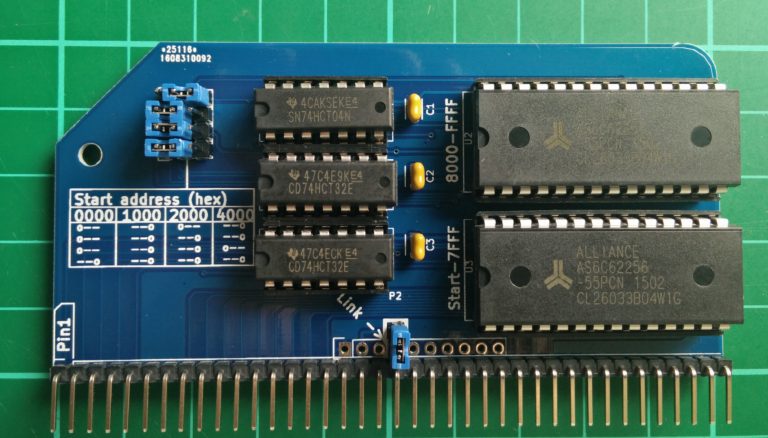
CP/M: The Page Pin from the ROM needs to be connected to the Page Pin on the RAM. If you have the Backplane Pro and have installed the double header pins supplied with that then nothing further needs to be done.
1 2x40 pin RA Header
2 28 pin wide DIL socket
3 14 pin narrow DIL socket
2 74LS32
1 74LS04
2 62256 RAM
3 100nf capacitors
4 3 pin header
4 jumper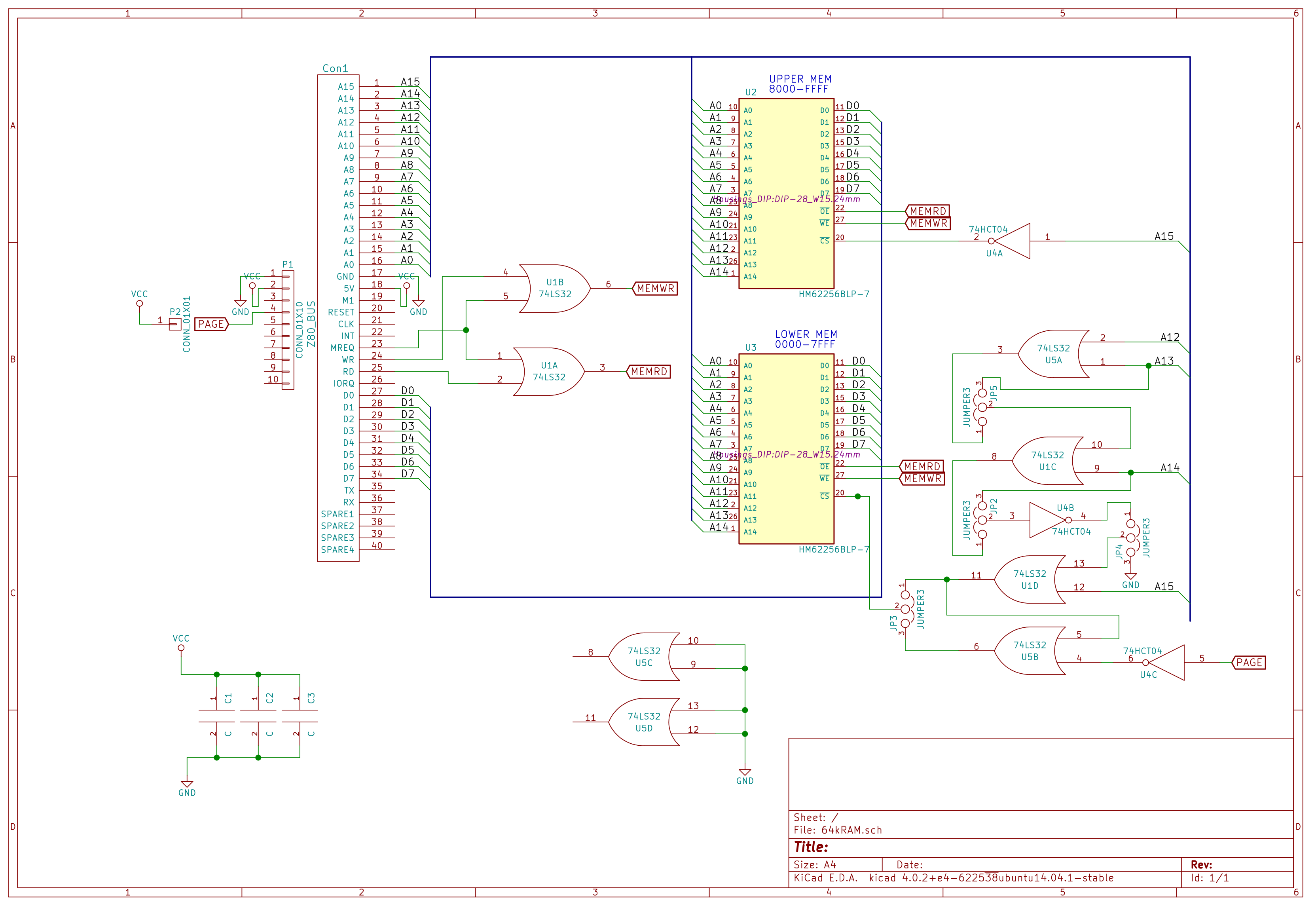
Jumper settings for the start address are as follows
0x0000 0x1000 0x2000 0x4000
0== ==0 0== ==0
0== ==0 ==0 ==0
0== ==0 ==0 0==
==0 ==0 ==0 ==0SIO/2 Serial Module
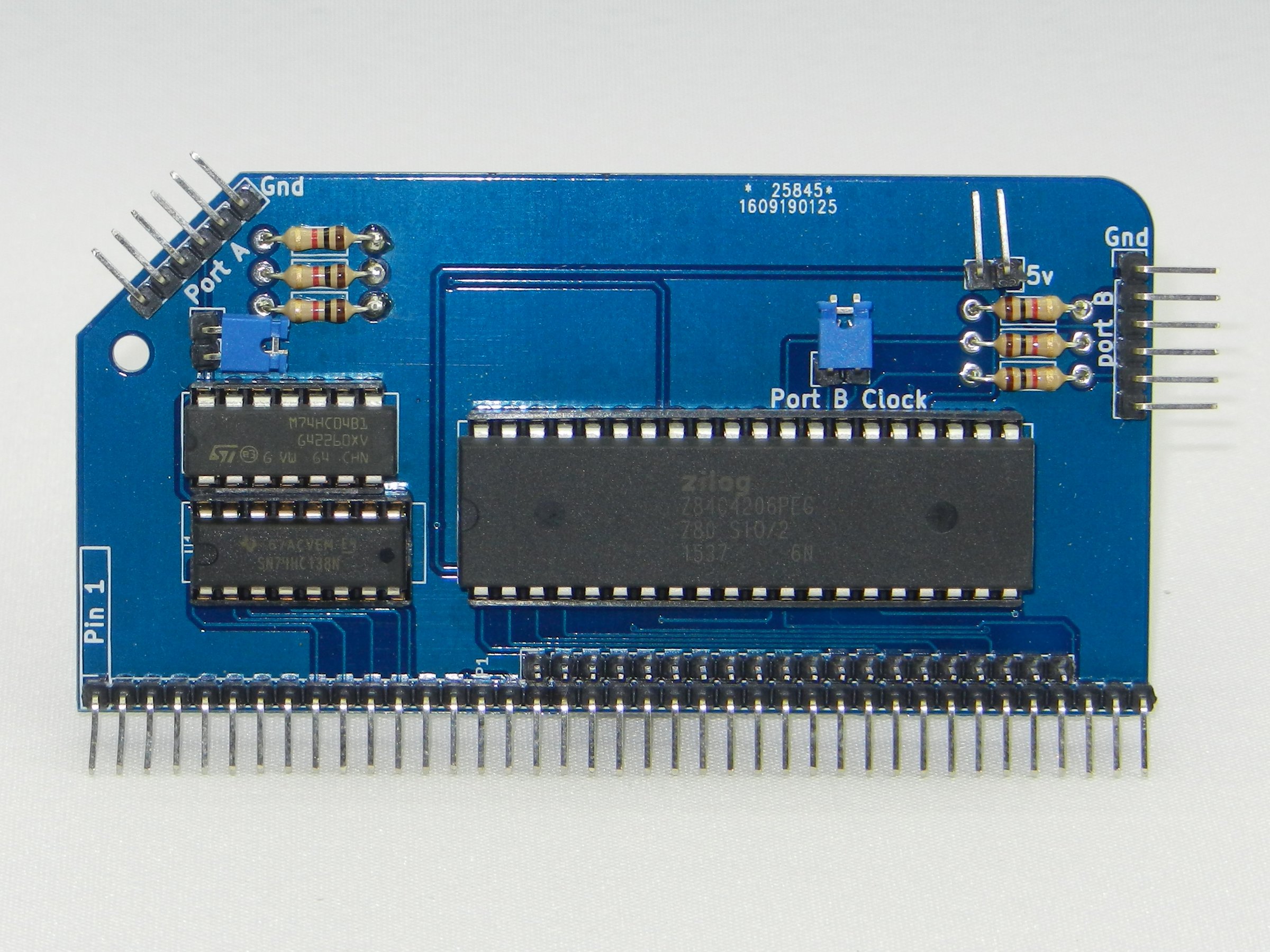
1 RC2014 DUAL SERIAL PCB
1 40x2 RA Header
1 40 pin wide DIL socket
1 16 pin narrow DIL socket
1 14 pin narrow DIL socket
1 SIO/2
1 74HCT138
1 74HCT04
6 1k resistor
2 6 pin RA Header
3 2 pin RA Header
3 Jumper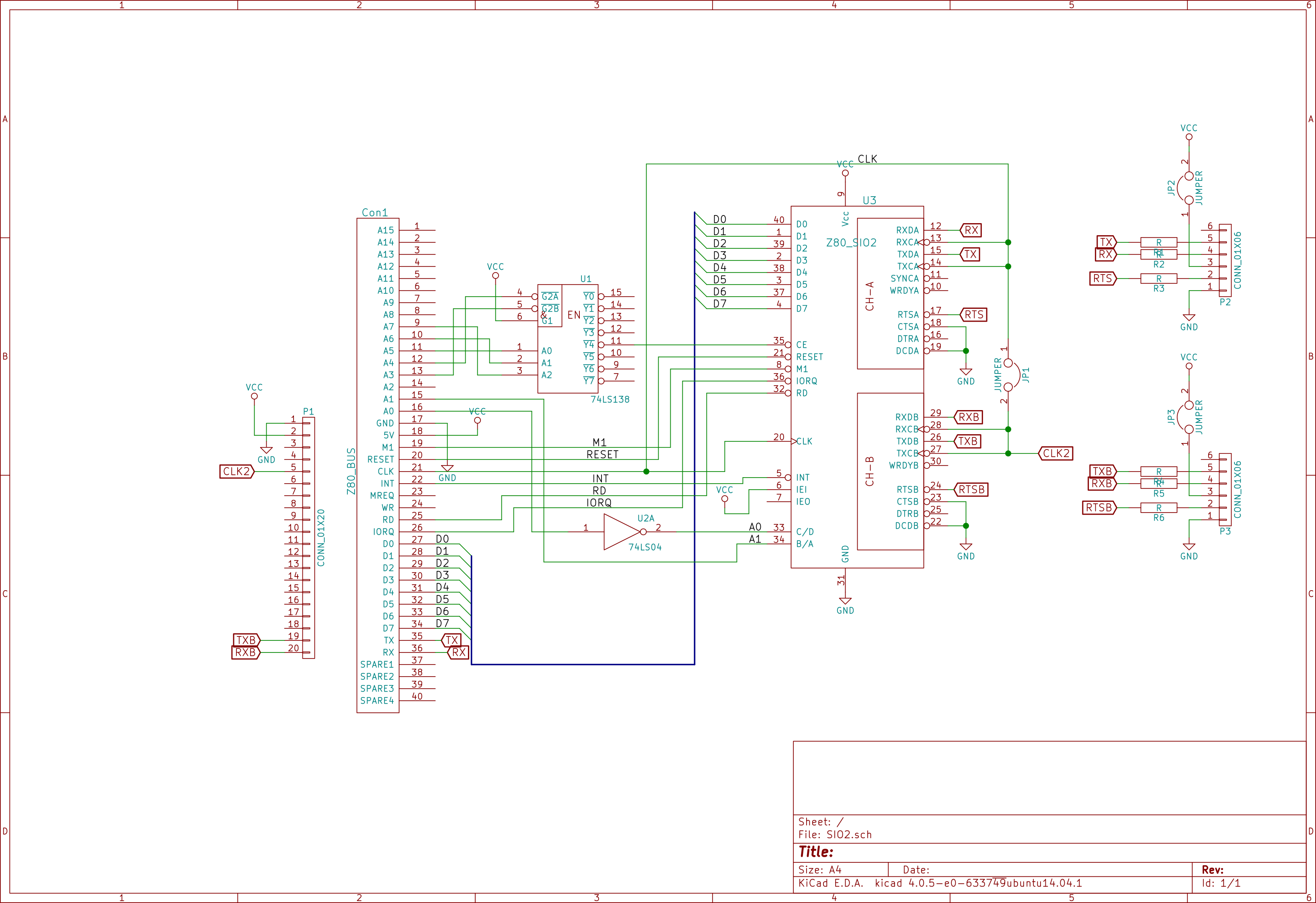
Compact Flash Module v2
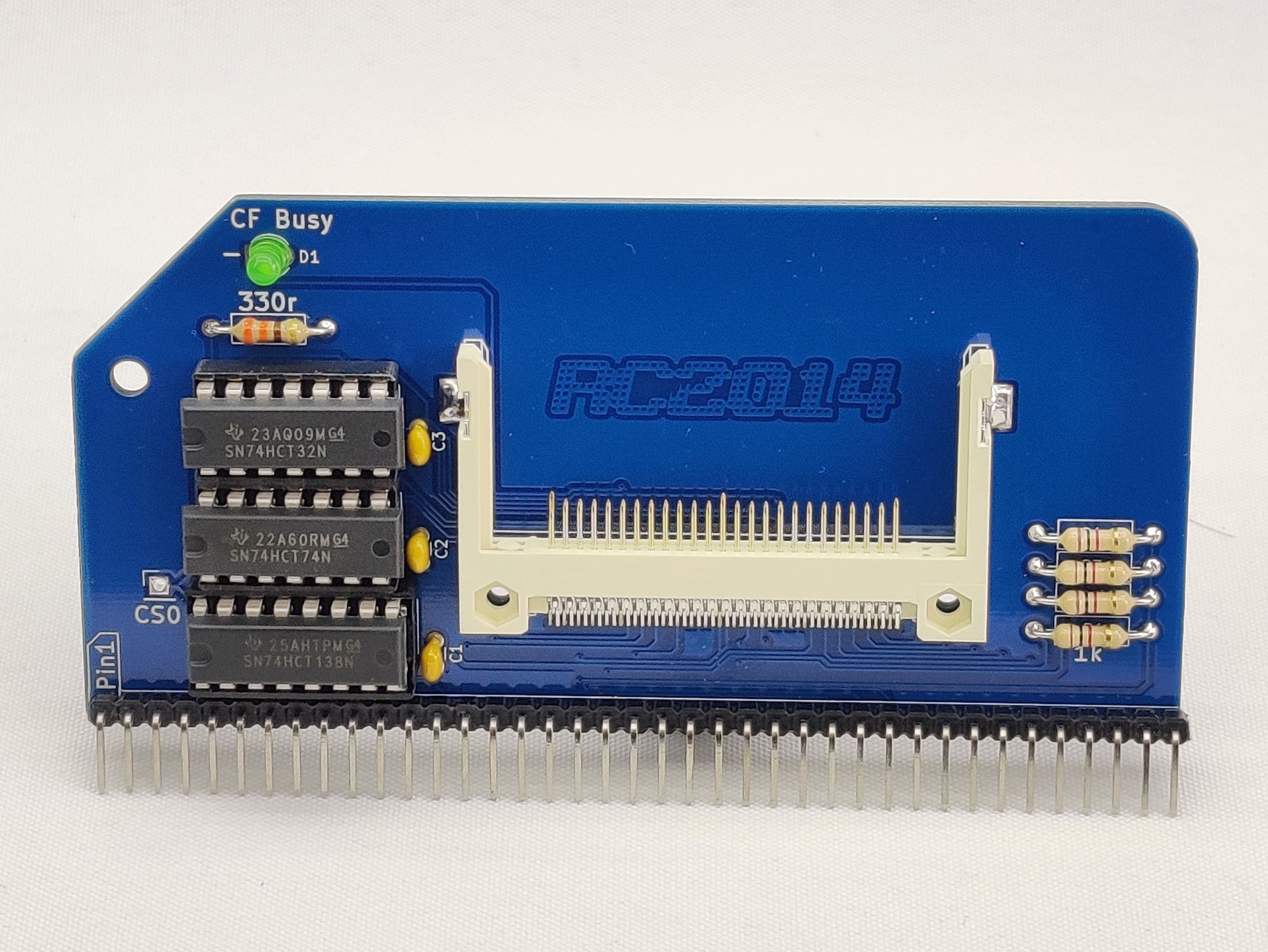
1 RC2014 CFLASH PCB
1 Compact Flash Socket
1 40 pin RA Header
1 16 pin narrow DIL socket
2 14 pin narrow DIL socket
3 100nf
1 74HCT138
1 74HCT32
1 74HCT74
1 330R resistor
4 1K resistor
1 3mm Green LED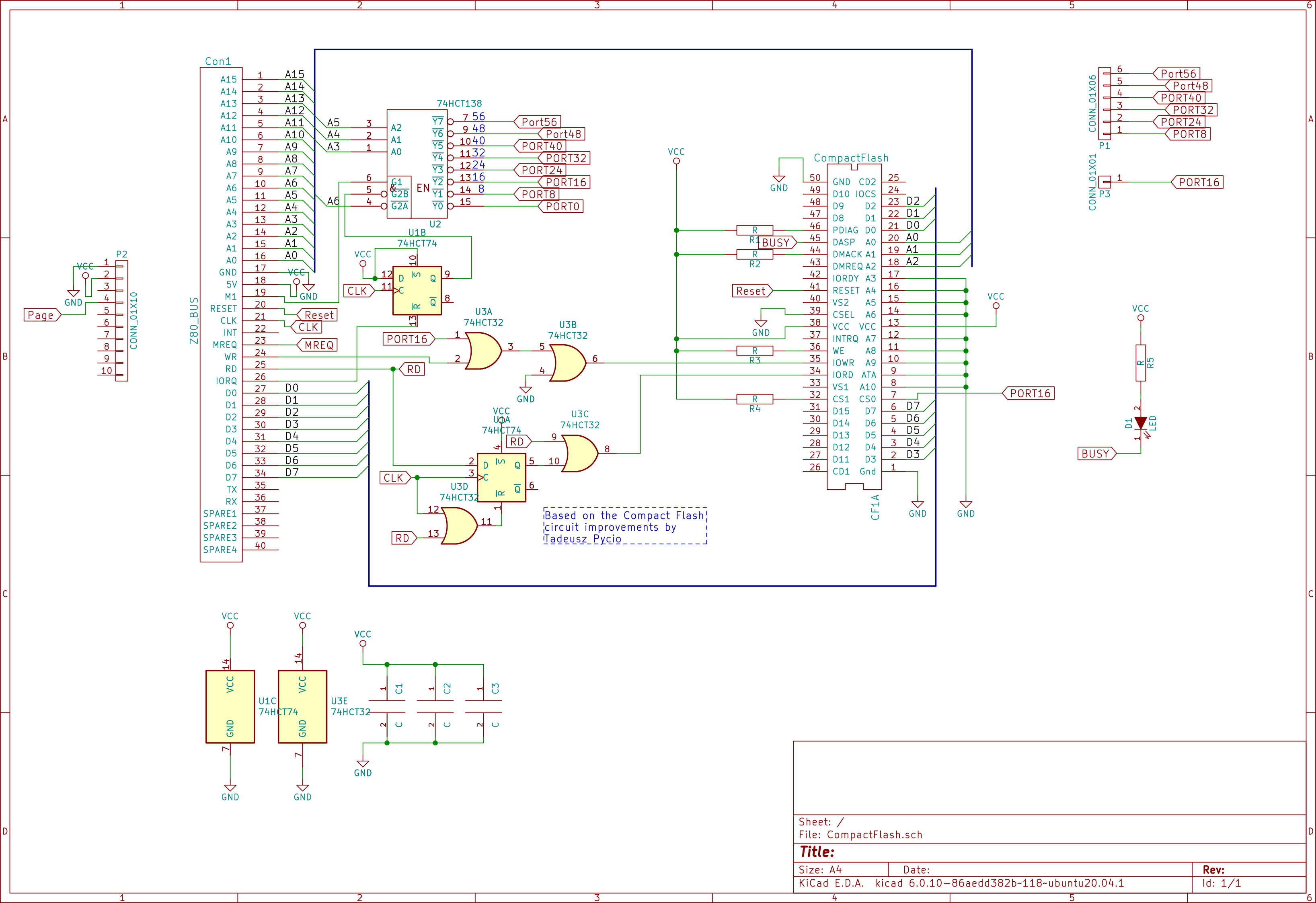
Configuration
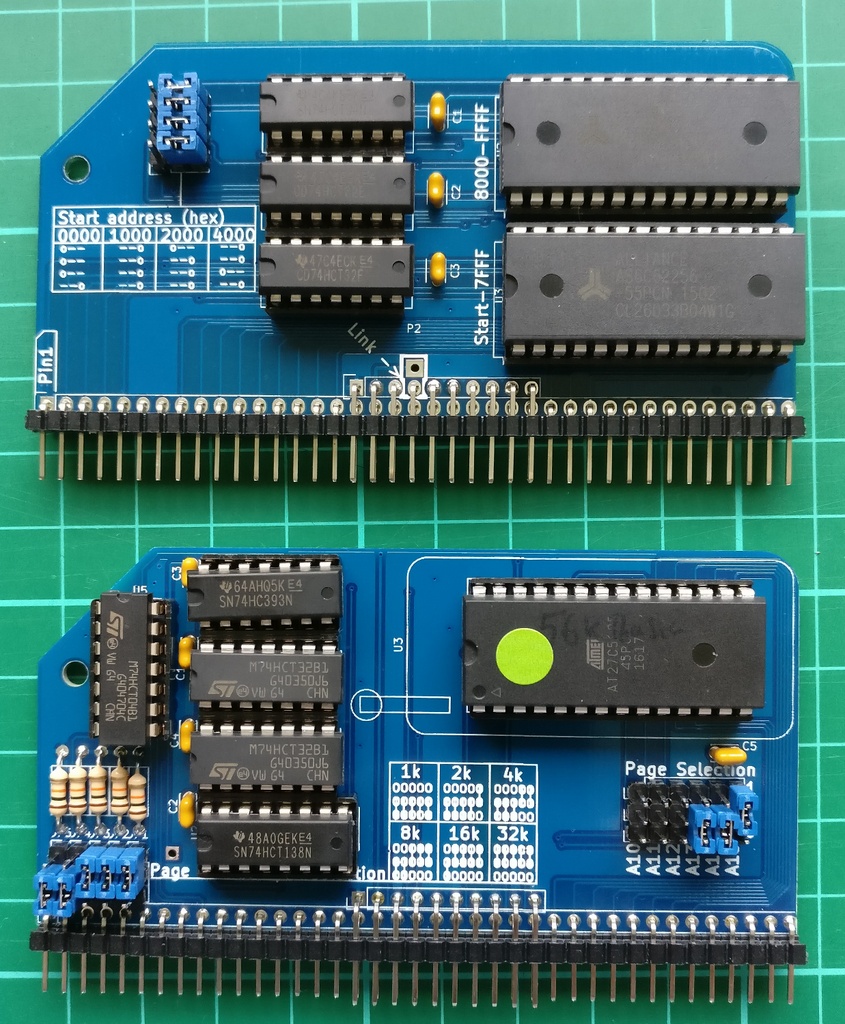
All four jumers to right hand setting.
Top 3 jumpers set start address to 0x0000.
Bottom jumper sets lower 32k to be paged in or out from Pageable ROM board.Note that the B option for BASIC will not work with this hardware set up. If you want to use BASIC from ROM set the A15 Page Selection jumper to 0. A better solution though is to download a copy of mbasic or BBC Basic to CP/M, which then allows you to use the compact flash card for storage
- https://rc2014.co.uk/troubleshooting/simple-guide-to-getting-cp-m-running-on-rc2014/
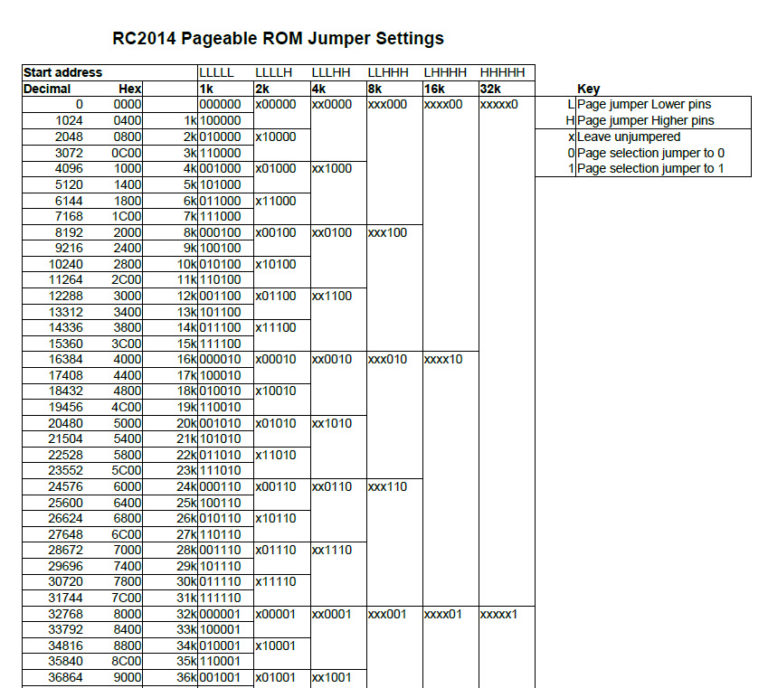
- RC2014-Pro-24886009-Jumper-Settings.pdf
Address space mapping
Memory
| Range |
Function |
0x0000 - 0x7FFF (32k) |
ROM / RAM - ROM is initially paged in and can be paged out |
0x8000 - 0xFFFF (32k) |
RAM |
I/O
| Range |
Bit pattern (A0-A7) |
Function |
|
|
|
Compact Flash - low 3 bytes select register |
|
|
|
Page ROM in and RAM out - reset by IO to port 48 |
|
|
|
Page ROM / RAM in and out - toggle by IO to port 56 |
|
|
|
SIO2 - bits 0 an 1 select ports C/D and B/A |
|
|
Shadow: Compact Flash |
|
0xB0 - 0xB7 |
Shadow: Page out ROM |
|
|
|
Shadow: Page out ROM / RAM |
RC2014 USB UART
Using supplied UART
[ 43.140568] usb 3-2: new full-speed USB device number 4 using xhci_hcd
[ 43.281499] usb 3-2: New USB device found, idVendor=3171, idProduct=0034, bcdDevice= 2.10
[ 43.281508] usb 3-2: New USB device strings: Mfr=1, Product=2, SerialNumber=3
[ 43.281510] usb 3-2: Product: USB to UART Adaptor (5v)
[ 43.281513] usb 3-2: Manufacturer: 8086 Consultancy
[ 43.281514] usb 3-2: SerialNumber: 0948
[ 43.287686] user.info: Apr 20 13:37:03 mtp-probe: checking bus 3, device 4: "/sys/devices/pci0000:00/0000:00:14.0/usb3/3-2"
[ 43.287966] user.info: Apr 20 13:37:03 mtp-probe: bus: 3, device: 4 was not an MTP device
[ 43.302148] cdc_acm 3-2:1.0: ttyACM0: USB ACM device
[ 43.302175] usbcore: registered new interface driver cdc_acm
[ 43.302177] cdc_acm: USB Abstract Control Model driver for USB modems and ISDN adapters
[ 43.302361] usbhid 3-2:1.2: couldn't find an input interrupt endpoint
[ 43.302404] usbcore: registered new interface driver usbhid
[ 43.302407] usbhid: USB HID core driverModule: cdc_acm (not available on Alpine/PostmarketOS)
Pins on I/O board:
GND!CTS5VTXRX!RTS
Connect: sudo tio /dev/ttyACM0
Consider adding your user to dialout group for sudo-less access: sudo usermod -aG dialout $USER.
Sending files with A:DOWNLOAD.COM
Use delay on sending data with tio /dev/ttyACM0 -o 1 (if it gets stuck try higher number than 1, but upload take more time).
The btc program can be compiled to create encoded data for upload: https://github.com/RC2014Z80/RC2014/tree/master/CPM/File%20Uploader.
Paste it's output to the terminal. It will start A:DOWNLOAD <file name> command and rest of the data will be interpreted by it. If all goes well it prints OK.
There is also UPLOAD.COM program that can be sent to the device to encode local files the same way: https://github.com/RC2014Z80/RC2014/tree/master/CPM/UPLOAD.COM.
The UPLOAD.PKG file is already encoded so you can just paste it to the terminal.
Sending longer files
Use tio to boot and navigate to target drive.
Then use CTRL-T followed by Q to quit tio.
Pipe btc output to tio:
btc <file> | tio /dev/ttyACM0 -o 1
Using CP/M
CP/M Quick Reference
Control key commands
CTRL + C |
Restarts CP/M by initiating a warm start |
CTRL + E |
Forces the cursor to the next line of the screen for continued command line input. |
CTRL + H |
Moves the cursor one space to the left in the same manner as the BS key. |
CTRL + I |
Inputs a tab code (same as the TAB key) |
CTRL + P |
Turns on or off the printer echo function. When the printer echo function is turned on, data displayed on the LCD screen is output to the printer (or other device assigned to LST:) each time the RETURN key is pressed. The printer echo function is turned on by pressing CTRL + P once and is turned off when CTRL + P is pressed a second time. (Make sure the printer is connected properly before using this command.) |
CTRL + R |
Redisplays the contents of the current command line. |
CTRL + S |
Momentarily stops processing currently being performed (same as the PAUSE key). Processing can be resumed by inputting this command again. |
CTRL + U |
Cancels the current command line and moves the cursor to the next line on the screen for input of a different command. |
CTRL + X |
Erases the current command line and moves the cursor back to the beginning of the line. |
CTRL + Z |
Terminates input from the keyboard (used in combination with certain CP/M transient commands). |
Commands
d: - A drive letterfilematch - an exact filename, or a wildcard match for files.
Items such as [item] are optional, ones such as <item> are compulsory.
DIR [d:][filematch]
Display a list of files in the specified, or current drive.
ERA [d:]<filematch>
Erase specified files. filematch *.* can be used to match all files in the current drive.
REN [d:]newname.ext = oldname.ext
Change the name of a disk file from oldname.ext to newname.ext
SAVE n [d:]filename.ext
Save the specified n number of pages of the transient program area to disk under the specified file name.
TYPE [d:]filename.ext
Display the contents of the specified file on the display screen. Display is only meaningful if the file contents was ASCII text.
USER n
Switches to the specified user area in a disk drive.
A user area is a physical area on a disk which has its own directory and which is managed separately from the rest of the disk. Data cannot be read from or written to any user area other than that in which CP/M is currently operating. A disk can be divided up into a maximum of 16 user areas.
PIP
Copy FOO.TXT to console (print).
C:PIP CON:=A:FOO.TXTWrite to file from terminal (CTRL-Z to EOF, CTRL-M+J for new line):
C:PIP FOO.TXT=CON:Copy file from current drive to A:
C:PIP A:UPLOAD.COM=UPLOAD.COMED
- http://www.gaby.de/cpm/manuals/archive/cpm22htm/ch2.htm
Commands mode
#a |
load all lines from file (given as arg to the command) to memory |
10a |
load 10 lines from file |
b#t |
go to beginning, print all lines |
b |
go to beginning |
n or -n |
move n lines ahead/behind and print |
t |
print current line |
k |
kill current line |
i |
insert before current line |
e |
save and exit |
o |
discard changes |
In insert mode
CTRL + H |
backspace one char |
CTRL + Z |
exit insert mode |
ASM
Compile and run example program:
c:asm example
c:load example
exampleShow compiled program listing:
type example.prnCompiler output line markers
S |
syntax error |
L |
bad label |
E |
bad expression |
R |
bad register |
Y |
bad value |
API
- https://www.seasip.info/Cpm/bdos.html
- https://obsolescence.wixsite.com/obsolescence/cpm-internals
- http://www.gaby.de/cpm/manuals/archive/cpm22htm/ch5.htm
Entry point: 05h (CALL 05h).
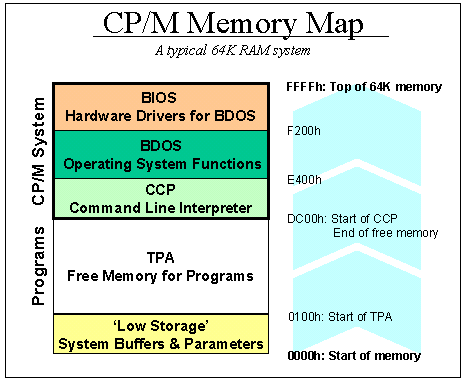
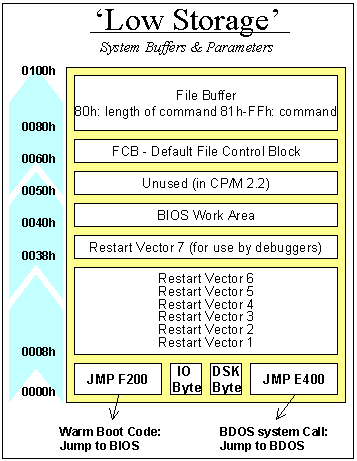
Memory map
File Control Block
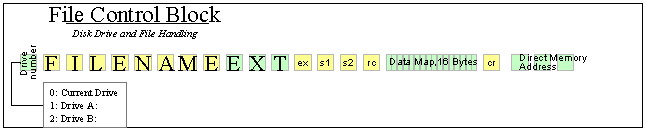
FCB start: 5Ch (not 60h as in the picture).
| Address | Field | Definition |
|---|---|---|
FCB+00h |
dr | drive code (0-16) 0 = use default drive for file 1 = auto disk select drive A, 2 = auto disk select drive B, ... 16 = auto disk select drive P. |
FCB+01h |
f1...f8 | contain the filename in ASCII upper-case, with high bit = 0 |
FCB+09h |
t1,t2,t3 | contain the filetype in ASCII upper-case, with high bit = 0. t1', t2', and t3' denote the bit of these positions, t1' = 1 = Read-Only file, t2' = 1 = SYS file, no DIR list |
FCB+0Ch |
ex | contains the current extent number, normally set to 00 by the user, but in range 0-31 during file I/O |
FCB+0Dh |
s1 | reserved for internal system use |
FCB+0Eh |
s2 | reserved for internal system use, set to zero on call to OPEN, MAKE, SEARCH |
FCB+0Fh |
rc | record count for extent ex; takes on values from 0-127; Set this to 0 when opening a file |
FCB+10h |
d0...dn | filled in by CP/M; reserved for system use |
FCB+20h |
cr | current record to read or write in a sequential file operation; normally set to zero by user after opening file |
FCB+21h |
r0,r1,r2 | optional random record number in the range 0- 65535, with overflow to r2, r0, r1 constitute a 16-bit value with low byte r0, and high byte r1 |
File Buffer start: 80h (128 bytes long).
Notes
- When running command in CP/M with file path as first argument the drive number and file name are set in default FCB automatically before program runs.
- When two arguments are given another drive number and file name are set starting from absolute
6Ch. It will be overwritten by file operations. - If no arguments are given the FCB file name is all blank/space characters (
- Command line arguments are also available from
80h(File Buffer).
Useful constants:
FCB EQU 5Ch ; File Control Block
FCBFNAME EQU FCB+01h ; FCB File Name
FCBEX EQU FCB+0Ch ; FCB Excent Number
FCBRC EQU FCB+0Fh ; FCB Record Count
FCBCR EQU FCB+20h ; FCB Current Record
FB EQU 80h ; File BufferCP/M procedures
| Function Number |
Function Name |
Input | Output | |
|---|---|---|---|---|
| Dec | Hex | |||
| 0 | 0 | System Reset | none | none |
| 1 | 1 | Console Input | none | A = ASCII char |
| 2 | 2 | Console Output | E = char | none |
| 3 | 3 | Reader Input | none | A = ASCII char |
| 4 | 4 | Punch Output | E = char | none |
| 5 | 5 | List Output | E = char | none |
| 6 | 6 | Direct Console I/O | E = 0FFH (input) | A = char |
| E = 0FEH (status) | A = status | |||
| E = char | none | |||
| 7 | 7 | Get I/O Byte | none | A = I/O byte value |
| 8 | 8 | Set I/O Byte | E = I/O byte | none |
| 9 | 9 | Print String | DE = Buffer Address | none |
| 10 | A | Read Console String | DE = Buffer | Console characters in Buffer |
| 11 | B | Get Console Status | none | A = 00/non zero |
| 12 | C | Return Version # | none | HL = Version # |
| 13 | D | Reset Disk System | none | none |
| 14 | E | Select Disk | E = Disk # | none |
| 15 | F | Open File | DE = FCB address | A = FF if not found |
| 16 | 10 | Close File | DE = FCB address | A = FF if not found |
| 17 | 11 | Search For First | DE = FCB address | A = Directory Code |
| 18 | 12 | Search For Next | none | A = Directory Code |
| 19 | 13 | Delete File | DE = FCB address | A = none |
| 20 | 14 | Read Sequential | DE = FCB address | A = Error Code |
| 21 | 15 | Write Sequential | DE = FCB Address | A = Error Code |
| 22 | 16 | Make File | DE = FCB address | A = FF if no DIR Space |
| 23 | 17 | Rename File | DE = FCB address | A = FF if not found |
| 24 | 18 | Return Login Vector | none | HL = Login Vector* |
| 25 | 19 | Return Current Disk | none | A = Current Disk Number |
| 26 | 1A | Set DMA Address | DE = DMA address | none |
| 27 | 1B | Get ADDR (ALLOC) | none | HL = ALLOC address* |
| 28 | 1C | Write Protect Disk | none | none |
| 29 | 1D | Get Read/only Vector | none | HL = ALLOC address* |
| 30 | 1E | Set File Attributes | DE = FCB address | A = none |
| 31 | 1F | Get ADDR (Disk Parms) | none | HL = DPB address |
| 32 | 20 | Set/Get User Code | E = 0FFH for Get | A = User Number |
| E = 00 to 0FH for Set | none | |||
| 33 | 21 | Read Random | DE = FCB address | A = Error |
| 34 | 22 | Write Random | DE = FCB address | A = Error Code |
| 35 | 23 | Compute File Size | DE = FCB address | r0, r1, r2 |
| 36 | 24 | Set Random Record | DE = FCB address | r0, r1, r2 |
| 37 | 25 | Reset Drive | DE = Drive Vector | A = 0 |
| 38 | 26 | Access Drive | not supported | |
| 39 | 27 | Free Drive | not supported | |
| 40 | 28 | Write Random w/Fill | DE = FCB | A = error code |
Reading file
Given file name in the arguments one can first check if argument was given by checking for space character in FCBFNAME (FBC + 01h).
If file name is filled we can open the file:
XOR A
LD (FCBEX),A ; select 0'th extent
LD (FCBRC),A ; clear
LD (FCBCR),A ; clear
LD C,FOPE ; open file
LD DE,FCB ; use default FCB
CALL BDOSSet EX, RC and CR to 0 and call File Open (0Fh). A will contain FFh if file was not found.
Next file can be read:
XOR A
LD (FCBCR),A ; start from beginning
LD C,FRED ; read file
LD DE,FCB ; use default FCB
CALL BDOSSet CR to 0 to start reading from beginning of the file and call Read Sequential (14h). A is set to 0 if read was successful.
128 bytes was read to FB (starting at 80h). CR (and EX) will be automatically incremented, so calling Read Sequential again will read next 128 byte of the file to FB.
Software
Linux tools
cpmtools
Disk format definitions: /usr/share/diskdefs.
List files in image: cpmls -f z80mbc2-d0 rc2014_cf.img
Copy all files from image: cpmcp -f z80mbc2-d0 rc2014_cf.img '0:*.*' /tmp/1
Additional entries for /usr/share/diskdefs:
## Extras for Z80-MBC2
# Z20-MBC DISK 0 (TWO RESERVED TRACK FOR CP/M)
diskdef z80mbc-d0
seclen 128
tracks 32
sectrk 32
blocksize 1024
maxdir 64
skew 0
boottrk 2
os 2.2
end
# Z20-MBC DISK 1
diskdef z80mbc-d1
seclen 128
tracks 32
sectrk 32
blocksize 1024
maxdir 64
skew 0
boottrk 0
os 2.2
end
# Z20-MBC2 CP/M 2.2 DISK 0 ONLY (ONE RESERVED TRACK FOR CP/M 2.2)
diskdef z80mbc2-d0
seclen 512
tracks 512
sectrk 32
blocksize 4096
maxdir 512
skew 0
boottrk 1
os 2.2
end
# Z20-MBC2 CP/M 2.2 DISK 1-15
diskdef z80mbc2-d1
seclen 512
tracks 512
sectrk 32
blocksize 4096
maxdir 512
skew 0
boottrk 0
os 2.2
end
# Z20-MBC2 CP/M 3 (DISK 0-15)
diskdef z80mbc2-cpm3
seclen 512
tracks 512
sectrk 32
blocksize 4096
maxdir 512
skew 0
boottrk 1
os 3
end
CP/M Software archives
- http://www.cpm.z80.de/binary.html
- http://www.retroarchive.org/cpm/index.html
- http://www.floppysoftware.es/cpm_projects.html?path=cpm_projects
ZDE16 - programmers editor
Configure COM file:
f:zdenst16 zde16Keys
ESC h |
Bring up the command key help |
CTRL+BS |
Delete char to left |
CTRL+k q / ESC q |
Quit editor without saving |
CTRL+k x / ESC x |
Exist and Save |
CTRL+k l / ESC l |
Load a new file |
CTRL+k s / ESC s |
Save the current file |
CTRL+r |
Page up |
CTRL+c |
Page down |
CTRL+e / cursor |
Line up |
CTRL+x / cursor |
Line down |
CTRL+s / cursor |
Cursor left |
CTRL+d / cursor |
Cursor right |
PMext - archives
List files in archive:
p:pmext <file.pma>Extract to drive:
p:pmext <file.pma> <drive>:
MS Basic
Basic files
Use unix2dos to convert line end to DOS compatible before uploading if file was created on UNIX.
Commands
list |
Print program |
system |
Exit to CP/M |
load "file" |
Load program from file |
print "hello" |
Print string |
MACRO-80 Assembler
- Manual: M80 Assembler.pdf
- Linker: Microsoft L80 Linker.pdf
Compiling
Using prompt
Run with M80; prompts for file names in format:
[[out-dev:]out-file[.ext]][,[lit-dev:]list-file[.ext]]=[in-dev:]in-file[.ext][/options]Try =example to compile example.mac file. Use CTRL+C to exit to CP/M.
Using arguments
For example compile Z80 assembly hello.mac:
D:m80 =hello.mac/ZCompile printing listing:
D:M80 ,TTY:=hello/ZCompile and save listing to .PRN file:
D:M80 =hello/LErrors
A |
Argument error |
C |
Undefined symbol |
N |
Number error |
U |
Undefined; Note: B0h gives U, try 0B0h instead |
Linker
Link and create .COM file:
D:L80 HELLO,HELLO/N/EZ80ASM - Z80 Relocating Macro Assembler
- Documentation: Z80ASM.PDF
Compiling .Z80 assembly file to .COM file:
d:z80asm <file>/f
FORTH-83 version 2.0 for CP/M-80
- Repository: https://github.com/janaite/forth83-80
- Manual: F83-20.MAN (from http://www.retroarchive.org/cpm/cdrom/CPM/FORTH-83/)
Copy f83.com to your system and run it.
Words:
BYE- exit to CP/MWORDS- list wordsSEEword - see word definitionVIEWword - find word in source code files.s- show stack.- delete top stack item
ZASMB - A Zilog mnemonic assembler
- Documentation: ZASMB Documentation.pdf
Compiles .Z80 to .COM file:
D:zasm <file>CamelForth
Resources
- CamelForth Z80
- On RC2014 Picasso (Minit II) ROM it is available in 8 KiB Bank 8 (JP:
0001). - Port of Brad Rodriguez' Z80 CamelForth to the RC2014
- Forth Tutorials
Forth overview
- Some Fort implementations like
gforthare case-insensitive, CamelForth is case-sensitive. - There are two operation modes:
- Interpreted - what you type in the console is executed every time enter is pressed,
- Compiled - each word is compiled into binary representation (its address) that can be executed later; some language constructs that require dictionary storage to work can only be used in compiled mode when we are defining contents of a word.
- There are two main stacks consisting of cells (16bit in case of CamelForth):
- Value/parameter stack - where various type of data values and word addresses are stored and processed by words,
- Return stack - where return address is stored for each word call; it is also used to store flow control data (like iterators and conditions) and can be used by words for temporary cell storage (
>RandR>).
- The interpreter treats any number as literal to be put on stack and any word as call to a word - these are space separated.
- There are special cases for words that switch into compiled mode (
:,CREATE) that take a word as argument following it; also'to get address of the word without calling its action - word address on stack can be executed withEXECUTE. - Each word consist of a link to previously defined word, name, parameter field (data storage area) and code filed (action to call on storage area address):
- Words can be created and are registered in program memory under a given name using
CREATEor:. - When word name is called its parameter filed address is placed on the stack and associated action code is jumped to.
- When using
CREATEdata can be stored under address of word using!, a buffer of cells or bytes can be allocated usingALLOT.,can be used to append cells to last created word. - Action code can be appended to word using
:orCREATEand appendingDOES>.
- Words can be created and are registered in program memory under a given name using
Comments
- [not supported in CamelForth]
\(back slash) comment to the end of line. (and)to comment inline.
Stack manipulation
1 2 3 ( put 1 2 and 3 on stack )
. ( pip from stack and dispaly )
.S ( show stack (gfort) )
2 DUP ( duplicate: 2 2 )
1 2 SWAP ( swap 2 items: 2 1 )
1 2 OVER ( copy secondmost item to top: 1 2 1 )
1 2 DROP ( drop top item: 1 )
1 2 3 ROT ( move thirdmost item to top: 2 3 1 )
1 2 NIP ( drop secondmost: 2 )
1 2 TUCK ( dup top before secondmost: 2 1 2 )
Return stack
Word calls put address in return stack and ; is compiled as EXIT that pops it and jump to it. It is also used by loops to keep track of condition variables and iterators and value for I.
>Rpops data stack value on return stack.R>pops return stack value to data stack.R@duplicates returns stack value to data stack.
These can be used to temporary store values on return stack but it has to be balanced and may mess with I and loop data if used inside loops.
Note that these only work in compiled context.
Arithmetic
1 2 3 4 + - * ( 3+4=7, 2-7=-5, 1*-5=-5 )
Note that CamelForth .S displays signed integers, . will print correct result.
Defining words
: DUBL 2 * ; ( define DUBL word that puts 2 on stack and multiplies two stack items )
3 DUBL ( now can be called like any other word: 6 )
Printing strings
Strings are put on stack as pair of address and length.
: FOO S" Hello HxD" ( record string on stack )
TYPE ; ( print the string )
FOO
Note that in CamelForth S" can only be used in compiled context.
Introspection
WORDS ( list defined words )
Variables
Variables are words, calling vairable puts its address on stack.
VARIABLE blah ( define variable word )
42 blah ! ( store 42 in blah variable )
blah @ ( put value on stack )
blah ? ( read and print variable )
5 CONSTANT five ( declare constant )
five SPACES ( print 5 spaces )
In Forth ture is -1 and false is 0. CamelForth does not have TRUE and FALSE words defined.
Control flow
IF checks result on top of the stack (-1 - true, 0 - false). then is end of if.
VARIABLE var
4 var !
: test var @ 5 >
IF ." Greater" CR
ELSE ." Less or equal" CR
THEN ;
test
- [not supported in CamelForth]
?DOtakes end and start value andLOOPcalls next iteration or is end of loop. DOsame as?DObut iterates at least once.Iin context of iteration puts iteration count on the stack.2 +loopwill step by 2 while-1 +loopwill count down.leavebreaks the loop.
: test 11 1 DO I . CR LOOP ;
test
: fib 0 1
BEGIN
DUP >R ROT DUP R> > ( condition )
WHILE
ROT ROT DUP ROT + DUP . ( body )
REPEAT
DROP DROP DROP ; ( after loop has executed )
20 fib
: lcd
BEGIN
SWAP OVER MOD ( body )
DUP 0= ( condition )
UNTIL DROP . ;
27 21 lcd ( 3 )
Infinite loop.
: test BEGIN ." Diamonds are forever" CR AGAIN ;
Arrays
Access works by adding offset of size cells to base array address and then accessing via it like normal variable.
CREATE foo 16 CELLS ALLOT ( creates array foo with 16 elements )
5 foo 2 CELLS + ! ( store 5 in index 2 )
4 foo ! ( store 4 in index 1 )
foo 2 CELLS + @ ( put value at index 2 on stack )
foo @ ( put value at index 1 on stack )
Constants are added with , word.
CREATE SIZES 18 , 21 , 24 , 27 , 30 , 255 ,
Strings
Have two forms:
- Address and length - consumed by
TYPE, - Counted string -
ALLOCallocated address where first byte is string length and rest is the string itself.
S"creates string constant. It can be copied to an allocated buffer withCMOVE.COUNTcan be used to get count from counted string.CHAR+orCHARSadds character(s) worth of bytes to address.
: test S" hello bar" TYPE ; ( puts address and length on stack and print it out )
CREATE foo 16 CHARS ALLOT ( allocate 16 character long buffer )
: hello S" Hello World!" ; ( put "Hello World!" )
hello ( put address and length to "Hello World!" word )
foo ! ( store string lenght in first byte - c-addr )
foo COUNT ( get the length and first byte address -c-addr c-addr u )
CMOVE ( copy string from contant to the buffer+1 )
foo COUNT TYPE ( print counted string )
On CamelForth foo COUNT looks like it gives wrong address but if one prints it with . it shows negative
number that is actually 1 more than foo so it is correct.
Place constant string in variable buffer.
: PLACE TUCK ! COUNT CMOVE ;
CREATE bar 16 CHARS ALLOT
: hello S" Hello World!" ; ( put "Hello World!" )
hello bar PLACE ( store "Hello World!" in bar )
bar COUNT
TYPE ( print "Hello World!" from counted string variable bar )
Note that CamelForth has non-standard >COUNTED that does what PLACE does.
Pointers
: goodbye ." Goodbye" CR ;
: hello ." Hello" CR ;
VARIABLE a
: GREET a @ EXECUTE ;
' hello a !
GREET
' goodbye a !
GREET
'puts address of following word on stack without executing it.EXECUTEexecute word from address on stack.
Meta words
: displaynumber CREATE , DOES> @ . ;
11 displaynumber anumber
anumber
CREATEtakes a name (as inCREATE foo), in this caseCREATE anumber, and creates an empty word for that name.,appends to the created word (storage) a cell from stack (11)- When calling created word (just
anumber) it puts its address on the stack,@can read cell behind that address (11). DOES>will attach an action to the word that executes when word is called (justanumber) and after its address is put on stack. In this example we read value from that words address (11) and print it with..
CamelForth Words
Low level
TABLE 1. GLOSSARY OF WORDS IN CAMEL80.AZM
Words which are (usually) written in CODE.
NAME stack in -- stack out description
Guide to stack diagrams: R: = return stack,
c = 8-bit character, flag = boolean (0 or -1),
n = signed 16-bit, u = unsigned 16-bit,
d = signed 32-bit, ud = unsigned 32-bit,
+n = unsigned 15-bit, x = any cell value,
i*x j*x = any number of cell values,
a-addr = aligned adrs, c-addr = character adrs
p-addr = I/O port adrs, sys = system-specific.
Refer to ANS Forth document for more details.
ANS Forth Core words
These are required words whose definitions are
specified by the ANS Forth document.
! x a-addr -- store cell in memory
+ n1/u1 n2/u2 -- n3/u3 add n1+n2
+! n/u a-addr -- add cell to memory
- n1/u1 n2/u2 -- n3/u3 subtract n1-n2
< n1 n2 -- flag test n1<n2, signed
= x1 x2 -- flag test x1=x2
> n1 n2 -- flag test n1>n2, signed
>R x -- R: -- x push to return stack
?DUP x -- 0 | x x DUP if nonzero
@ a-addr -- x fetch cell from memory
0< n -- flag true if TOS negative
0= n/u -- flag return true if TOS=0
1+ n1/u1 -- n2/u2 add 1 to TOS
1- n1/u1 -- n2/u2 subtract 1 from TOS
2* x1 -- x2 arithmetic left shift
2/ x1 -- x2 arithmetic right shift
AND x1 x2 -- x3 logical AND
CONSTANT n -- define a Forth constant
C! c c-addr -- store char in memory
C@ c-addr -- c fetch char from memory
DROP x -- drop top of stack
DUP x -- x x duplicate top of stack
EMIT c -- output character to console
EXECUTE i*x xt -- j*x execute Forth word 'xt'
EXIT -- exit a colon definition
FILL c-addr u c -- fill memory with char
I -- n R: sys1 sys2 -- sys1 sys2
get the innermost loop index
INVERT x1 -- x2 bitwise inversion
J -- n R: 4*sys -- 4*sys
get the second loop index
KEY -- c get character from keyboard
LSHIFT x1 u -- x2 logical L shift u places
NEGATE x1 -- x2 two's complement
OR x1 x2 -- x3 logical OR
OVER x1 x2 -- x1 x2 x1 per stack diagram
ROT x1 x2 x3 -- x2 x3 x1 per stack diagram
RSHIFT x1 u -- x2 logical R shift u places
R> -- x R: x -- pop from return stack
R@ -- x R: x -- x fetch from rtn stk
SWAP x1 x2 -- x2 x1 swap top two items
UM* u1 u2 -- ud unsigned 16x16->32 mult.
UM/MOD ud u1 -- u2 u3 unsigned 32/16->16 div.
UNLOOP -- R: sys1 sys2 -- drop loop parms
U< u1 u2 -- flag test u1<n2, unsigned
VARIABLE -- define a Forth variable
XOR x1 x2 -- x3 logical XOR
ANS Forth Extensions
These are optional words whose definitions are
specified by the ANS Forth document.
<> x1 x2 -- flag test not equal
BYE i*x -- return to CP/M
CMOVE c-addr1 c-addr2 u -- move from bottom
CMOVE> c-addr1 c-addr2 u -- move from top
KEY? -- flag return true if char waiting
M+ d1 n -- d2 add single to double
NIP x1 x2 -- x2 per stack diagram
TUCK x1 x2 -- x2 x1 x2 per stack diagram
U> u1 u2 -- flag test u1>u2, unsigned
Private Extensions
These are words which are unique to CamelForth.
Many of these are necessary to implement ANS
Forth words, but are not specified by the ANS
document. Others are functions I find useful.
(do) n1|u1 n2|u2 -- R: -- sys1 sys2
run-time code for DO
(loop) R: sys1 sys2 -- | sys1 sys2
run-time code for LOOP
(+loop) n -- R: sys1 sys2 -- | sys1 sys2
run-time code for +LOOP
>< x1 -- x2 swap bytes
?branch x -- branch if TOS zero
BDOS DE C -- A call CP/M BDOS
branch -- branch always
lit -- x fetch inline literal to stack
PC! c p-addr -- output char to port
PC@ p-addr -- c input char from port
RP! a-addr -- set return stack pointer
RP@ -- a-addr get return stack pointer
SCAN c-addr1 u1 c -- c-addr2 u2
find matching char
SKIP c-addr1 u1 c -- c-addr2 u2
skip matching chars
SP! a-addr -- set data stack pointer
SP@ -- a-addr get data stack pointer
S= c-addr1 c-addr2 u -- n string compare
n<0: s1<s2, n=0: s1=s2, n>0: s1>s2
USER n -- define user variable 'n'
High level
TABLE 1. GLOSSARY OF "HIGH LEVEL" WORDS
(files CAMEL80D.AZM and CAMEL80H.AZM)
NAME stack in -- stack out description
Guide to stack diagrams: R: = return stack,
c = 8-bit character, flag = boolean (0 or -1),
n = signed 16-bit, u = unsigned 16-bit,
d = signed 32-bit, ud = unsigned 32-bit,
+n = unsigned 15-bit, x = any cell value,
i*x j*x = any number of cell values,
a-addr = aligned adrs, c-addr = character adrs
p-addr = I/O port adrs, sys = system-specific.
Refer to ANS Forth document for more details.
ANS Forth Core words
These are required words whose definitions are
specified by the ANS Forth document.
# ud1 -- ud2 convert 1 digit of output
#S ud1 -- ud2 convert remaining digits
#> ud1 -- c-addr u end conv., get string
' -- xt find word in dictionary
( -- skip input until )
* n1 n2 -- n3 signed multiply
*/ n1 n2 n3 -- n4 n1*n2/n3
*/MOD n1 n2 n3 -- n4 n5 n1*n2/n3, rem & quot
+LOOP adrs -- L: 0 a1 a2 .. aN --
, x -- append cell to dict
/ n1 n2 -- n3 signed divide
/MOD n1 n2 -- n3 n4 signed divide, rem & quot
: -- begin a colon definition
; end a colon definition
<# -- begin numeric conversion
>BODY xt -- a-addr adrs of param field
>IN -- a-addr holds offset into TIB
>NUMBER ud adr u -- ud' adr' u'
convert string to number
2DROP x1 x2 -- drop 2 cells
2DUP x1 x2 -- x1 x2 x1 x2 dup top 2 cells
2OVER x1 x2 x3 x4 -- x1 x2 x3 x4 x1 x2 per diag
2SWAP x1 x2 x3 x4 -- x3 x4 x1 x2 per diagram
2! x1 x2 a-addr -- store 2 cells
2@ a-addr -- x1 x2 fetch 2 cells
ABORT i*x -- R: j*x -- clear stack & QUIT
ABORT" i*x 0 -- i*x R: j*x -- j*x print msg &
i*x x1 -- R: j*x -- abort,x1<>0
ABS n1 -- +n2 absolute value
ACCEPT c-addr +n -- +n' get line from terminal
ALIGN -- align HERE
ALIGNED addr -- a-addr align given addr
ALLOT n -- allocate n bytes in dict
BASE -- a-addr holds conversion radix
BEGIN -- adrs target for backward branch
BL -- char an ASCII space
C, char -- append char to dict
CELLS n1 -- n2 cells->adrs units
CELL+ a-addr1 -- a-addr2 add cell size to adrs
CHAR -- char parse ASCII character
CHARS n1 -- n2 chars->adrs units
CHAR+ c-addr1 -- c-addr2 add char size to adrs
COUNT c-addr1 -- c-addr2 u counted->adr/len
CR -- output newline
CREATE -- create an empty definition
DECIMAL -- set number base to decimal
DEPTH -- +n number of items on stack
DO -- adrs L: -- 0 start of DO..LOOP
DOES> -- change action of latest def'n
ELSE adrs1 -- adrs2 branch for IF..ELSE
ENVIRONMENT? c-addr u -- false system query
EVALUATE i*x c-addr u -- j*x interpret string
FIND c-addr -- c-addr 0 ..if name not found
xt 1 ..if immediate
xt -1 ..if "normal"
FM/MOD d1 n1 -- n2 n3 floored signed division
HERE -- addr returns dictionary pointer
HOLD char -- add char to output string
IF -- adrs conditional forward branch
IMMEDIATE -- make last def'n immediate
LEAVE -- L: -- adrs exit DO..LOOP
LITERAL x -- append numeric literal to dict.
LOOP adrs -- L: 0 a1 a2 .. aN --
MAX n1 n2 -- n3 signed maximum
MIN n1 n2 -- n3 signed minimum
MOD n1 n2 -- n3 signed remainder
MOVE addr1 addr2 u -- smart move
M* n1 n2 -- d signed 16*16->32 multiply
POSTPONE -- postpone compile action of word
QUIT -- R: i*x -- interpret from keyboard
RECURSE -- recurse current definition
REPEAT adrs1 adrs2 -- resolve WHILE loop
SIGN n -- add minus sign if n<0
SM/REM d1 n1 -- n2 n3 symmetric signed division
SOURCE -- adr n current input buffer
SPACE -- output a space
SPACES n -- output n spaces
STATE -- a-addr holds compiler state
S" -- compile in-line string
." -- compile string to print
S>D n -- d single -> double precision
THEN adrs -- resolve forward branch
TYPE c-addr +n -- type line to terminal
UNTIL adrs -- conditional backward branch
U. u -- display u unsigned
. n -- display n signed
WHILE -- adrs branch for WHILE loop
WORD char -- c-addr n parse word delim by char
[ -- enter interpretive state
[CHAR] -- compile character literal
['] -- find word & compile as literal
] -- enter compiling state
ANS Forth Extensions
These are optional words whose definitions are
specified by the ANS Forth document.
.S -- print stack contents
/STRING a u n -- a+n u-n trim string
AGAIN adrs -- uncond'l backward branch
COMPILE, xt -- append execution token
DABS d1 -- +d2 absolute value, dbl.prec.
DNEGATE d1 -- d2 negate, double precision
HEX -- set number base to hex
PAD -- a-addr user PAD buffer
TIB -- a-addr Terminal Input Buffer
WITHIN n1|u1 n2|u2 n3|u3 -- f test n2<=n1<n3?
WORDS -- list all words in dict.
Private Extensions
These are words which are unique to CamelForth.
Many of these are necessary to implement ANS
Forth words, but are not specified by the ANS
document. Others are functions I find useful.
!CF adrs cfa -- set code action of a word
!COLON -- change code field to docolon
!DEST dest adrs -- change a branch dest'n
#INIT -- n #bytes of user area init data
'SOURCE -- a-addr two cells: len, adrs
(DOES>) -- run-time action of DOES>
(S") -- c-addr u run-time code for S"
,BRANCH xt -- append a branch instruction
,CF adrs -- append a code field
,DEST dest -- append a branch address
,EXIT -- append hi-level EXIT action
>COUNTED src n dst -- copy to counted str
>DIGIT n -- c convert to 0..9A..Z
>L x -- L: -- x move to Leave stack
?ABORT f c-addr u -- abort & print msg
?DNEGATE d1 n -- d2 negate d1 if n negative
?NEGATE n1 n2 -- n3 negate n1 if n2 negative
?NUMBER c-addr -- n -1 convert string->number
-- c-addr 0 if convert error
?SIGN adr n -- adr' n' f get optional sign
advance adr/n if sign; return NZ if negative
CELL -- n size of one cell
COLD -- cold start Forth system
COMPILE -- append inline execution token
DIGIT? c -- n -1 ..if c is a valid digit
-- x 0 ..otherwise
DP -- a-addr holds dictionary ptr
ENDLOOP adrs xt -- L: 0 a1 a2 .. aN --
HIDE -- "hide" latest definition
HP -- a-addr HOLD pointer
IMMED? nfa -- f fetch immediate flag
INTERPRET i*x c-addr u -- j*x
interpret given buffer
L0 -- a-addr bottom of Leave stack
LATEST -- a-addr last word in dictionary
LP -- a-addr Leave-stack pointer
L> -- x L: x -- move from Leave stack
NFA>CFA nfa -- cfa name adr -> code field
NFA>LFA nfa -- lfa name adr -> link field
R0 -- a-addr end of return stack
REVEAL -- "reveal" latest definition
S0 -- a-addr end of parameter stack
TIBSIZE -- n size of TIB
U0 -- a-addr current user area adrs
UD* ud1 d2 -- ud3 32*16->32 multiply
UD/MOD ud1 u2 -- u3 ud4 32/16->32 divide
UINIT -- addr initial values for user area
UMAX u1 u2 -- u unsigned maximum
UMIN u1 u2 -- u unsigned minimum
IO ports
It is possible to set B register (high address byte) when doing output to port:
88 FF54 PC!
Here:
88is byte for data.FFis high address byte54is low address byte (port)
CamelForth implementation details
- CamelForth adds NEXT assembly macro invocation to each word implementation to load next word to be executed and jump to its implementation.
EXECUTEpops address of word from stack and jumps to it.DOES>will then put old interpreter pointer on return stack and load new pointer and parameter field address from parameter stack and put parameter field address as top of stack, then call NEXT.- After word definition is executed, EXIT is called that pops return address from return stack and jumps to it with NEXT.
- CamelForth does not use function call instructions but does uses
SPregister andpop/pushto manipulate parameter stack. - In essence all execution happens within action code of words in the dictionary and execution flow jumps from one word to another keeping return addresses on the return stack.
- Data values are stored on parameter stack and in dictionary, associated to words parameter field.
- Constants and variables are just words that don't have actions and only use parameter filed address to store values in the dictionary.
Z80 CPU register usage:
; Direct-Threaded Forth model for Zilog Z80
; 16 bit cell, 8 bit char, 8 bit (byte) adrs unit
; Z80 BC = Forth TOS (top Param Stack item)
; HL = W working register
; DE = IP Interpreter Pointer
; SP = PSP Param Stack Pointer
; IX = RSP Return Stack Pointer
; IY = UP User area Pointer
; A, alternate register set = temporaries
BCregister keeps the top stack value at all times while the stack has the following items.
RC2014 Cards
RC2014 Cards Resources
- https://hackaday.io/project/159057-game-boards-for-rc2014
- https://www.youtube.com/watch?v=1K_cc8wFURc
- TMS9918A based video card
- SN76489 based sound card
- https://www.tindie.com/stores/mfkamprath/
- ESP8266 Wifi Module For RC2014
- DS1302 Real Time Clock Module for RC2014
Quazar OLED interface

Official site: https://2014.samcoupe.com/#graphicoled
Based on SSD1305 OLED display (128x32 version?): SSD1305.pdf
Uses 0x50 I/O port by default (fully configurable). I/O decoder uses 74HCT02 NOR gates and 74GCT688 8-bit comparator.
The SSD1305 chip is placed behind two 74HCT573 8-bit latches so it can be timed slower than Z80 bus:
- One latch takes 8 bit data bus and forwards to the OLED chip.
- The other latch takes 3 control bits from higher address buss byte as output from B register.
- Latches take input on I/O bus write when base address matches.
- Compactor is enabled when RW and IORQ are active (low).
- If address matches the I/O address select the latches will copy and store data from data bus and first 3-bits from high address byte.
- The latched data is presented to OLED until the next I/O write to the card occurs.
Software
I have implemented a program to display images using instructions form provided manual:
- rc2014-oled -
oledprogram for CP/M and PNG image converter.
Quazar SID Interface
SID Programming

Memory Addresses of the SID
| Reg | Function | |||||||
| 0 | frequency voice 1 low byte | |||||||
| 1 | frequency voice 1 high byte | |||||||
| 2 | pulse wave duty cycle voice 1 low byte | |||||||
| 7..4 | 3..0 | |||||||
|---|---|---|---|---|---|---|---|---|
| 3 | — | pulse wave duty cycle voice 1 high byte | ||||||
| 4 | control register voice 1 | |||||||
| 7 | 6 | 5 | 4 | 3 | 2 | 1 | 0 | |
| noise | pulse | sawtooth | triangle | test | ring modulation with voice 3 | synchronize with voice 3 | gate | |
| 7..4 | 3..0 | |||||||
| 5 | attack duration | decay duration voice 1 | ||||||
| 6 | sustain level | release duration | ||||||
| 7 | frequency voice 2 low byte | |||||||
| 8 | frequency voice 2 high byte | |||||||
| 9 | pulse wave duty cycle voice 2 low byte | |||||||
| 7..4 | 3..0 | |||||||
| 10 | — | pulse wave duty cycle voice 2 high byte | ||||||
| 11 | control register voice 2 | |||||||
| 7 | 6 | 5 | 4 | 3 | 2 | 1 | 0 | |
| noise | pulse | sawtooth | triangle | test | ring modulation with voice 1 | synchronize with voice 1 | gate | |
| 7..4 | 3..0 | |||||||
| 12 | attack duration | decay duration voice 2 | ||||||
| 13 | sustain level | release duration voice 2 | ||||||
| 14 | frequency voice 3 low byte | |||||||
| 15 | frequency voice 3 high byte | |||||||
| 16 | pulse wave duty cycle voice 3 low byte | |||||||
| 7..4 | 3..0 | |||||||
| 17 | — | pulse wave duty cycle voice 3 high byte | ||||||
| 18 | control register voice 3 | |||||||
| 7 | 6 | 5 | 4 | 3 | 2 | 1 | 0 | |
| noise | pulse | sawtooth | triangle | test | ring modulation with voice 2 | synchronize with voice 2 | gate | |
| 7..4 | 3..0 | |||||||
| 19 | attack duration | decay duration voice 3 | ||||||
| 20 | sustain level | release duration voice 3 | ||||||
| 21 | — | filter cutoff frequency low byte | ||||||
| 22 | filter cutoff frequency high byte | |||||||
| 23 | filter resonance and routing | |||||||
| 7..4 | 3 | 2 | 1 | 0 | ||||
| filter resonance | external input | voice 3 | voice 2 | voice 1 | ||||
| 24 | filter mode and main volume control | |||||||
| 7 | 6 | 5 | 4 | 3..0 | ||||
| mute voice 3 | high pass | band pass | low pass | main volume | ||||
| 25 | paddle x value (read only) - not available | |||||||
| 26 | paddle y value (read only) - not available | |||||||
| 27 | oscillator voice 3 (read only) - not available | |||||||
| 28 | envelope voice 3 (read only) - not available | |||||||
Envelopes

| Value |
Attack Rate
|
Decay/Release Rate |
| Decimal | (Time/Cycle) | (Time/Cycle) |
| 0 | 2 mS | 6 mS |
| 1 | 8 mS | 24 mS |
| 2 | 16 mS | 48 mS |
| 3 | 24 mS | 72 mS |
| 4 | 38 mS | 114 mS |
| 5 | 56 mS | 168 mS |
| 6 | 68 mS | 204 mS |
| 7 | 80 mS | 240 mS |
| 8 | 100 mS | 300 mS |
| 9 | 250 mS | 750 mS |
| 10 | 500 mS | 1.5 S |
| 11 | 800 mS | 2.4 S |
| 12 | 1 S | 3 S |
| 13 | 3 S | 9 S |
| 14 | 5 S | 15 S |
| 15 | 8 S | 24 S |
Frequency
\ Frequency table:
: SID:NOTE:C4 4389 ;
: SID:NOTE:C4# 4650 ;
: SID:NOTE:D4 4927 ;
: SID:NOTE:D4# 5220 ;
: SID:NOTE:E4 5530 ;
: SID:NOTE:F4 5859 ;
: SID:NOTE:F4# 6207 ;
: SID:NOTE:G4 6577 ;
: SID:NOTE:G4# 6968 ;
: SID:NOTE:A4 7382 ;
: SID:NOTE:A4# 7821 ;
: SID:NOTE:B4 8286 ;
\ Octave shifts
: SID:OCT:UP 2* ;
: SID:OCT:DOWN 2/ ;
Using with RC2014 Mini II Picasso

Limitations
- Interrupt timer won't work since first half of memory is ROM and can't install interrupt handler. This will work with CP/M cards where all memory space is backed by RAM.
- It is not possible to read data from SID chip. Paddled and voice 3 data and ADSR registers cannot be read.
Basic
Set ROM address to 0 100 (just Bank 2 set) to boot into Microsoft BASIC (Phil Green).
Insert SID interface card: marked A15 pin is pin 1.
Use the following test BASIC program (as provided in the instructions):
10 DATA 205,7,10,123,66,14,84,237,121
20 DATA 0,0,0,203,248,237,121,195,125,17
30 FOR A=-1024 TO -1006
40 READ D
50 POKE A,D
60 NEXT A
70 POKE -32695,0
80 POKE -32694,252
90 LET A=USR(1024)
100 LET A=USR(6159)
101 LET A=USR(1280)
102 LET A=USR(1776)
103 LET A=USR(1041)
110 FOR D=256 TO 511
120 LET A=USR(D)
130 NEXT D
140 GOTO 110Type RUN to start it. You should hear "siren" audio effect.
CamelForth
Set ROM address to 0 001 (just Bank 8 set) to boot into CamelForth (Justin Skists).
Paste following Forth program.
\ PS2! c c p-addr -- Data byte (A), high address byte (B), port address (C) - OUT to port with A and B registers set
: PC2! SWAP >< OR PC! ;
\ SID! c c -- Data value, register (0-31); bits 5,6 are for interrupt settings; bit 7 (/CS) is handled
: SID!
2DUP 128 OR 84 PC2!
2DUP 127 AND 84 PC2!
128 OR 84 PC2! ;
: SIDRST 0 24 SID! 0 4 SID! ;
: SIDTEST 15 24 SID! 10 0 DO 255 0 DO I 1 SID! LOOP LOOP 0 24 SID! ;
SIDRST
15 24 SID!
0 5 SID!
240 6 SID!
17 4 SID!
SIDTESTDecimals used:
- 84 = 0x52 - I/O port number
- 24 = 0x18 register 0x18 (24), no interrupt
- 128 - high bit set
- 127 - all but high bit set
See project page for CamelForth SID library: sid.4th
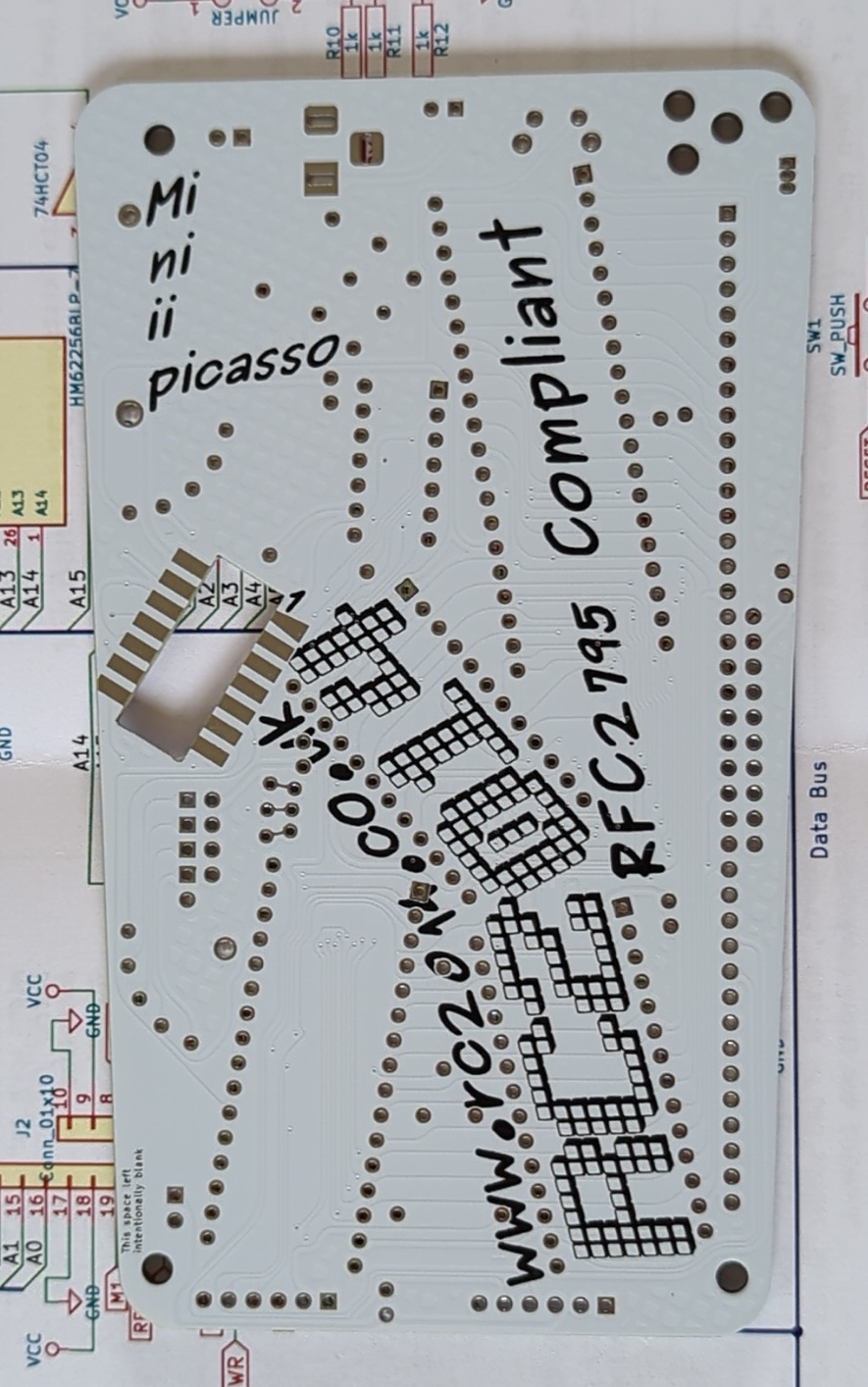
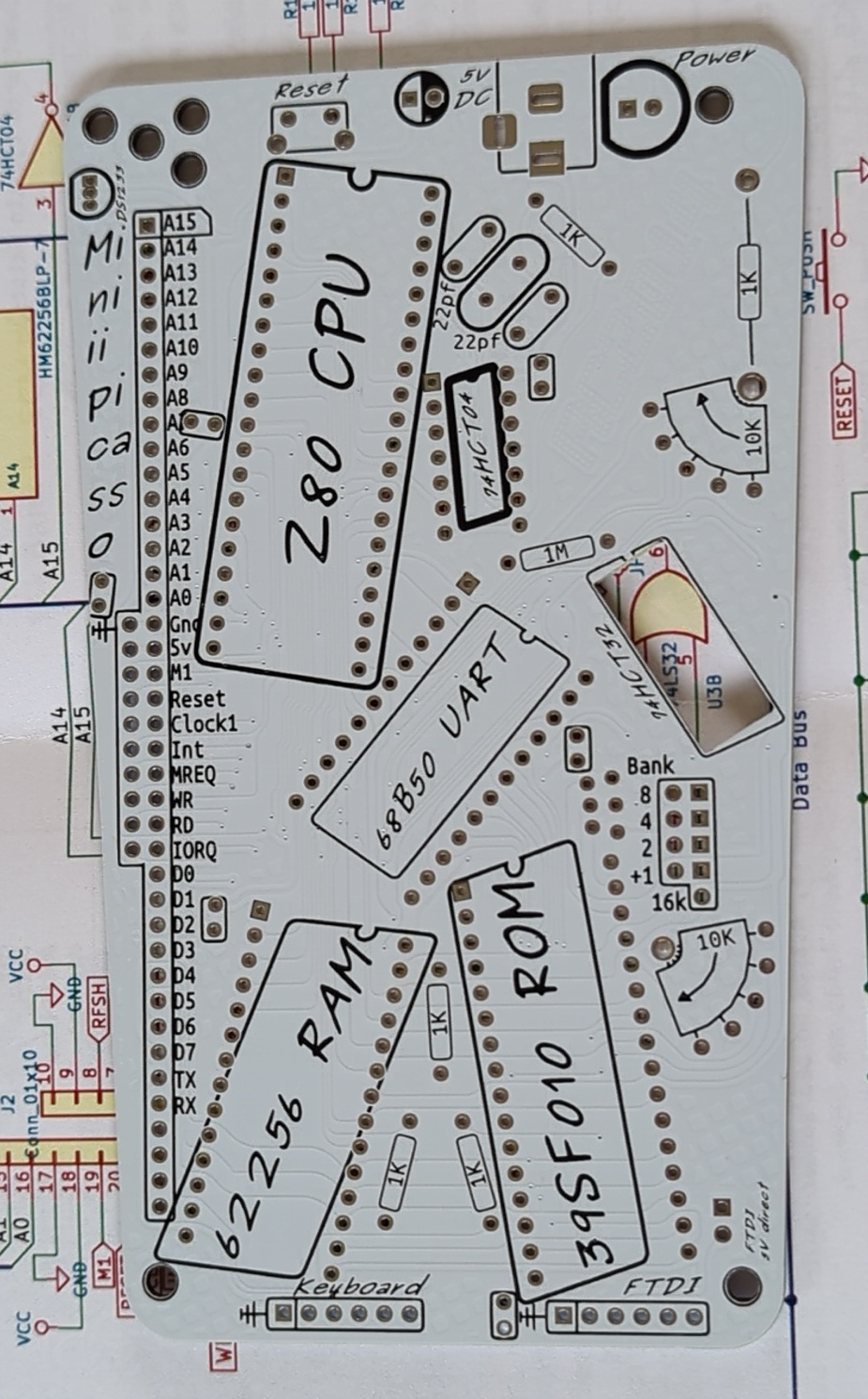
Mini II Picasso
- Kit number: 942527
- RC2014 Mini II Picasso
- RC2014 Mini II (of which Picasso is a PCB variant)
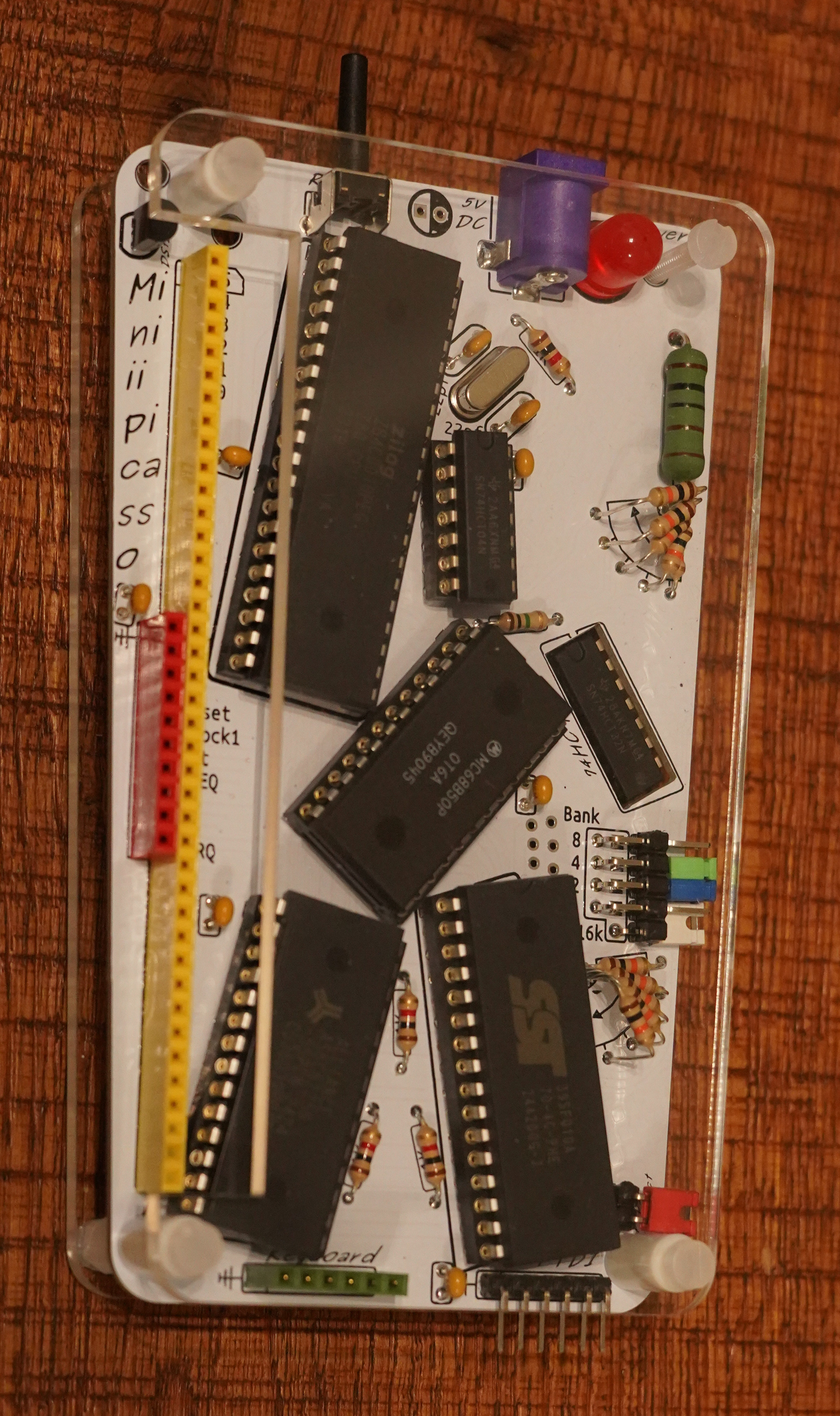
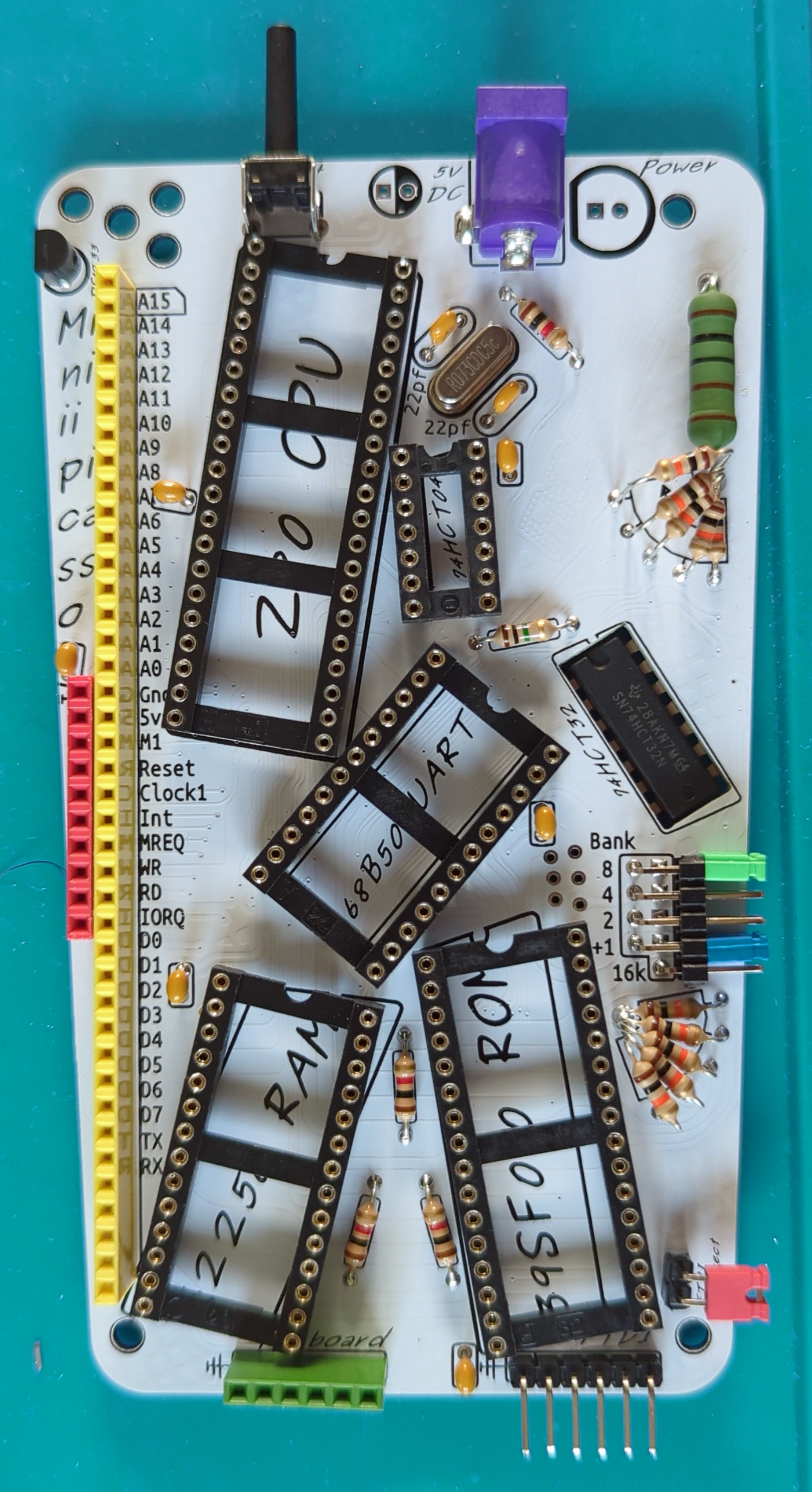
Schematic
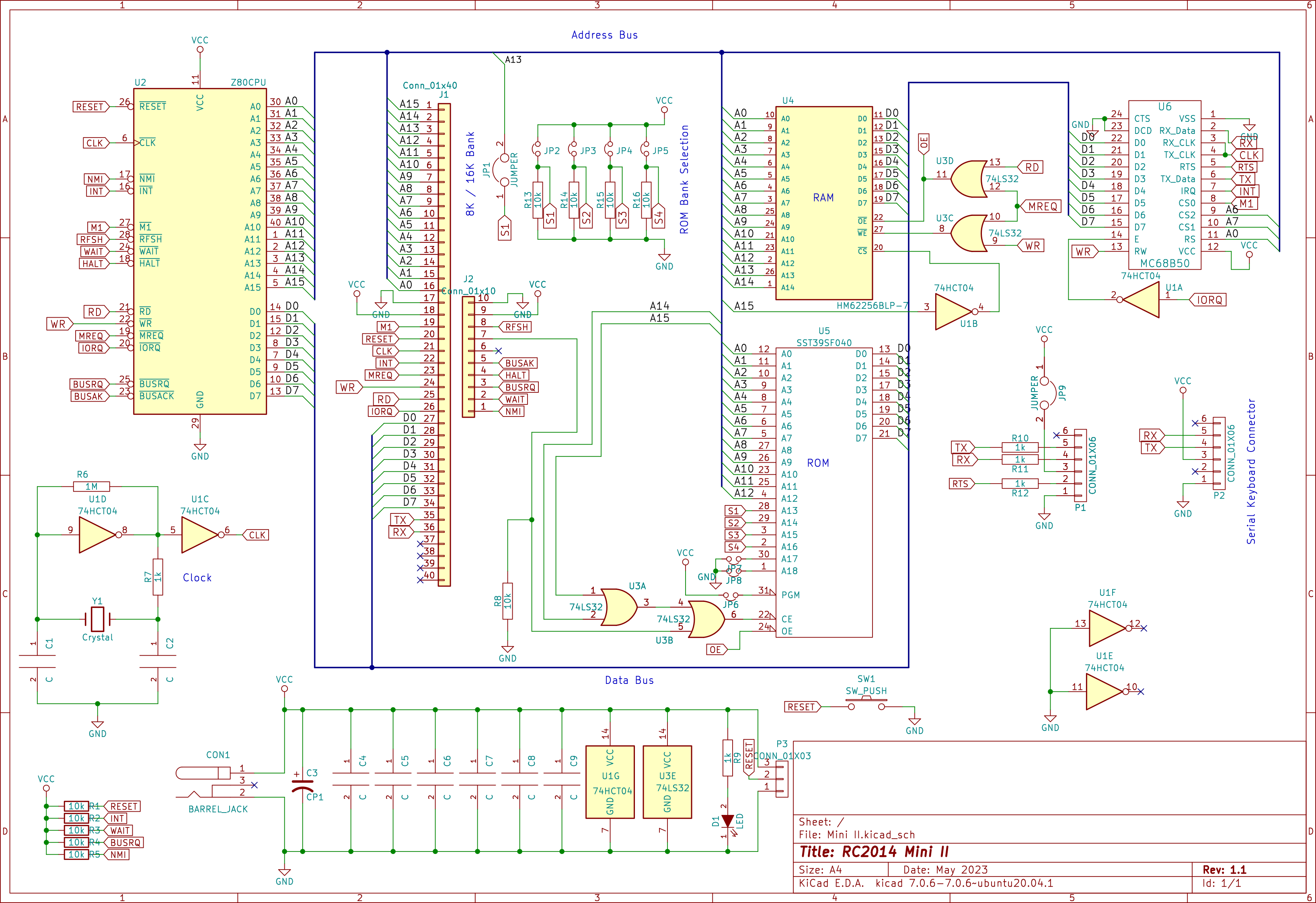
A DS1233+5 will also keep the Z80 in reset state on power-on until the voltages have stabilised, meaning the Z80 should always boot cleanly.
Memory map
0x0000 (0 KiB) - 0x1FFF |
ROM - 8 KiB Bank |
ROM - 16 KiB Bank |
0x2000 (8 KiB) - 0x3FFF |
ROM Shadow - 8 KiB | |
0x4000 (16 KiB) - 0x7FFF |
Unused | |
0x8000 (32 KiB) - 0x8000 |
RAM - 32 KiB | |
ROM map
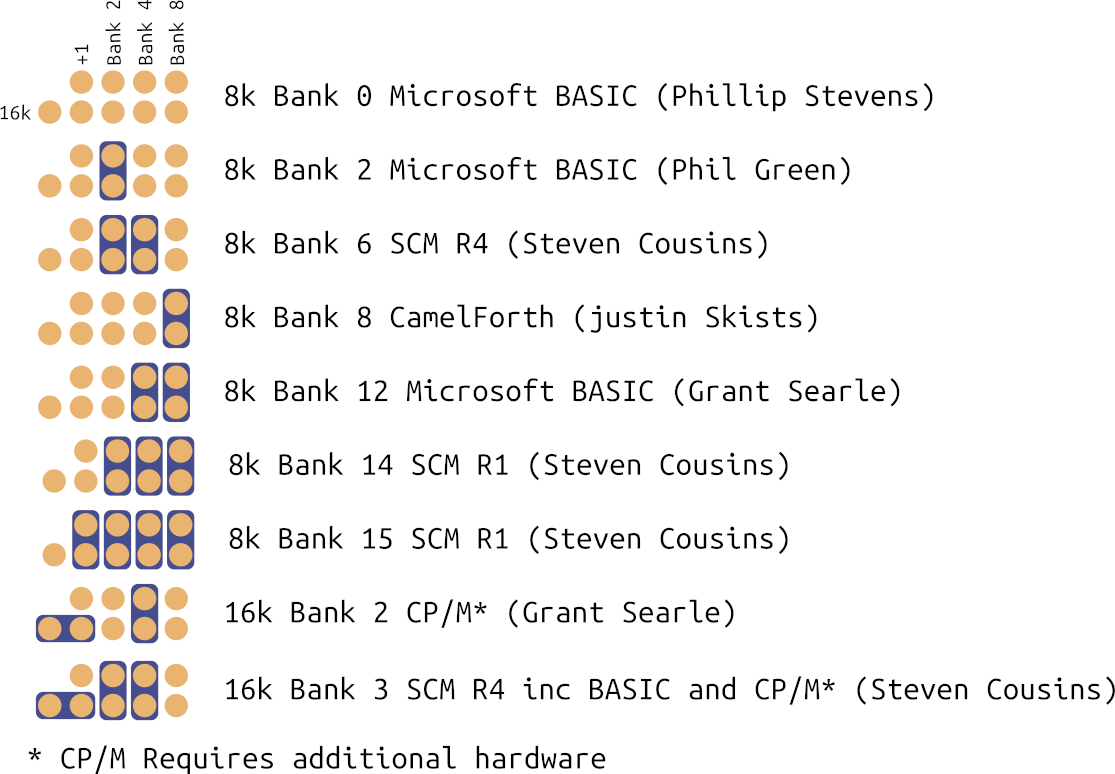
There is 128 KiB of ROM mapped as 8 KiB or 16 KiB bank depending on jumper setting.
JP1/JP2 can either be horizontal (16k), omitted (lower 8k) or vertical (upper 8k).
| 16 KiB Bank | 8 KiB Bank | +1 (-- is 16k and +1) |
Bank 2, 4, 8 | Image |
| 0 | 0 | 0 |
000 |
Microsoft BASIC (Phillip Stevens) |
| 1 | 1 |
000 |
Reserved | |
| 1 | 2 | 0 |
100 |
Microsoft BASIC (Phil Green) |
| 3 | 1 |
100 |
Reserved | |
| 2 | 4 | -- |
010 |
CP/M* (Grant Searle) |
| 5 | ||||
| 3 | 6 | -- |
110 |
SCM R4 inc BASIC and CP/M* (Steven Cousins) |
| 7 | ||||
| 4 | 8 | 0 |
001 |
CamelForth (Justin Skists) |
| 9 | 1 |
001 |
Reserved | |
| 5 | 10 | 0 |
101 |
Reserved |
| 11 | 1 |
|
Reserved | |
| 6 | 12 | 0 |
011 |
Microsoft BASIC (Grant Searle) |
| 13 | 1 |
|
Reserved | |
| 7 | 14 | 0 |
111 |
SCM R1 (Steven Cousins) |
| 15 | 1 |
111 |
SCM R1 (Steven Cousins) |