
Networks & Switching
Editable diagram
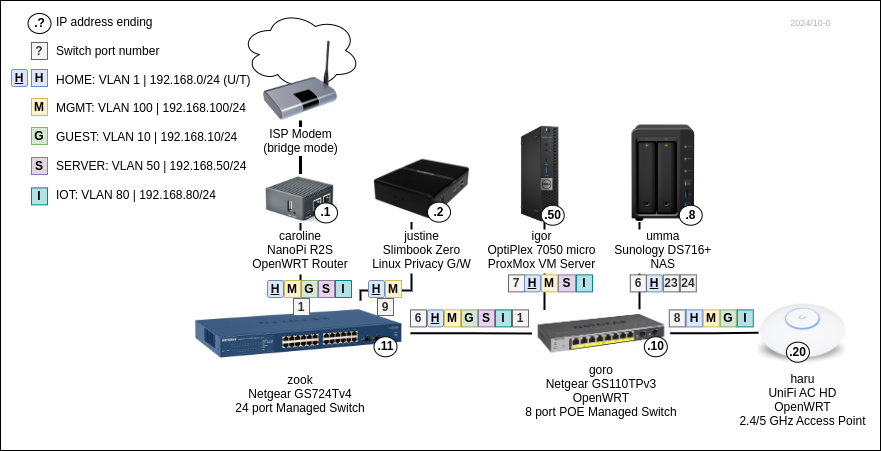
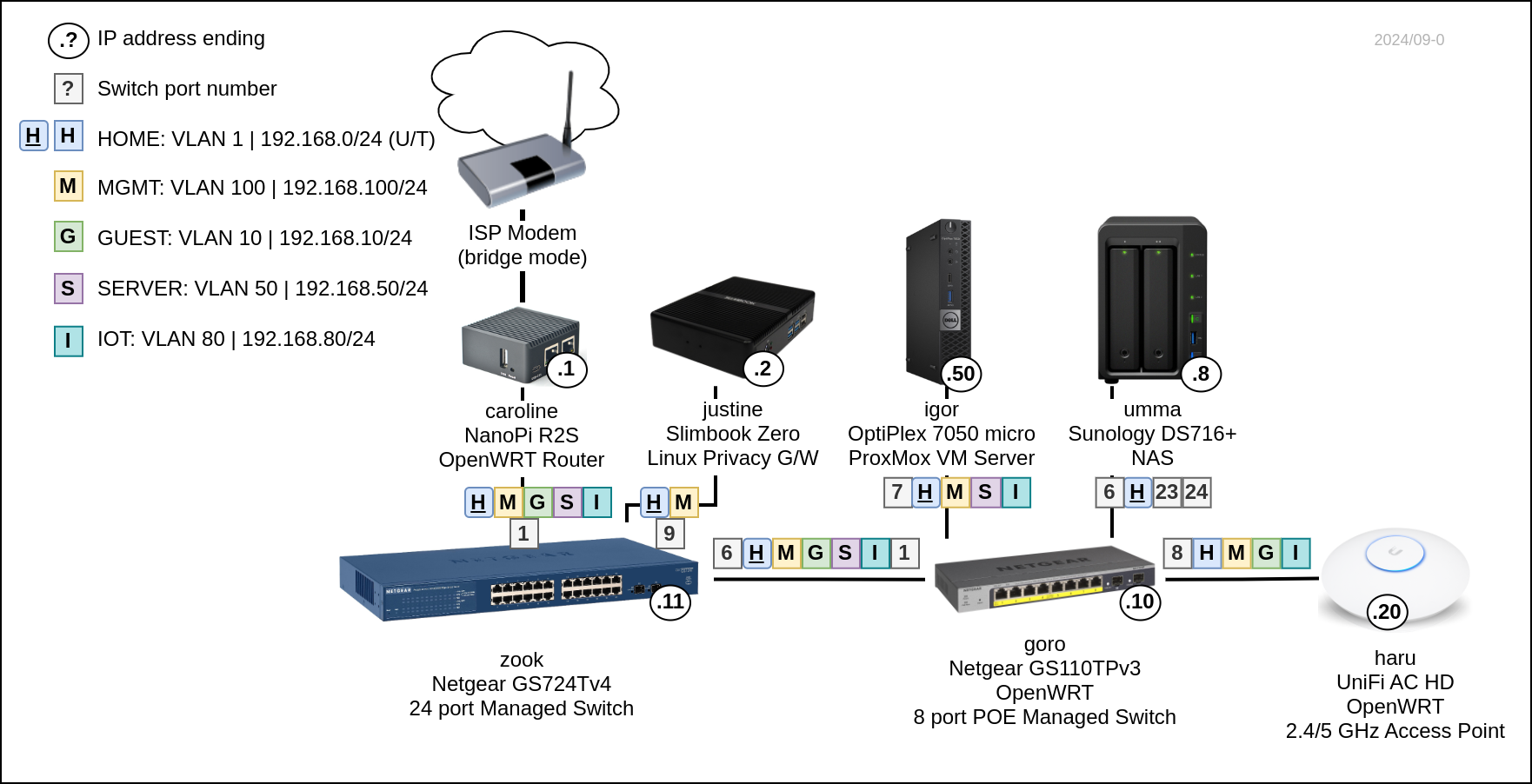
VLANs
| Name |
Tag |
Network |
Description | Gateways |
| HOME | 1 |
192.168.1.0/24 | Internal home network |
caroline: 192.168.1.1 justine: 192.168.1.2 (DHCP default) |
| GUEST | 10 |
192.168.10.0/24 | Isolated network |
caroline: 192.168.10.1 (DHCP default) |
| SERVER | 50 |
192.168.50.0/24 | Internet exposed servers |
caroline: 192.168.50.1 (DHCP default) |
| IOT |
80 |
192.168.80.0/24 | IoT devices |
carolone: 192.168.100.1 (DHCP default) |
| MGMT | 100 |
192.168.100.0/24 | Management network |
carolone: 192.168.100.1 justine: 192.168.100.2 (DHCP default) |
Connectivity
Caroline does VLAN routing.
| Name |
Internet access G/W |
DNS |
WiFi SSID |
Access to |
| HOME | Justine (VPN), Caroline |
Justine (PiHole), Caroline |
Haru, Haru Legacy (2.4GHz) |
SERVER, IOT |
| GUEST | Caroline | Caroline | Toudi, Toudi Legacy (2.4GHz) |
|
| SERVER | Caroline | Caroline | ||
| IOT |
Caroline | Caroline | Haru IoT (2.4GHz) |
|
| MGMT | Justine (VPN), Caroline | Justine (PiHole), Caroline | Haru MGMT (2.4GHz) |
SERVER |
Subnets
| Base range |
Subnet 1 / Usage |
Subnet 2 / Usage | Subnet 3 / Usage |
| 10.0.0.0/8 | reserved for work VPNs |
||
| 172.16.0.0/12 (to 172.31.) |
|||
| 172.17.1.1/24 | Justine VPN: vpn |
||
| 172.17.2.1/24 | Justine VPN: outpust |
||
| 172.17.100.1/24 | VPS VPN: vps |
||
| 172.18.0.0/16 | Justine Docker |
||
| 172.19.0.0/16 | Igor Kubenretes |
||
| 172.20.0.0/24 | Igor Sandbox VMs |
||
| 192.168.0.0/16 | |||
| 192.168.0.0/24 | HOME VLAN |
||
| 192.168.10.0/24 | GUEST VLAN |
||
| 192.168.50.0/24 | SERVER VLAN |
||
| 192.168.80.0/24 | IOT VLAN |
||
| 192.168.100.0/24 | MGMT VLAN |
Adding networks
Caroline
- Network -> Interfaces -> Devices
- Add
VLAN (802.1q)oneth1for new VLAN tag
- Add
- Network -> Interfaces
- Add interface for the new device
- Configure DHPC server on the new interface with options for default G/W and DNS server
3,192.168.80.1-
6,192.168.80.1
- Network -> Firewall -> Zones
- Add zone for the new interface
- Network -> Firewall -> Traffic rules
- Add rule for DHCP (
UDP 67) - Add rule for DNS (
UDP+TCP 53) - Add rule for ICMP
- Add rule for DHCP (
- Network -> DHCP and DNS -> Devices & Ports
- Add new interface to DHCP server Listen interfaces
Switch configuration
OpenWRT edit VLAN tag assignment
Network -> Interfaces -> Devices -> switch (Bridge device) -> Configure... -> Bridge VLAN filtering