
Networks & Switching
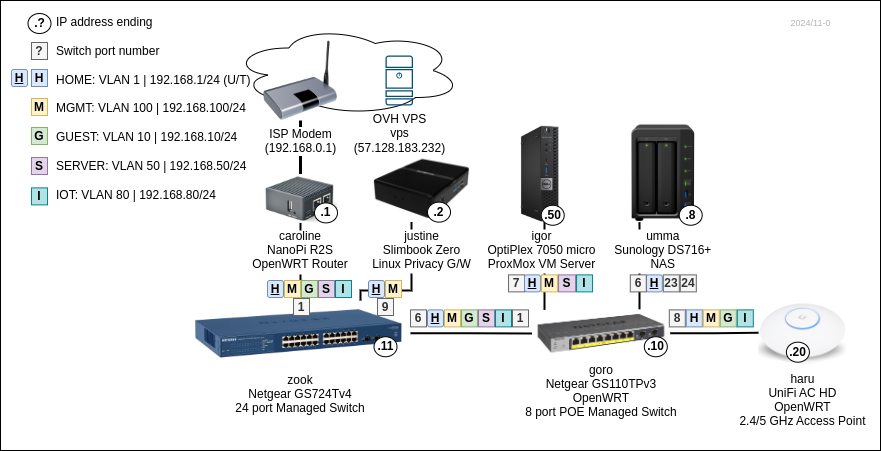
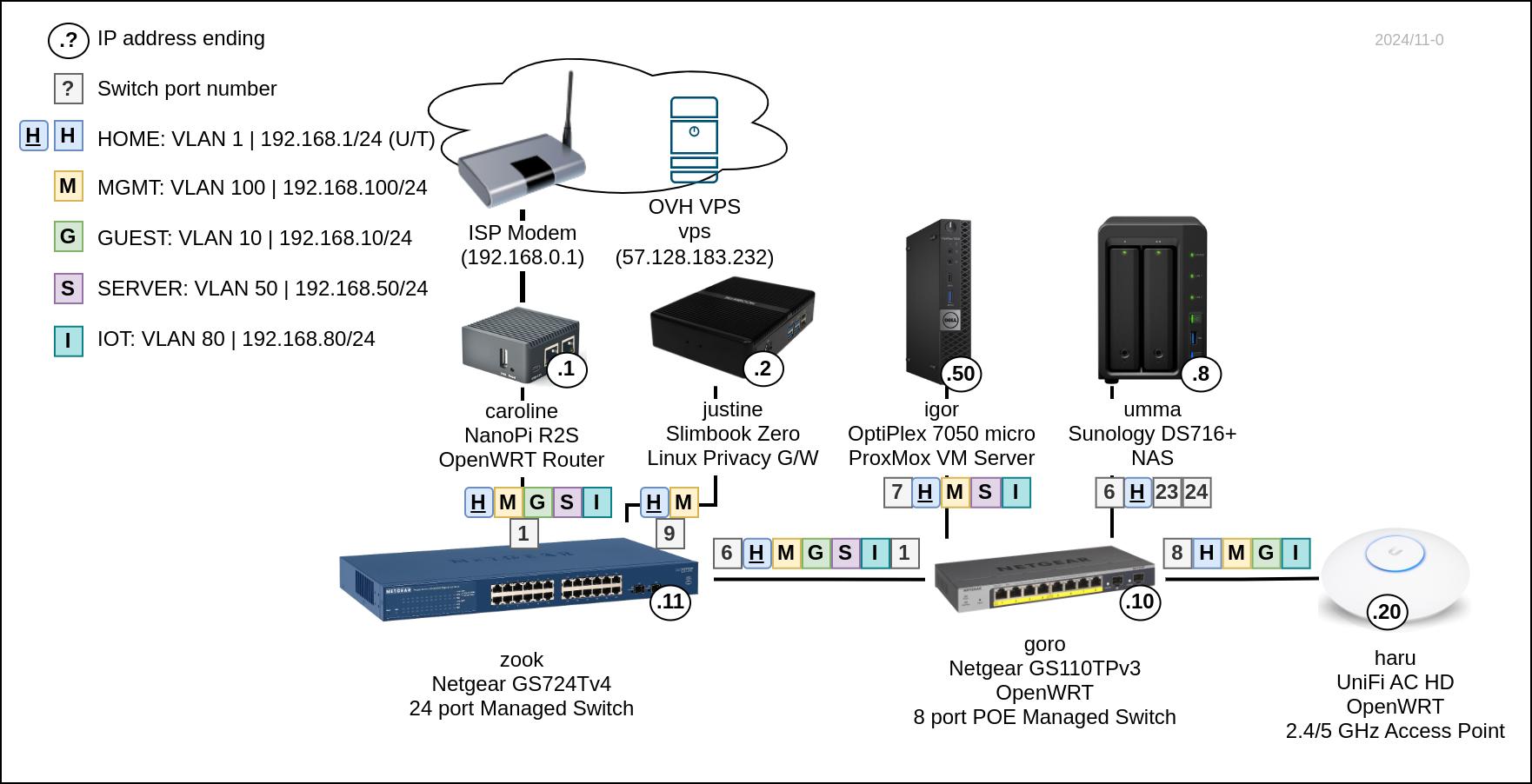
Editable diagram
VLANs
| Name |
Tag |
Network |
Description | Gateways |
| HOME | 1 |
192.168.1.0/24 | Internal home network |
caroline: 192.168.1.1 justine: 192.168.1.2 (DHCP default) |
| GUEST | 10 |
192.168.10.0/24 | Isolated network |
caroline: 192.168.10.1 (DHCP default) |
| SERVER | 50 |
192.168.50.0/24 | Internet exposed servers |
caroline: 192.168.50.1 (DHCP default) |
| IOT |
80 |
192.168.80.0/24 | IoT devices |
carolone: 192.168.100.1 (DHCP default) |
| MGMT | 100 |
192.168.100.0/24 | Management network |
carolone: 192.168.100.1 justine: 192.168.100.2 (DHCP default) |
Connectivity
Caroline does VLAN routing.
| Name |
Internet access G/W |
DNS |
WiFi SSID |
Access to |
| HOME | Justine (VPN), Caroline |
Justine (PiHole), Caroline |
Haru, Haru Legacy (2.4GHz) |
SERVER, IOT |
| GUEST | Caroline | Caroline | Toudi, Toudi Legacy (2.4GHz) |
|
| SERVER | Caroline | Caroline | ||
| IOT |
Caroline | Caroline | IoT (2.4GHz) |
|
| MGMT | Justine (VPN), Caroline | Justine (PiHole), Caroline | Haru MGMT (2.4GHz) |
SERVER |
Subnets
| Base range |
Subnet 1 / Usage |
Subnet 2 / Usage | IPv6 ULA fd42:dead:beef/48 |
10.0.0.0/8 |
reserved for work VPNs |
||
172.16.0.0/12 (to 172.31.) |
|||
172.17.1.1/24. |
Justine VPN: vpn |
|
|
172.17.2.1/24 |
Justine VPN: outpust |
fd42:dead:beef:1721/64 |
|
172.17.100.1/24 |
VPS VPN: vps |
fd42:dead:beef:1700/64 |
|
172.18.0.0/16 |
Justine Docker |
fd42:dead:beef:1800/64 |
|
172.19.0.0/16 |
Igor Kubenretes |
fd42:dead:beef:1900/64 |
|
172.20.0.0/24 |
Igor Sandbox VMs |
fd42:dead:beef:2000/64 |
|
192.168.0.0/16 |
|
||
192.168.1.0/24 |
HOME VLAN |
fd42:dead:beef:6801/64 |
|
192.168.10.0/24 |
GUEST VLAN |
fd42:dead:beef:6810/64 |
|
192.168.50.0/24 |
SERVER VLAN |
fd42:dead:beef:6850/64 |
|
192.168.80.0/24 |
IOT VLAN |
fd42:dead:beef:6880/64 |
|
192.168.100.0/24 |
MGMT VLAN |
fd42:dead:beef:6800/64 |
Adding networks
Caroline
- Network -> Interfaces -> Devices
- Add
VLAN (802.1q)oneth1for new VLAN tag
- Add
- Network -> Interfaces
- Add interface for the new device
- Configure DHPC server on the new interface with options for default G/W and DNS server
3,192.168.80.1-
6,192.168.80.1
- Network -> Firewall -> Zones
- Add zone for the new interface
- Network -> Firewall -> Traffic rules
- Add rule for DHCP (
UDP 67) - Add rule for DNS (
UDP+TCP 53) - Add rule for ICMP
- Add rule for DHCP (
- Network -> DHCP and DNS -> Devices & Ports
- Add new interface to DHCP server Listen interfaces
Switch configuration
OpenWRT edit VLAN tag assignment
Network -> Interfaces -> Devices -> switch (Bridge device) -> Configure... -> Bridge VLAN filtering
IPv6
ULA
- Unique local address
- Use for private or local addressing.
- Prefix
fc00::/7- Prefix
fd00::/8format:- Global ID:
fdxx:xxxx:xxxx::/48-x-es should be chosen random - Subnets (64k):
fdxx:xxxx:xxxx:ssss::/64 - Expanded:
fdxx:xxxx:xxxx:ssss:0000:0000:0000:0000/128
- Global ID:
- Prefix
fc00::/8is not defined.
- Prefix
For WireGuard the Global ID can be generated with base64 -d | hexdump from server's public key.
Random ID can be made with cat /dev/random | head -c5 | ruby -e 'puts STDIN.read.unpack("H*")'.
ULA: fd42:dead:beef/48
IPv4 in IPv6
Example: ::ffff:192.0.2.1 -> hex encoded ::ffff:c000:201