
Justine
Interfaces
enp1s0
- HOME VLAN; untagged
ip link set enp1s0 up
ip addr replace 192.168.0.2/24 dev enp1s0
ip route add default via 192.168.0.1 dev enp1s0
mgmt@enp1s0
- MGMT VLAN; tagged VLAN 100
ip link add link enp1s0 name mgmt type vlan id 100
ip link set mgmt up
ip addr replace 192.168.100.2/24 dev mgmt
docker0
- 172.18.0.1/16
Set up automatically by docker.
Docker namespaces use virtual interface that gets bridged with docker0.
Routing
Forwarding
Enabled but packets dropped by default on firewall.
sysctl net.ipv4.ip_forward=1
iptables -P FORWARD DROP
Mullvad
Mullvad VPN outgoing traffic is MASQUERADEed for it to get Mullvad assigned internal IP.
# Mullvad gateway
iptables -t nat -A POSTROUTING -s 192.168.0.0/24 -o mullvad -j MASQUERADE
iptables -t nat -A POSTROUTING -s 172.17.1.0/24 -o mullvad -j MASQUERADE
When Mullvad VPN is up/down additional firewall rules are added:
PostUp = iptables -A FORWARD -o mullvad -i enp1s0 -j ACCEPT && iptables -A FORWARD -i mullvad -o enp1s0 -j ACCEPT
PreDown = iptables -D FORWARD -o mullvad -i enp1s0 -j ACCEPT && iptables -D FORWARD -i mullvad -o enp1s0 -j ACCEPT
This will allow forwarding between mullvad (VPN) and enp1s0 (HOME) networks.
Vpn
When this WireGuard endpoint is enabled additional rules are added:
PostUp = iptables -A FORWARD -o vpn -i enp1s0 -j ACCEPT && iptables -A FORWARD -i vpn -o enp1s0 -j ACCEPT && iptables -A FORWARD -o vpn -i mullvad -j ACCEPT && iptables -A FORWARD -i vpn -o mullvad -j ACCEPT
PreDown = iptables -D FORWARD -o vpn -i enp1s0 -j ACCEPT && iptables -D FORWARD -i vpn -o enp1s0 -j ACCEPT && iptables -D FORWARD -o vpn -i mullvad -j ACCEPT && iptables -D FORWARD -i vpn -o mullvad -j ACCEPT
This will allow:
- vpn users to access local network (HOME),
- vpn users to access the internet via mullvad VPN interface.
Docker
Allow traffic from Docker (IPHole) to be originating from justine IP if routed through default HOME VLAN gateway (caroline) - this is when VPN is turned off to keep DNS working.
# VPN gateway (used if mullvad is stopped)
iptables -t nat -A POSTROUTING -s 172.17.1.1/24 -o enp1s0 -j MASQUERADE
PIHole uses Mullvad's hosted DNS server at: 193.138.218.74. It is accessible over VPN and also without it.
Any DNS port 53 packet going over Mullvad VPN will be SNAT'ed to Mullvads DNS server transparently to prevent DNS leaks. This means that running DNS resolved (unbind) makes no sense since all DNS requests will end up on Mullvad's server anyway.
Local networks
Allow access to other local networks via caroline:
ip route add 192.168.0.0/16 dev enp1s0 via 192.168.0.1VPN
vpn
- caroline UDP port: 34563
- justine UDP port: 51821
For all devices to VPN-in to the G/W from internal networks and also from the internet.
VPN access from outside the network
iptables -t nat -A POSTROUTING -s 172.17.1.0/24 -o enp1s0 -j MASQUERADETraffic from VPN (172.17.1.0/24) needs to be MASQUERADE'ed when going out to internal network because there are devices configured with caroline as default G/W. Also justine, when not connected to Mullvad will use caroline as default G/W.
This means that all traffic from external devices will looks like coming from caroline.
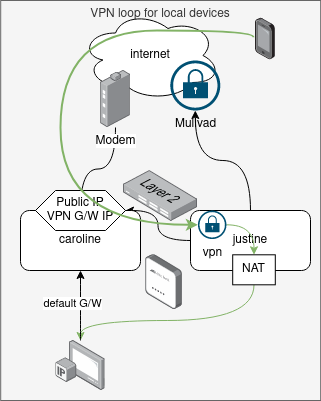
VPN access from withing the network
Devices like laptop or phone will be on always-on home VPN. This means that they will be connecting to VPN via public IP to reach justine.
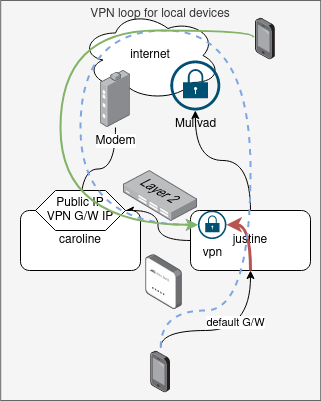
This entry will capture attempt from devices that route via justine (default G/W 192.168.0.2) to justine to prevent traffic going out to Mullvad and comming back to caroline and down to justine.
iptables -t nat -A PREROUTING -s 192.168.0.0/16 -d 46.7.126.16 -p udp --dport 34563 -j DNAT --to-destination 192.168.0.2:51821The /16 prefix is used so this rule captures all internal subnets.
Public IP in the rule will need to be updated if it ever changes! This IP is the IP of VPN endpoint - caroline public DHCP assigned IP/Virgin Media IP.
MYSTERY
- this only gets few packet hit, so bulk traffic is bypassing this rule
- when connected to MGMT with laptop the traffic to HOME network is slow, looks like it is going through the loop