
Using CP/M
CP/M Quick Reference
Control key commands
CTRL + C |
Restarts CP/M by initiating a warm start |
CTRL + E |
Forces the cursor to the next line of the screen for continued command line input. |
CTRL + H |
Moves the cursor one space to the left in the same manner as the BS key. |
CTRL + I |
Inputs a tab code (same as the TAB key) |
CTRL + P |
Turns on or off the printer echo function. When the printer echo function is turned on, data displayed on the LCD screen is output to the printer (or other device assigned to LST:) each time the RETURN key is pressed. The printer echo function is turned on by pressing CTRL + P once and is turned off when CTRL + P is pressed a second time. (Make sure the printer is connected properly before using this command.) |
CTRL + R |
Redisplays the contents of the current command line. |
CTRL + S |
Momentarily stops processing currently being performed (same as the PAUSE key). Processing can be resumed by inputting this command again. |
CTRL + U |
Cancels the current command line and moves the cursor to the next line on the screen for input of a different command. |
CTRL + X |
Erases the current command line and moves the cursor back to the beginning of the line. |
CTRL + Z |
Terminates input from the keyboard (used in combination with certain CP/M transient commands). |
Commands
d: - A drive letterfilematch - an exact filename, or a wildcard match for files.
Items such as [item] are optional, ones such as <item> are compulsory.
DIR [d:][filematch]
Display a list of files in the specified, or current drive.
ERA [d:]<filematch>
Erase specified files. filematch *.* can be used to match all files in the current drive.
REN [d:]newname.ext = oldname.ext
Change the name of a disk file from oldname.ext to newname.ext
SAVE n [d:]filename.ext
Save the specified n number of pages of the transient program area to disk under the specified file name.
TYPE [d:]filename.ext
Display the contents of the specified file on the display screen. Display is only meaningful if the file contents was ASCII text.
USER n
Switches to the specified user area in a disk drive.
A user area is a physical area on a disk which has its own directory and which is managed separately from the rest of the disk. Data cannot be read from or written to any user area other than that in which CP/M is currently operating. A disk can be divided up into a maximum of 16 user areas.
PIP
Copy FOO.TXT to console (print).
C:PIP CON:=A:FOO.TXTWrite to file from terminal (CTRL-Z to EOF, CTRL-M+J for new line):
C:PIP FOO.TXT=CON:Copy file from current drive to A:
C:PIP A:UPLOAD.COM=UPLOAD.COMED
- http://www.gaby.de/cpm/manuals/archive/cpm22htm/ch2.htm
Commands mode
#a |
load all lines from file (given as arg to the command) to memory |
10a |
load 10 lines from file |
b#t |
go to beginning, print all lines |
b |
go to beginning |
n or -n |
move n lines ahead/behind and print |
t |
print current line |
k |
kill current line |
i |
insert before current line |
e |
save and exit |
o |
discard changes |
In insert mode
CTRL + H |
backspace one char |
CTRL + Z |
exit insert mode |
ASM
Compile and run example program:
c:asm example
c:load example
example
Show compiled program listing:
type example.prnCompiler output line markers
S |
syntax error |
L |
bad label |
E |
bad expression |
R |
bad register |
Y |
bad value |
API
- https://www.seasip.info/Cpm/bdos.html
- https://obsolescence.wixsite.com/obsolescence/cpm-internals
- http://www.gaby.de/cpm/manuals/archive/cpm22htm/ch5.htm
Entry point: 05h (CALL 05h).
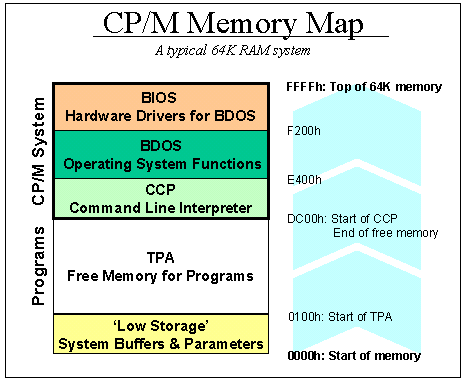
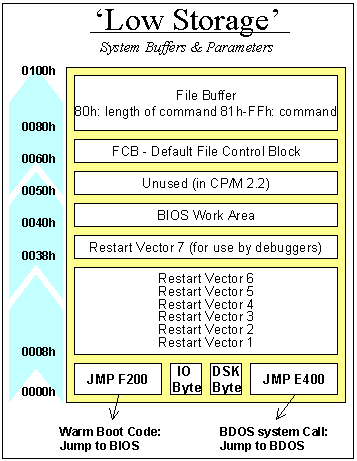
Memory map
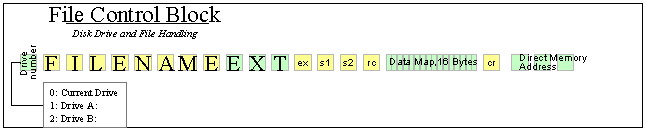
0 = use default drive for file
1 = auto disk select drive A,
2 = auto disk select drive B,
...
16 = auto disk select drive P. f1...f8 contain the filename in ASCII upper-case, with high bit = 0 t1,t2,t3 contain the filetype in ASCII upper-case, with high bit = 0. t1', t2', and t3' denote the bit of these positions,
t1' = 1 = Read-Only file,
t2' = 1 = SYS file, no DIR list ex contains the current extent number, normally set to 00 by the user, but in range 0-31 during file I/O s1 reserved for internal system use s2 reserved for internal system use, set to zero on call to OPEN, MAKE, SEARCH rc record count for extent ex; takes on values from 0-127 d0...dn filled in by CP/M; reserved for system use cr current record to read or write in a sequential file operation; normally set to zero by user r0,r1,r2 optional random record number in the range 0- 65535, with overflow to r2, r0, r1 constitute a 16-bit value with low byte r0, and high byte r1
Selected procedures
| C | Name | Description | DE | A (output) |
01h |
Console input | Wait for a character from the keyboard; then echo it to the screen and return it. | ASCII | |
03h |
Raw console input | Reads a character from the console without checking for ^S / ^Q. |
ASCII | |
09h |
Output string | Print string until $. |
pointer to string | |
0Ah - BDOS function 10 |
Buffered console input | Line editor is used. Line output is written starting from 2'nd byte of the buffer. 0'th byte should be the length of the buffer, 1'st byte is ignored. | address or zero | |